Portable
PLUS
Computer
Troubleshooting
8-17
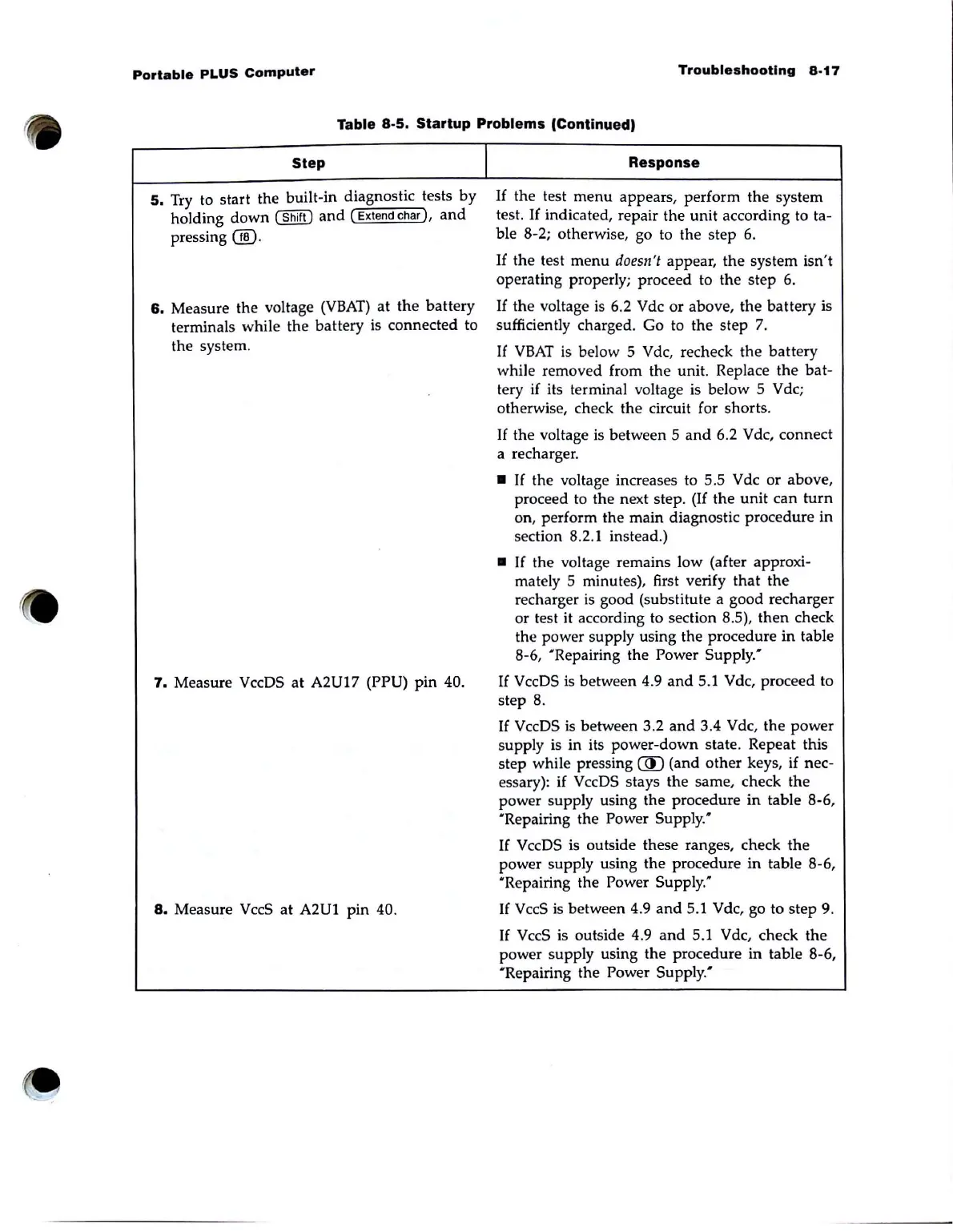
Table 8-5. Startup Problems (Continued)
Step
5.
Try to start the built·in diagnostic tests by
holding
down
(Shift)
and
( Extend
char),
and
pressing 00·
6.
Measure the voltage
(VBAT)
at
the
battery
terminals while the battery is connected to
the system.
7.
Measure VccDS
at
A2U17 (PPU) pin 40.
8.
Measure VccS
at
A2U1 pin 40.
I
Response
If
the test
menu
appears, perform the system
test.
If
indicated, repair the unit according to tao
ble 8-2; otherwise, go to the
step
6.
If
the
test
menu
doesn't appear,
the
system isn't
operating properly; proceed to
the
step 6.
If
the voltage
is
6.2 Vdc
or
above,
the
battery is
sufficiently charged. Go to the
step
7.
If
VBAT
is below 5 Vdc, recheck
the
battery
while removed from the unit. Replace
the
bat-
tery if its terminal voltage
is
below 5 Vdc;
otherwise, check the circuit for shorts.
If
the voltage is between 5
and
6.2 Vdc, connect
a recharger .
•
If
the voltage increases to 5.5 Vdc
or
above,
proceed to the next step.
(If
the
unit
can
turn
on, perform the main diagnostic procedure
in
section 8.
2.1
instead.)
•
If
the voltage remains low (after approxi-
mately 5 minutes), first verify
that
the
recharger
is
good (substitute a good recharger
or
test it according to section 8.5),
then
check
the power supply using the procedure in table
8-6,
'Repairing the Power
Supply:
If
VccDS
is
between 4.9
and
5.1 Vdc, proceed to
step 8.
If
VccDS
is
between 3.2
and
3.4 Vdc, the
power
supply
is
in its power-down state. Repeat this
step while pressing
(ID
(and
other
keys, if nec-
essary):
if
VccDS stays the same, check the
power supply using the procedure
in
table 8-6,
'Repairing the Power
Supply:
If
VccDS is outside these ranges, check
the
power supply using the procedure
in
table 8-6,
'Repairing
the Power
Supply:
If
V ccS
is
between 4.9
and
5.1 V dc, go to
step
9.
If
VccS is outside 4.9
and
5.1 Vdc, check
the
power supply using
the
procedure in table 8-6,
'Repairing the Power Supply.'



 To Next Page