8-18
Troubleshooting
Portable
PLUS
Computer
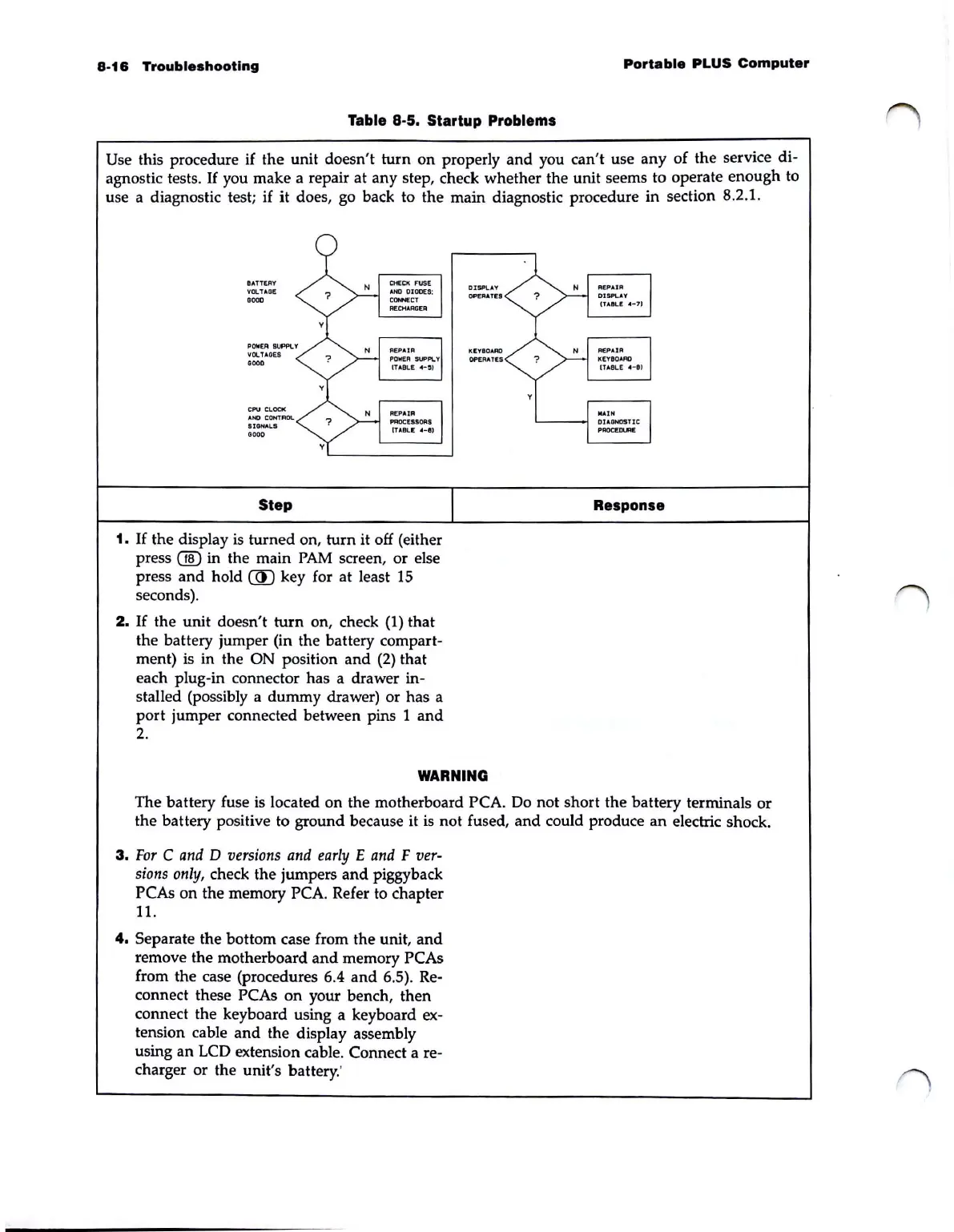
Table 8-5. Startup Problems
Use this procedure
if
the unit doesn't
turn
on
properly
and
you can't use any of the service
di·
agnostic tests.
If
you make a repair at any step, check whether the unit seems to operate enough to
use a diagnostic test;
if
it does, go back to the main diagnostic procedure in section 8.2.1.
BATTERY
VOL
HO!
.000
IIOL
HOES
.000
CPU
CLOCI(
AND
CONTROL
SIGNAL.S
GOOD
Step
1.
If
the display
is
turned on,
turn
it off (either
press
® in the main
PAM
screen, or else
press
and
hold
CID
key for at least
15
seconds).
2.
If
the unit doesn't
turn
on, check
(1)
that
the battery jumper (in the battery
compart-
ment) is in the ON position and
(2)
that
each
plug·in connector has a drawer in-
stalled (possibly a dummy drawer) or has a
port
jumper connected between pins 1
and
2.
DISPlAY
OP£RATIE:5
KI!YIIOARO
OPERATES
WARNING
Response
The battery fuse
is
located
on
the motherboard PCA. Do not short the battery terminals
or
the battery positive
to
ground because it is not fused,
and
could produce
an
electric shock.
3.
For
C
and
D
versions
and
early
E
and
F
ver-
sions
only,
check the jumpers
and
piggyback
PCAs
on
the memory PCA. Refer to chapter
11.
4.
Separate the bottom case from the unit,
and
remove the motherboard
and
memory PCAs
from the case (procedures 6.4
and
6.5). Re-
connect these PCAs
on
your bench, then
connect the keyboard using a keyboard
ex-
tension cable
and
the display assembly
using
an
LCD
extension cable. Connect a re-
charger or the unit's battery:



 To Next Page