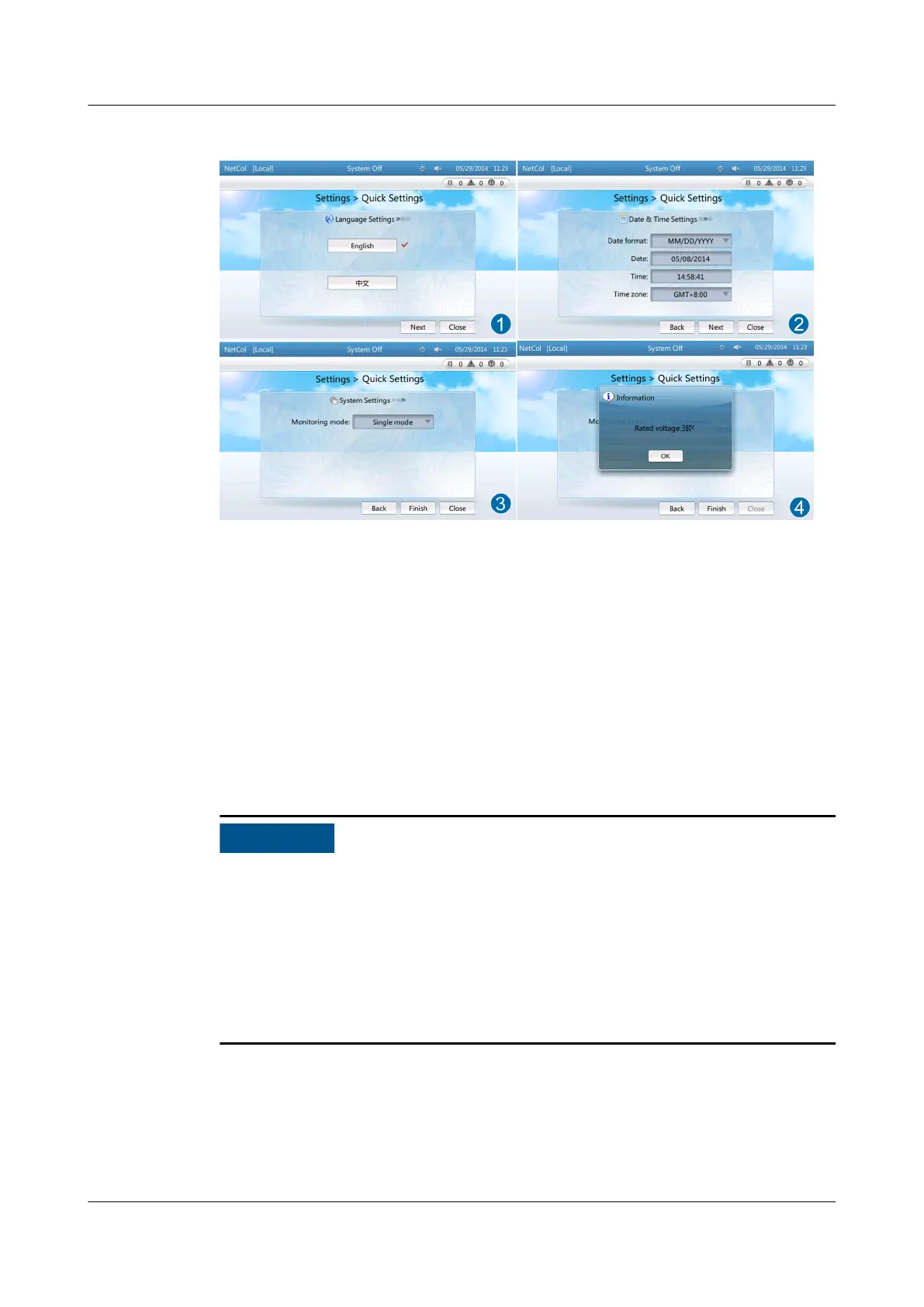
Figure 4-5 Quick settings
Step 2 Set the time and date and tap Next, as shown by (2) in Figure 4-5.
Step 3 Set system parameters and tap Finish, as shown by (3) in Figure 4-5.
Step 4 The system displays a dialog box for
conrming the rated voltage. Tap OK after
conrmation, as shown by (4) in Figure 4-5.
----End
4.5.2 Initial
Conguration
● When conguring the temperature and humidity parameters, do not place the
cursor between the decimal point and the following digit of the value.
Otherwise, the decimal point cannot be deleted, and the parameter value fails
to be
congured.
● To ensure the security of user information, you need to import a certicate and
key before using the controller, and periodically update the
certicate and key.
For details about how to import a certicate and key, see 4.7.13 Importing a
Certicate and Key.
4.5.2.1 User Right Authentication
To enhance security, before a user attempts to perform setting and maintenance
operations, the user needs to enter the user name and password for right
authentication. Figure 4-6 shows the setting login screen for an example.
NetCol5000-A(025, 035) In-row Air Cooled Smart
Cooling Product
User Manual (600 mm Width) 4 ACC Introduction
Issue 17 (2020-10-22) Copyright © Huawei Technologies Co., Ltd. 90







 To Next Page