No. Items Note
6 The current major
alarm signals and their
quantity
refers to the current major alarm signals
and their quantity.
7 The current warning
signals and their
quantity
refers to the current warning alarm
signals and their quantity.
8 The status bar N/A
9 The alarm bar You can tap in the alarm bar to
enter the active alarm screen that displays all
active alarms.
10 Logout button
indicates that you have logged in to the
system as Admin, Engineer, or Operator, and
can tap the icon to log out.
4.4 Menu Hierarchy
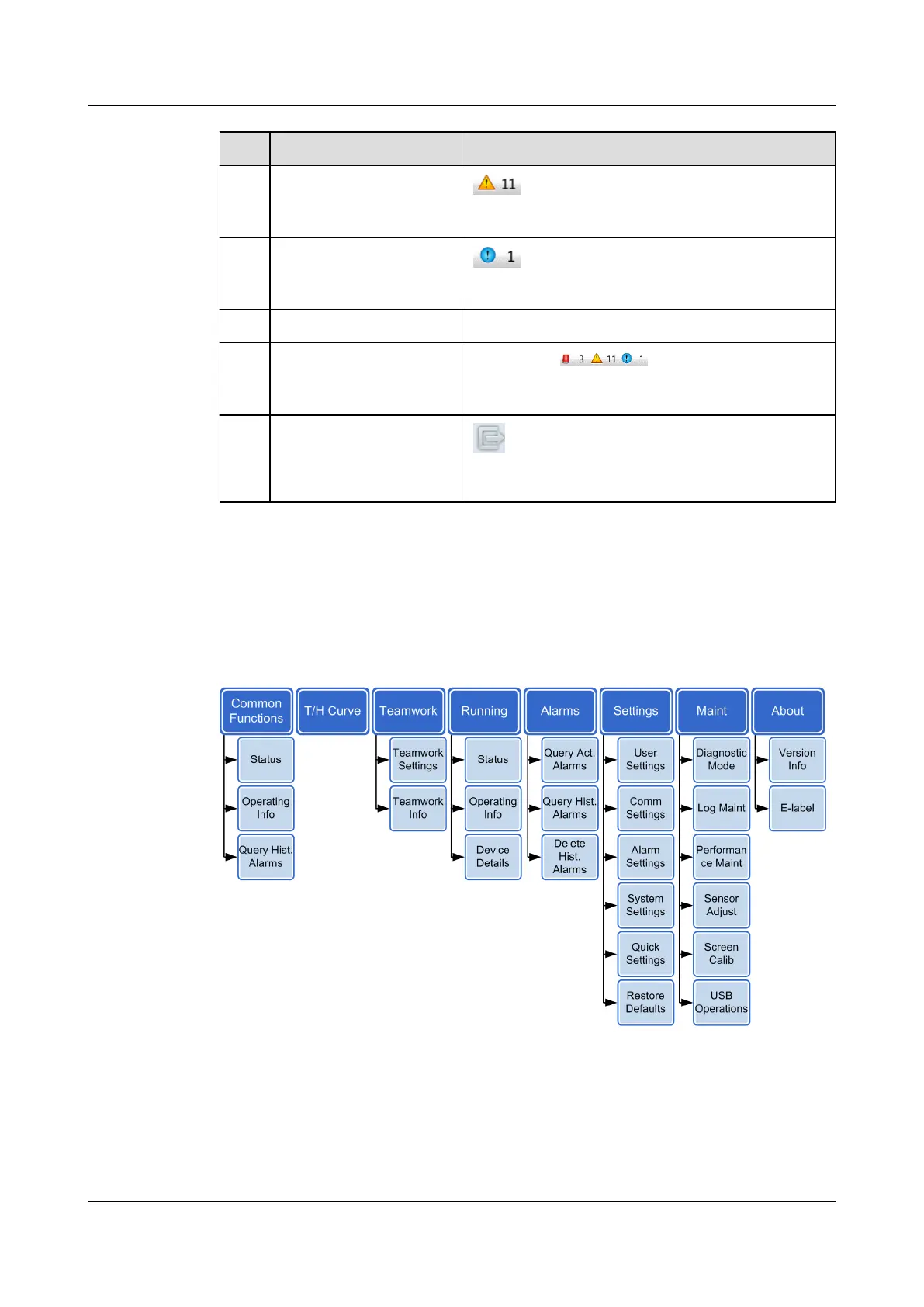
Figure 4-4 shows the hierarchy of the controller menu.
Figure 4-4 Hierarchy of the controller menu
The functions of the menus are described as follows:
● Common Functions
Indicates the component status, system parameters, and historical alarms of
the smart cooling product.
NetCol5000-A(025, 035) In-row Air Cooled Smart
Cooling Product
User Manual (600 mm Width) 4 ACC Introduction
Issue 17 (2020-10-22) Copyright © Huawei Technologies Co., Ltd. 88







 To Next Page