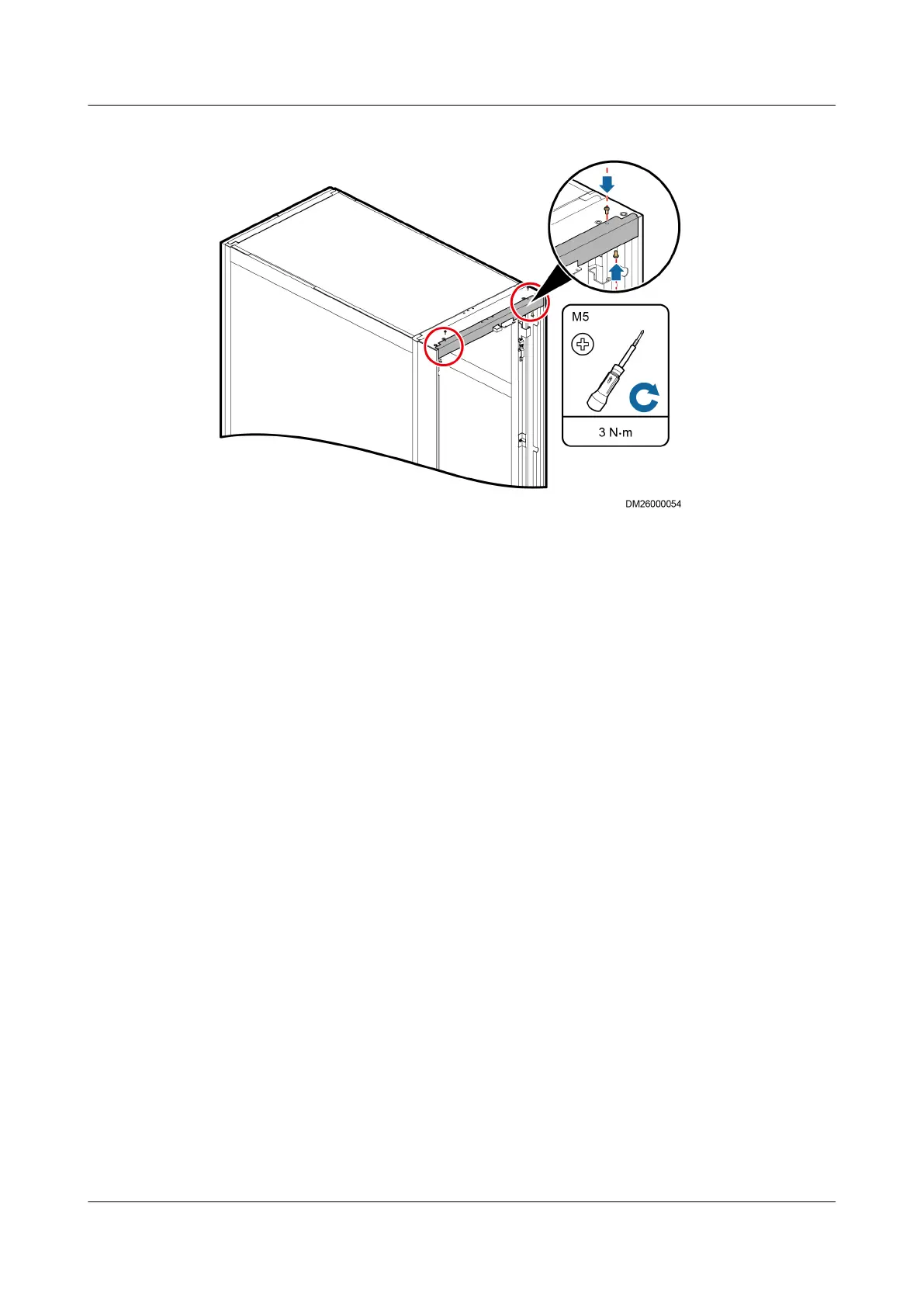
Figure 3-35 Installing the top sealing plate
Step 6 Install the hinges and connecting plates removed in Step 2 on the corresponding
positions on the enclosure frame.
Step 7 Install the cabinet front door on the enclosure frame.
Step 8 Install the power cable for the display screen. Connect the ground cable under the
front door to the enclosure frame according to the label on the enclosure frame.
Step 9 After installing the enclosure frame, the power cable for the display screen may be
not long enough to open the door completely. Cut
o the cable ties, which
fastening the power cable, to make sure the front door can rotate smoothly.
----End
3.10.2 (Optional) Installing the Top Frame
Bottom Pipe Routing
Step 1 Remove the two M5x10 tapping screws that secure the front door sealing plate on
the top of the cabinet, as shown by (1) in Figure 3-36.
NetCol5000-A(025, 035) In-row Air Cooled Smart
Cooling Product
User Manual (600 mm Width) 3 Installation Guide
Issue 17 (2020-10-22) Copyright © Huawei Technologies Co., Ltd. 65







 To Next Page