Alarm Status Indicators Buzzer
A major alarm occurs. Yellow Beeping intermittently
A critical alarm occurs. Red Beeping continuously
4.2 Controller Ports
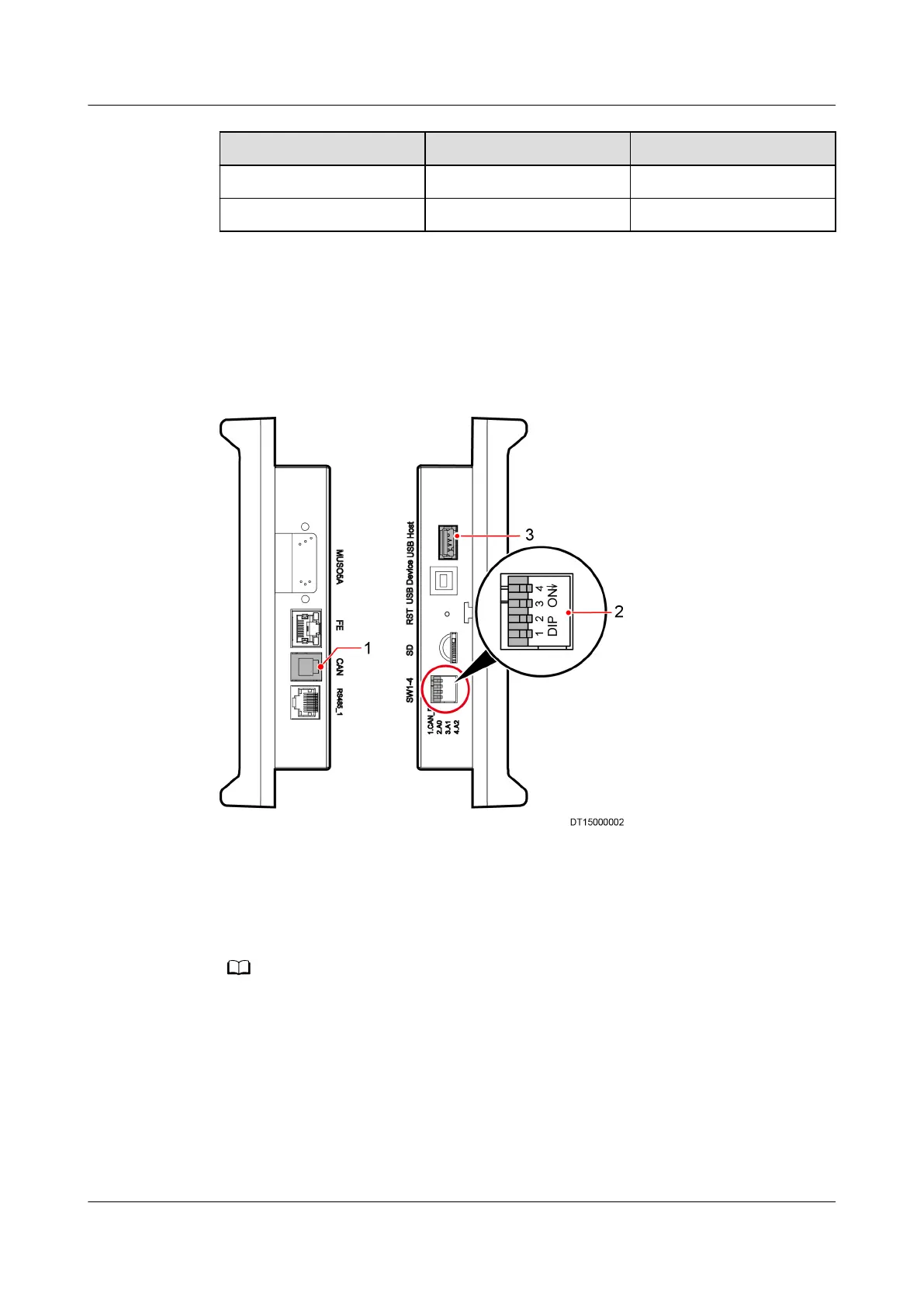
Figure 4-2 shows the ports on the two sides of the controller.
Figure 4-2 Ports on the controller sides
(1) Communications port for the main control
board and LCD
(2) Dual in-line package (DIP) switch on LCD
a
(3) USB port
a: The rst toggle switch DIP status is ON, and the second, third, fourth toggle switch DIP
status are non ON.
4.3 Home Screen
You can tap the menu items, buttons, or icons on the screen to enter related
screens or perform operations, such as Running, Alarms and Settings. The
controller main screen is shown in Figure 4-3.
NetCol5000-A(025, 035) In-row Air Cooled Smart
Cooling Product
User Manual (600 mm Width) 4 ACC Introduction
Issue 17 (2020-10-22) Copyright © Huawei Technologies Co., Ltd. 86







 To Next Page