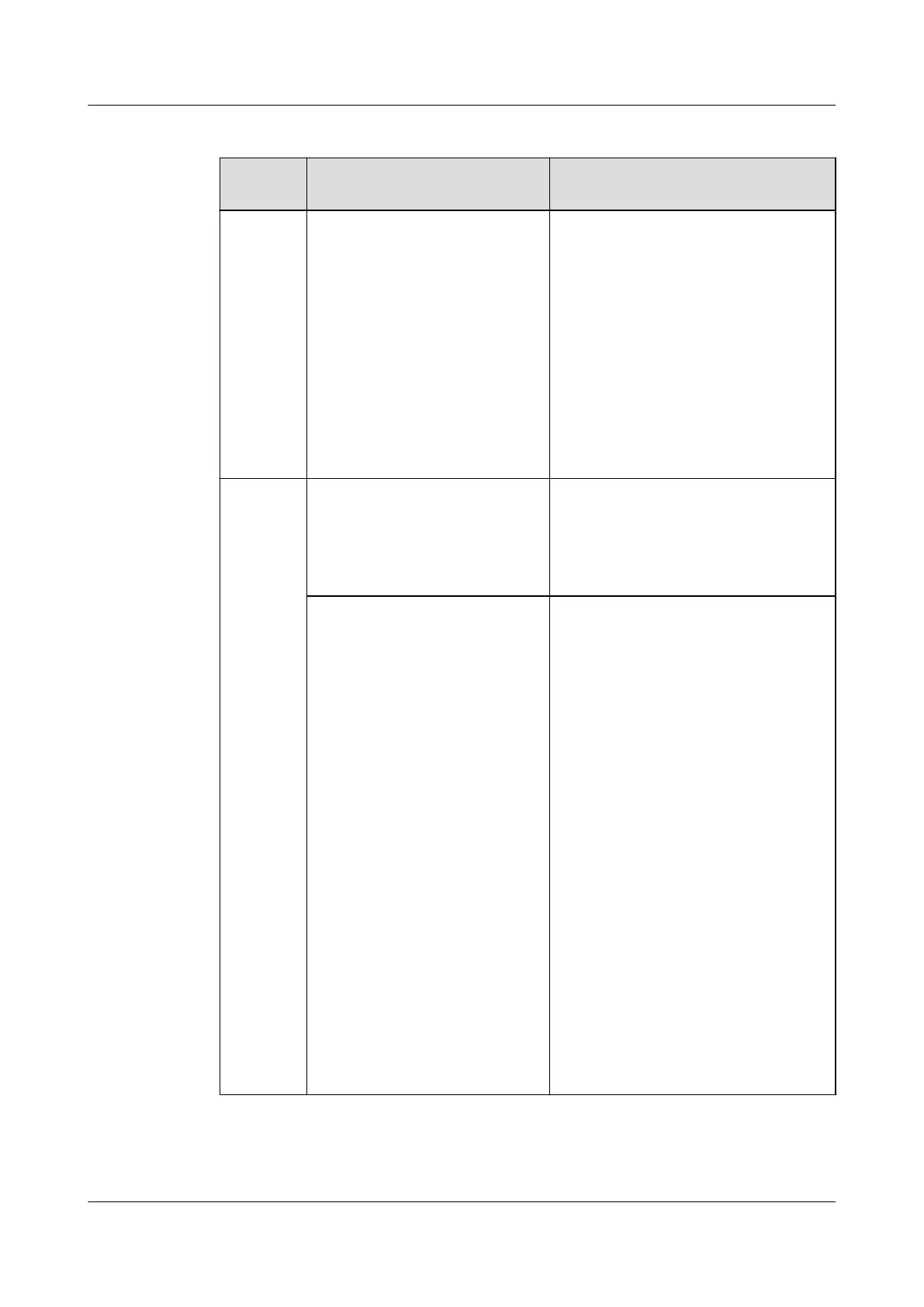
Table 6-4 Quarterly maintenance checklist
Compon
ent
Item (on the Basis of
Monthly Maintenance)
Troubleshooting
Monitori
ng
Export smart cooling product
logs, alarms, temperatures,
humidity, the operating status
of the compressor, fan,
electric heater, electric
humidier, and water pump,
and time from the monitoring
system. View the historical
alarms generated in this
quarter and select the most
common
ve ones. (If no
monitoring system is
available, skip this item.)
Rectify the fault or contact Huawei
technical support.
Humidi
er
Start the indoor unit, choose
Maint > Diagnostic Mode >
Enter from the main screen,
and set Humidier to 50%.
Water injection is smooth.
● Check that the water inlet sluice
is open.
● Disconnect the humidier water
injection hose and clear the
blockage in the hose.
(Following the preceding
step) Set Humidier to 0%,
and press the manual water
drain button on the side of
the electric control box to
check whether water drainage
is normal. After the check is
complete, set the manual
drainage button on the side
of the electric control box to
normal
humidication.
NOTE
1. Ensure that the manual
drainage button on the side
of the electric control box is
set to "O: Normal
humidifying" after the check
ends. Otherwise, the
humidier will not be lled
with water when it is
running.
2. If the humidier cylinder is
dirty and the water level
exceeds 4/5 during the
quarterly maintenance,
replace the cylinder.
Disconnect the drainpipe from the
device, and use a rubber mallet to
knock the drainpipe to remove
foreign matter or impurities from
the drainpipe. Then remove the
water pump and clean up
impurities from the water pump. If
the impurities are too much to be
cleared, replace the water pump.
NOTE
● When installing a pipe, seal screw
thread joints using water sealant
and ensure that no water leaks.
● If the fault persists after the
maintenance, see section 6.4
Troubleshooting for further
processing.
NetCol5000-A(025, 035) In-row Air Cooled Smart
Cooling Product
User Manual (600 mm Width) 6 System Operation and Maintenance
Issue 17 (2020-10-22) Copyright © Huawei Technologies Co., Ltd. 158







 To Next Page