Programming manual
Programming the phone 61
“SIA-IP” TYPE
If a phone number is a “SIA-IP” type, the IP address and port of the SIA-IP receiver must be
entered in the receiver number field in the “Number” section, using the following format:
xxxyyyzzzttt,ppppp
where:
- “xxxyyyzzzttt” are the 4 octets of the IP address (standard IPv4), each of which should be
written with 3 figures and, if necessary, “0” filler characters and no separation points.
- “ppppp” is the port and should be written with 5 figures and, if necessary, “0” filler
characters.
POLLING SIA-IP
If a phone number is a "SIA-IP" type number, you can enable the “polling” function. In this
way, from this number the control panel sends a periodic signal to the receiver SIA-IP server,
which can verify proper functioning of the transmission. The parameters of the polling
periodicity are available in the “Telephone parameters” section (Table 11-2: Telephone
parameters).
ACCOUNT CODE
Depending on the protocol, the account code can be exclusively numeric or can accept also
the letters “A”, “B”, “C”, “D”, “E”, “F”, available on keys and .
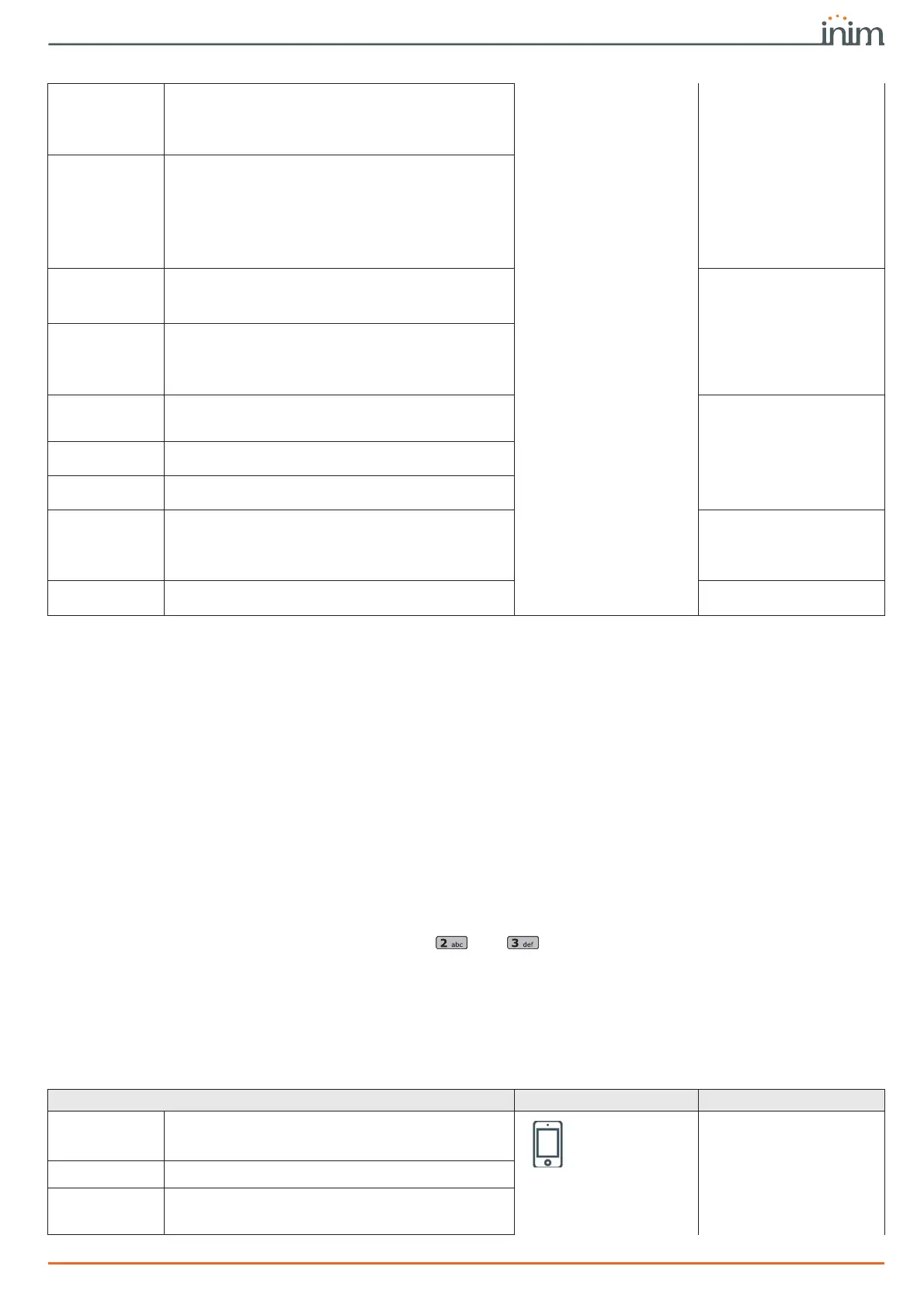
Telephone line
Channel
Checkbox for the selection of the channel on which the
call can be routed:
•PSTN
•Nexus
•LAN
Encryption
This field allows you to select the SIA-IP protocol
encryption type:
•None
• AES 128 bit
• AES 192 bit
• AES 256 bit
After selecting the type is is necessary to indicate
the encryption key.
Receive SMS
This option allows the phone number to receive an
SMS message from the Nexus GSM module, as well as
all other event-related communications.
Telephone, Selected
number, "number", Op-
tions
Toggle channel
on
This option, in the event of call failure on a channel,
enables the control panel to carry out call attempts on
an alternative channel and then try again on the
original channel and continue on both channels
alternately for the set the number of attempts.
SIA-IP
If a phone number is configured as “SIA-IP”, you must
program the IP address and the SIA-IP receiver port in
this section.
Not available
(LAN) port
(Nexus) port
Port used for SIA-IP communication via LAN/Nexus
Enable SIA-IP
polling
If a phone number is a "SIA-IP" type number, this
option enables the polling function.
Partitions
You can associate each phone number with specific
partitions. By selecting the partitions, you can enable/
disable users (who have at least one of these
partitions in common with the phone number) to
modify the number concerned.
Telephone, Selected
number, "number"
Failed call
A key is available that directly accesses the
programming section of the failed call.event.
Events, Failed call
Table 11-1: Parameters of single phone number
Table 11-2: Telephone parameters
Parameter Software section Installer menu section
Dial-tone check
The control panel will engage the phone line and check
for the “dial tone”; if present, the control panel will
start dialing.
Telephone
parameters -
Telephone line
parameters
Parameters
Dial tone check
Pulse dialing
The control panel will dial using pulse tone.
Pulse dialing
Telephone line
fault alert
If a “telephone line fault” event occurs, the control
panel will flash the respective icon on the keypad
displays.
Line down signal



 To Next Page