66 Iridium Extreme™ User Manual
7: Predictive Text Entry
For all alphabetic languages:
To complete a message, you may need to switch between these four main
modes of text entry during message creation:
r 8PSE8JTF8XXPSEQSFEJDUJWFUFYUFOUSZ
r -FUUFS8JTF-XMFUUFSCZMFUUFSQSFEJDUJWFUFYUFOUSZ
r /VNCFSTOVNCFSFOUSZOPOQSFEJDUJWF
r 1VODUVBUJPO !QVODUVBUJPOFOUSZOPOQSFEJDUJWF
The appropriate text entry mode can be selected by pressing the
Convenience key on the side of the Iridium Extreme™. The active text entry
mode will be displayed on the screen as indicated in the illustrations on
the following page.
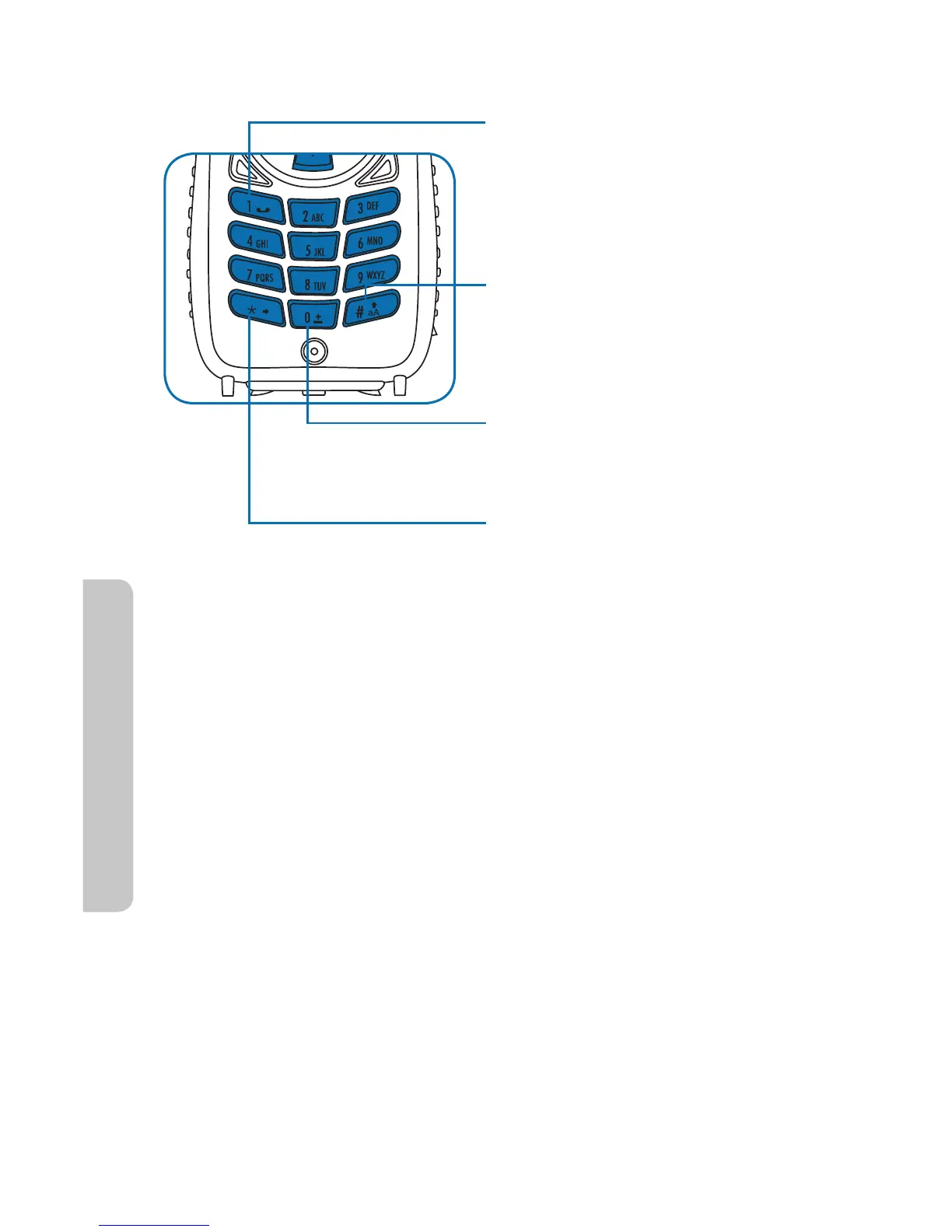
The 1 key can be used for entering
punctuation, however for full and
efficient punctuation entry you
can switch to Punctuation mode
(123).
Pressing the Pound key (#)
switches between lower and
upper case, indicated by the (u)
symbol. This is the Shift key.
Pressing the Zero key (0) enters
a space, indicated by the (
9
)
symbol. This is the Space key.
Pressing the Asterisk key (*)
enters the next word or letter,
indicated by the (
t
) symbol. This
is the Next key.



 To Next Page