Service functions and error messages
Page 151
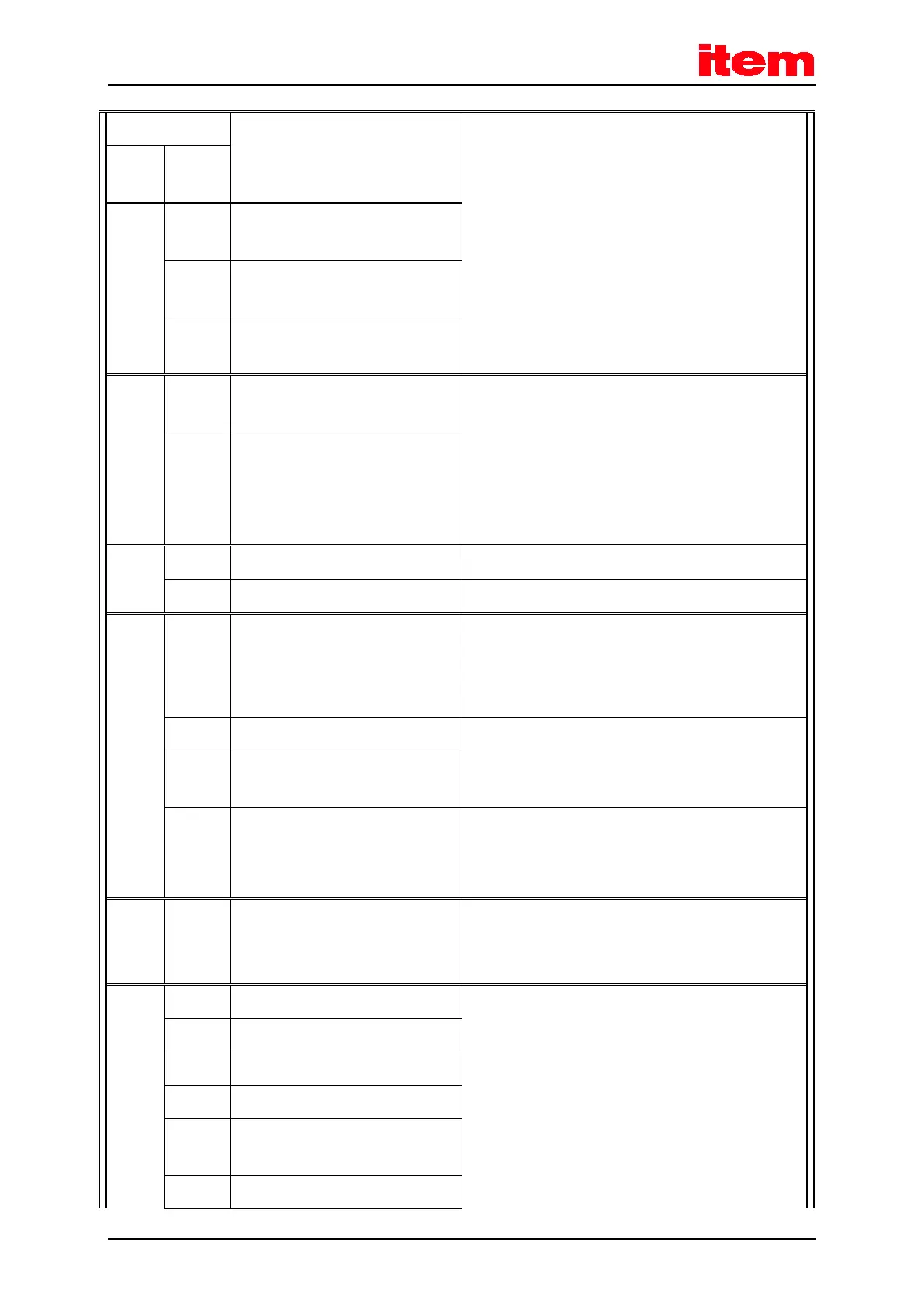
Meaning of the error message
1 IRQ:
speed controller overflow
2 IRQ:
position controller overflow
3 IRQ:
interpolator overflow
81 4 IRQ:
low-level overflow
Please contact the Technical Support.
5 IRQ:
MDC overflow
82 0 Sequence control: general For information only, no measures required.
1 CO write access started multiple times Please contact the Technical Support.
83 0 Invalid technology module
or
Technology module:
(slot/combination)
Load the correct firmware.
Check the slot.
If necessary, contact the Technical Support.
1 Technology module not supported Load the correct firmware.
If necessary, contact the Technical Support.
2 Technology module:
HW revision not supported
3 Service memory module: write error Please contact the Technical Support.
84 0 State change of the sequence control Detailed information concerning internal processes.
No measures required. If necessary, select the option “Entry
into buffer” in the error management.
90 0 Missing hardware component (SRAM) Please contact the Technical Support.
1 Missing hardware component (FLASH)
2 Error during booting of FPGA
3 Error during start of SD-ADUs
4 SD-ADU synchronisation error after
start
5 SD-ADU not synchronous


 To Next Page
 Loading...