USER MANUAL
Chapter 7 Remote Access via Web Client
Access the NVR using a web browser by downloading and installing the plugin. Ensure that the
internet settings of the NVR are configured correctly.
7.1 Basic System Environment Requirements
The minimum requirements for hardware and OS required to run Web Client:
7.2
Web Plugin Download and Installation
For Internet Explorer:
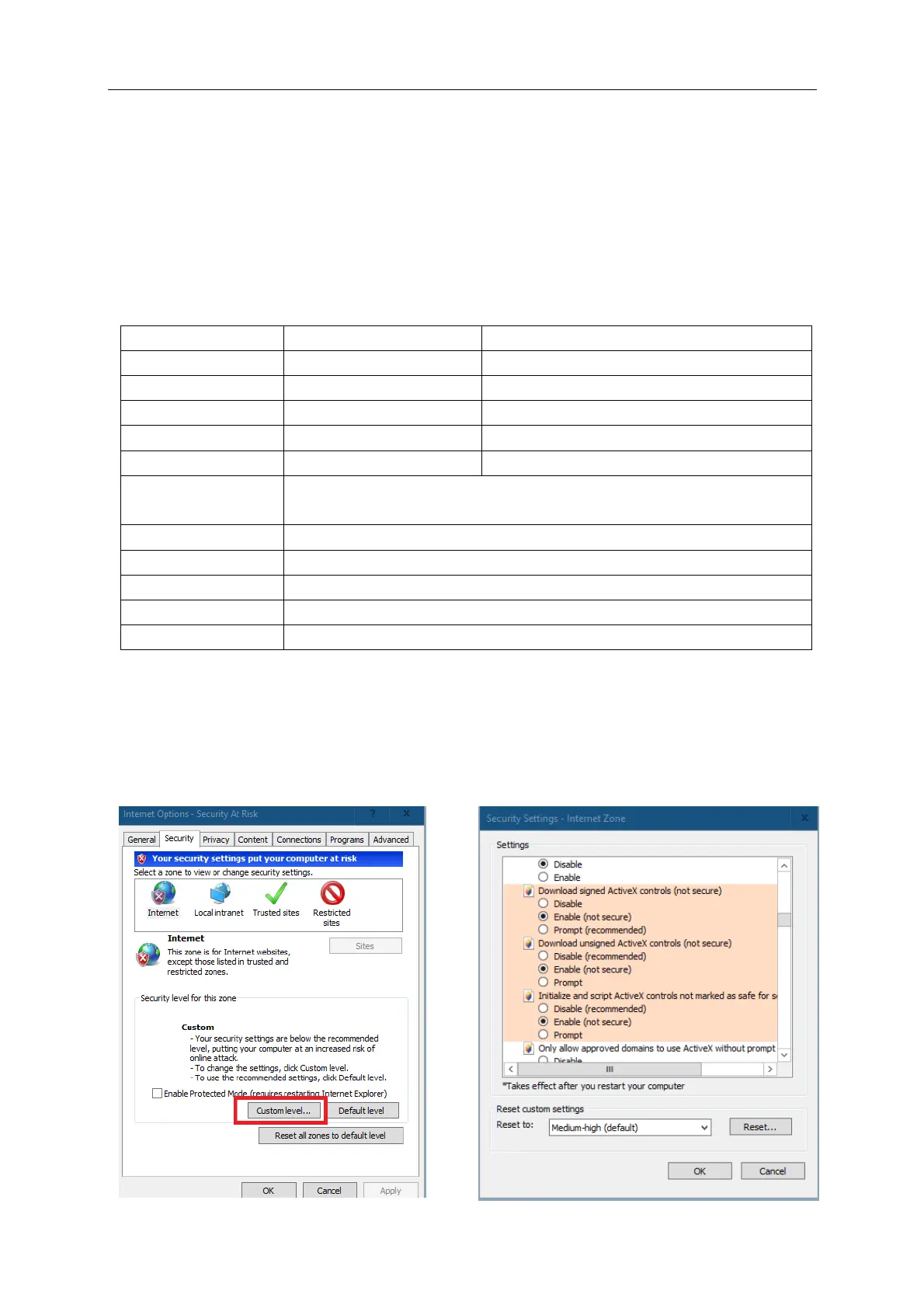
1. Launch Internet Explorer. Click the “Tools” tab – “Internet Options” – “Security” Tab – “Custom.
Level”. Modify the security settings as shown and click “OK”.
Intel® Core™ i5 CPU or higher
Windows 7 or above
Mac OS X® 10.9 or above
10/100/1000M Ethernet Adapter
Internet Explorer (Ver. 11, 10 or 9). Edge Chromium not supported.
Only when using the IE Tab Chrome extension (Windows only)
V5.1 or above. Use the Surveillance Client application for MAC
V51 or below. V52 or above not supported



 To Next Page