USER MANUAL
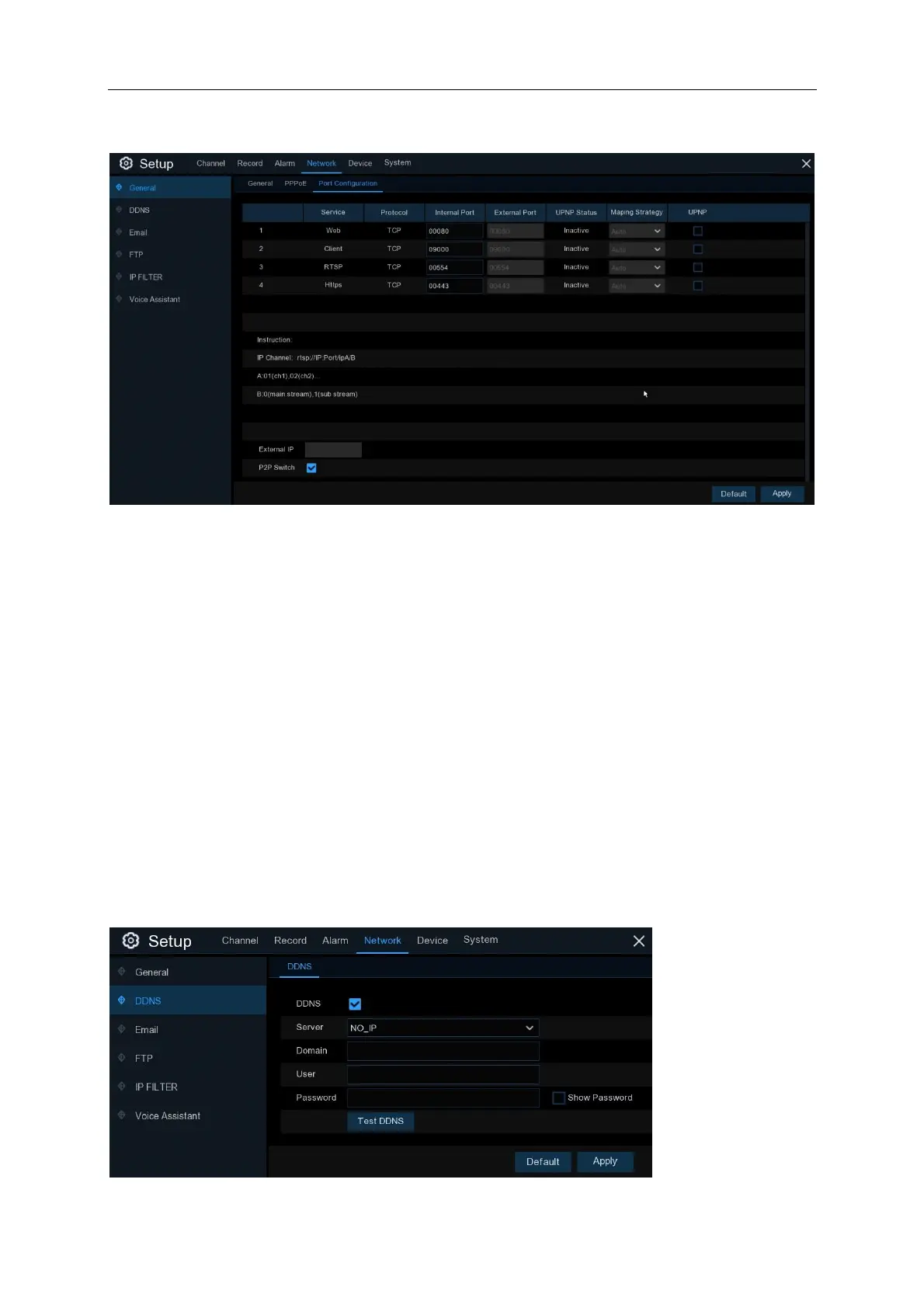
5.4.1.3 Port Configuration
Web Port: This is the port that you will use to log in remotely to the NVR (e.g. using the Web
Client). If the default port 80 is already taken by other applications, please change it.
Client Port: This is the port that the NVR will use to send information through. If the default port
9000 is already taken by other applications, please change it.
RTSP Port: Default is 554, if the default port 554 is already taken by other applications, please
change it.
UPNP: If you want to log in remotely to the NVR using Web Client, you need to complete the port
forwarding. Enable this option if your router supports the UPnP. You need to enable UPnP both, on
NVR and router. In this case, you do not need to configure manually port forwarding on your router.
If your router does not support UPnP, make sure the port forwarding is completed manually
5.4.2 DDNS
This menu allows you to configure DDNS settings. The DDNS provides a static address to simplify
remote connection to your NVR. To use the DDNS, you first need to open an account on the
DDNS service provider’s web page.



 To Next Page