2011-07-01/00561073 [SCR Power Controller TYA202] 99
9 What to do if ...
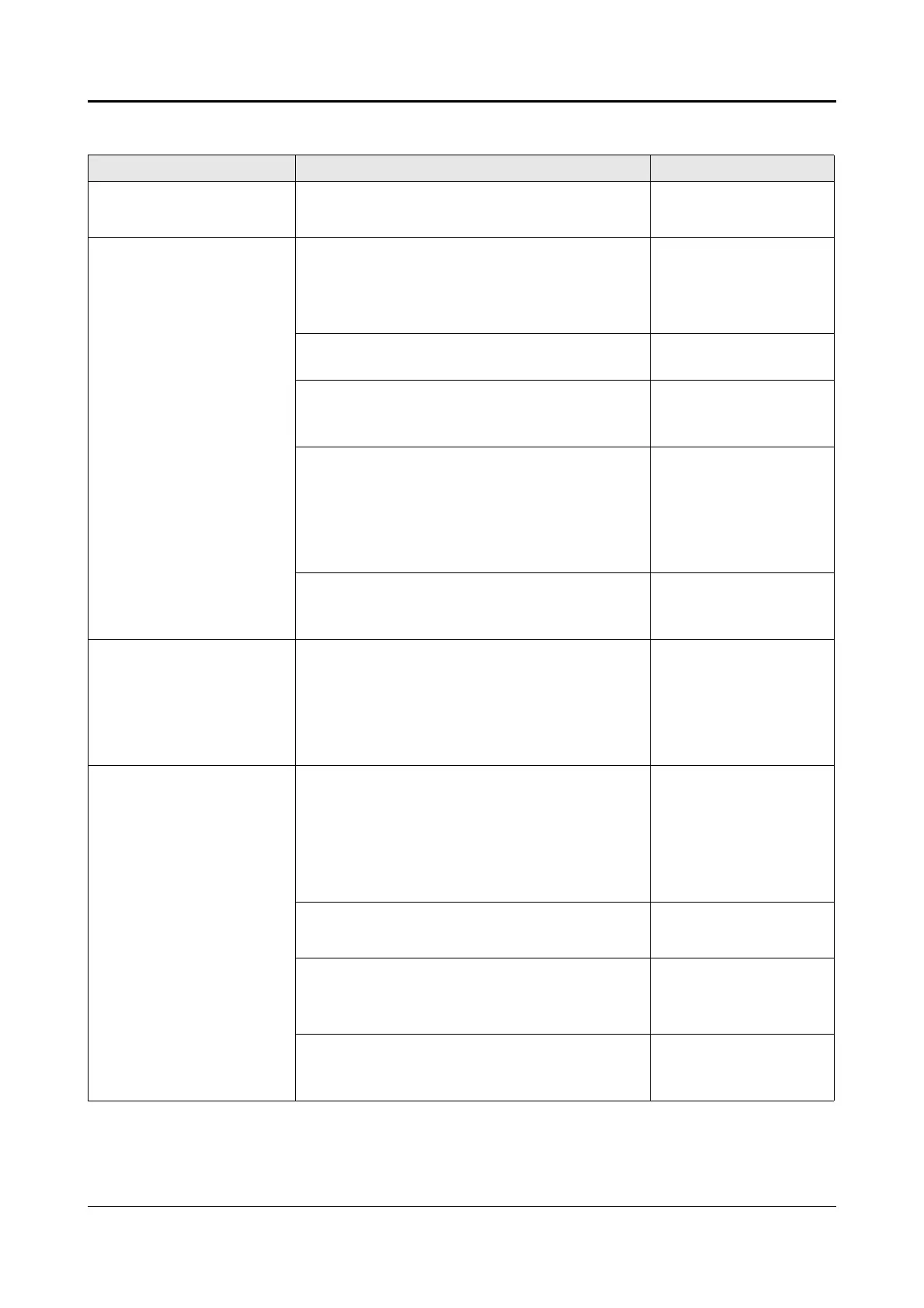
What is happening ? Cause / Remedy Information
Green LED Power is
flashing
- Display switch-off active
h Press any key
v Chapter 5.1.1 „De-
vice data“
Power controller is not
producing any output
power
although green power
LED
is lit and a set point val-
ue entered.
- Parameters have been changed in the
configuration level but not completed.
h Leave the configuration level with EXIT
and wait for a restart.
-
- Wire break at the analog input or incor-
rect analog input wiring
v Chapter 3.3 „Con-
nection diagram“
- Set point value configuration incorrectly
configured, e.g. set via interface.
v Chapter 5.1.4 „Set
point value config-
uration“
- Input for firing-pulse inhibit active
A padlock symbol is shown in the info line
as the operating mode.
Undo connection between screw terminal 7
and 8 at terminal X2_2.
v Chapter 4.1.2
„Display of mea-
sured values“
-Load failure
h Check load and load connections
v Chapter 8 „Fault
messages and
alarms“
LED Fuse is lit - Semi-conductor fuse defective
due to short circuit in power section
h Remedy short circuit in the load or load
circuit
h Fit a new semi-conductor fuse
v Chapter 8.2 „Re-
place defective
semi-conductor
fuse“
Power from the power
controller although no
set point value (output
level) is specified by the
controller.
- Configuration problem:
Controller output signal set to 4 ... 20mA
and current at power controller analog in-
put set to 0 ... 20 mA.
h Check configuration and set same input
signals at controller and power controller.
v Chapter 5.1.3 „An-
alog inputs“
v Chapter 5.1.4 „Set
point value config-
uration“
- Power controller in manual mode
h Exit manual mode with EXIT
v Chapter 6.2 „Man-
ual mode“
- Base load default value set
h Check settings for base load default val-
ue
v See “Base load”
on page 55.
-SCR short circuit v Chapter 8 „Fault
messages and
alarms“


 To Next Page