2011-07-01/00561073 [SCR Power Controller TYA202] 39
4 Operation
Adhere to the
switch-on
sequence
The voltage supplies to the control electronics and to the power section must
be switched on simultaneously.
4.1 Display after switch-on of the device
Sequence When the voltage supply is switched on, the LED Power is continuously lit
green first and an hour glass appears on the display. Then, the master is syn-
chronised with the slave device and a rotary field detection is carried out. If all
devices are wired correctly, the controller displays the mains voltage.
Malfunction
messages
v Chapter 8 „Fault messages and alarms“
4.1.1 Display and control elements
Use and to view current measured values such as currents, voltage
Under no circumstances may the voltage supply for the control
electronics be switched on before the load voltage! This is especially
important for operating transformer loads and resistive loads with a
large temperature coefficient (TC >> 1)!
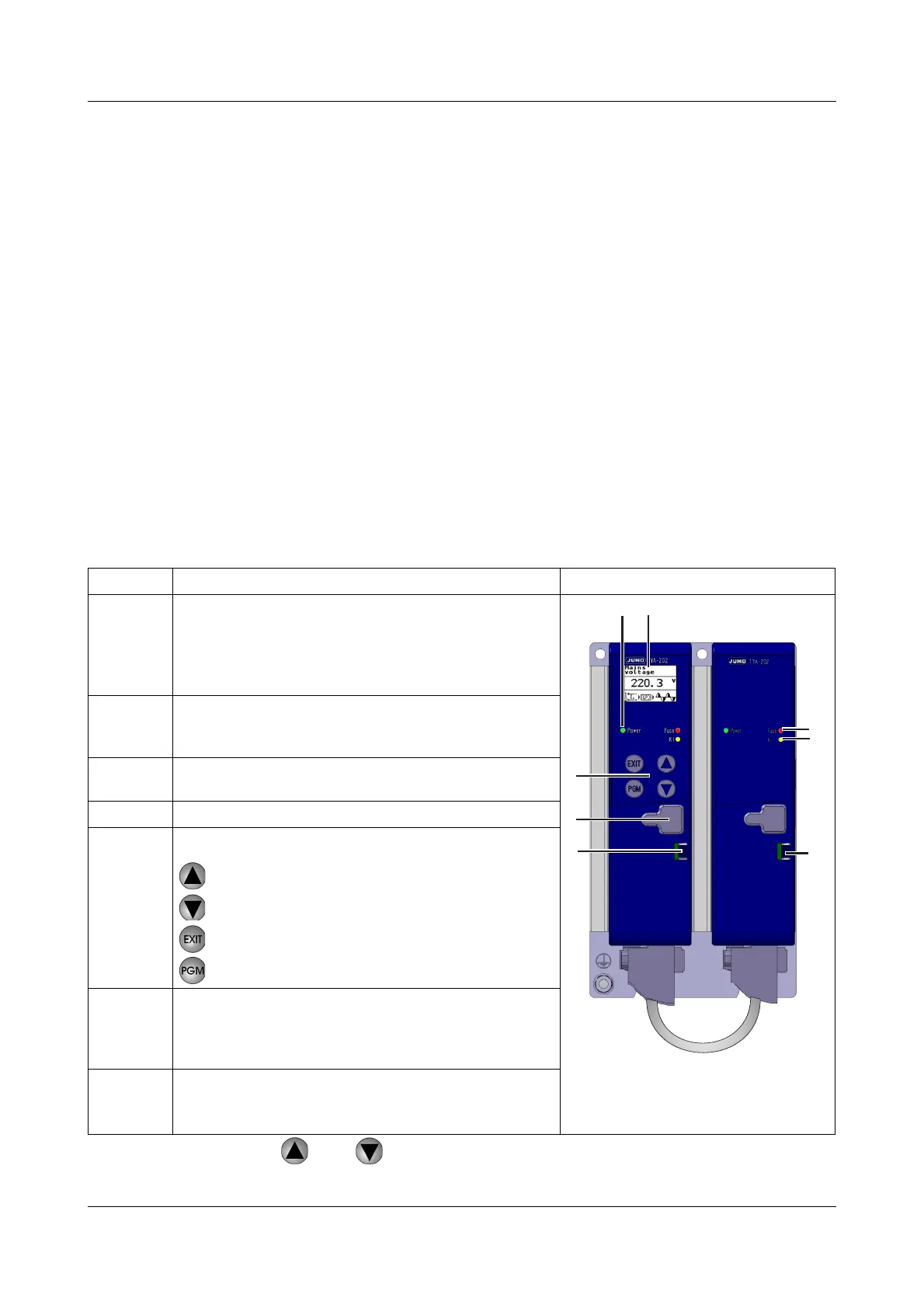
Legend Remark Fig.
1
LED Power (green) is continuously lit when the voltage
supply is connected.
It flashes regularly when the display light is switched
off.
v Chapter 9 „What to do if ...“
2
Display (96 x 64 pixels) with white background lighting.
The info line at the bottom of the display indicates cur-
rent settings and error messages.
3
The LED Fuse (red) is lit when the semi-conductor fuse
is blown on the corresponding power controller.
4
LED K1 (yellow) Malfunction message display
5 Keys:
Increasing the value / previous parameter
Reducing the value / next parameter
Cancel / one level back
Programming / one level deeper
6
USB setup interface
Configuration is carried out on the LH device and auto-
matically transmitted to the RH device via the patch
cable.
7
Spring clip to release plastic case
v Chapter 8.2 „Replace defective semi-conduc-
tor fuse“


 To Next Page