76 Additional Functions
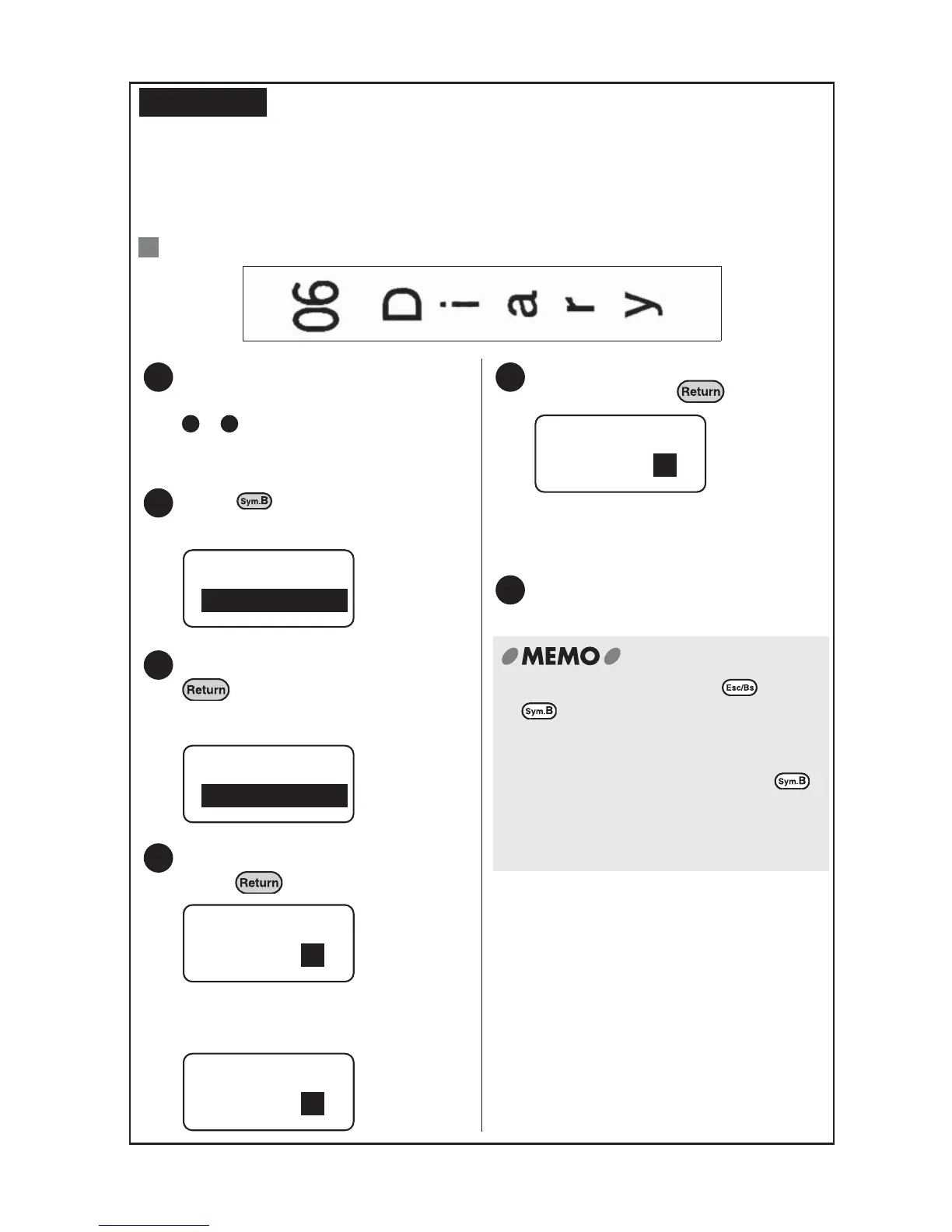
Printing two-digit numbers vertically
The two-digit setting handles double figured numbers as one character.
Select the "Double Figure" setting to align and print dates, house numbers of
addresses, etc. when using the vertical orientation.
: Enter "06 Diary".
REFERENCE
Ex.
Change the label orientation
(horizontal/vertical) using steps
- indicated on the previous
page, and select "Vertical".
Press .
The Symbol-B menu will be displayed.
Select "DoubleFigure" and press
.
Registered two-digit numbers will be
displayed.
Select "00" from the menu and
press .
In this case the position of the 10 is
"00" so select "00".
The 00 option menu will be displayed.
Select "06" from the "00" position
menu and press .
"06" is displayed at the position of the
cursor.
Enter text continuously.
1
1 5
2
Symbol-B
Work
3
Symbol-B
DoubleFigure
4
DoubleFigure
00
10
00
–
09
00
01
5
00
–
09
040302 05
06 07
6
x To stop the process press or
. This takes you back to the
previous step. Repeating this procedure
brings you back to the text enter screen.
x To enter two-digit numbers press
and choose "DoubleFigure". Figures
entered in the text screen will not be
handled as double figure numbers.



 To Next Page