EN UG-020 Link 6 user guide r1.0 41
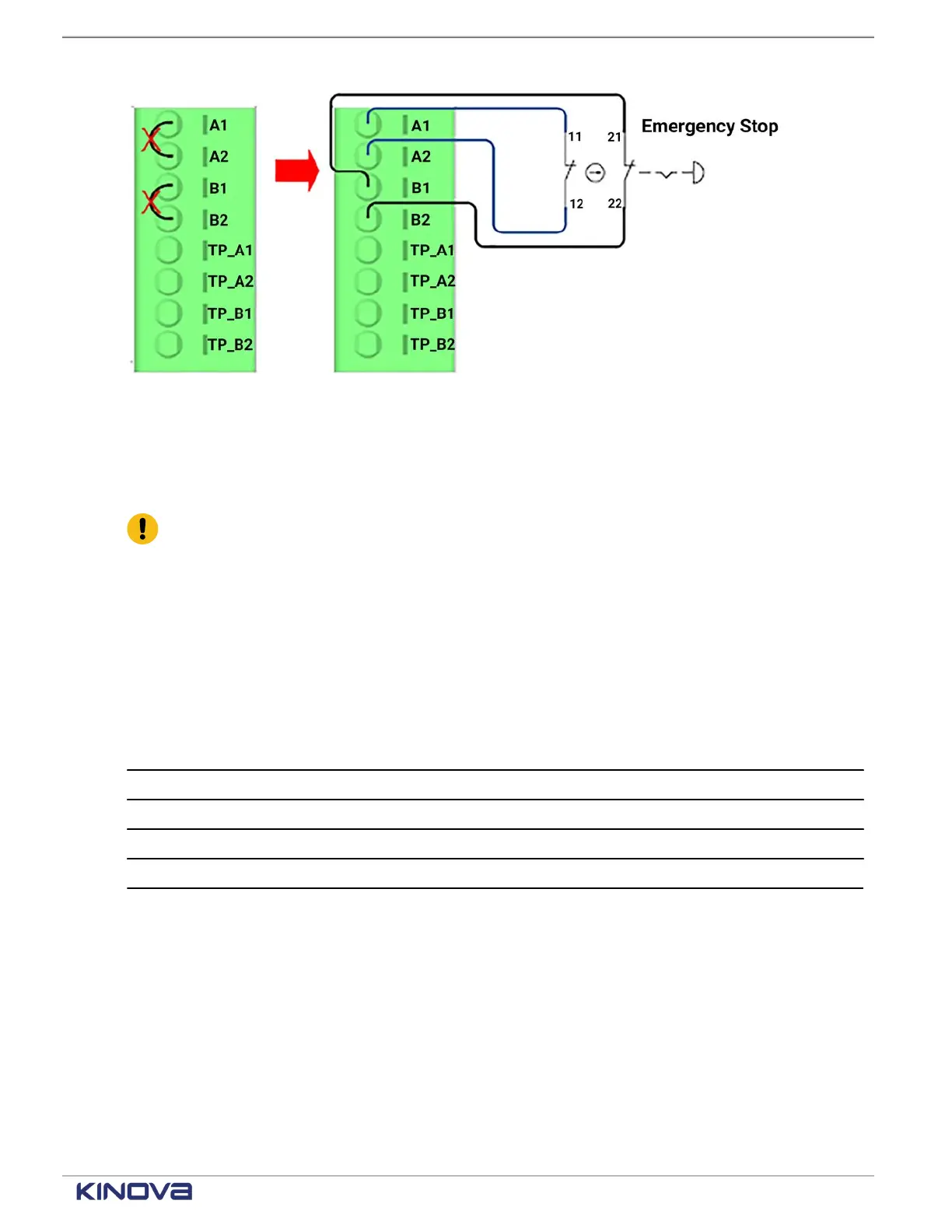
Figure 37: Terminal connections with external emergency stop connected
Teach pendant bypass inputs
There are only two ways to bypass teach pendant inputs. All other configurations prevent the
robot arm from receiving power.
Important: Make sure the teach pendant is not installed when you bypass teach pendant
inputs.
If a teach pendant is connected on the front panel, leave TP_A1, TP_B1, and TP_B2 open. Remove
any jumper wires that are installed.
If a teach pendant is not connected on the front panel, connect TP_A1 to TP_A1 and TP_B1 to
TP_B2.
The terminal connections belong to the SAFETY - ESTOP terminal group.
Table 30: Teach pendant bypass inputs terminal connections
Label Purpose
TP_A1 24V wetting port
TP_A2
TP_B1 24V wetting port
TP_B2
+1 514-277-3777 kinovarobotics.com
© 2022 Kinova inc. All rights reserved.



 To Next Page