EN UG-020 Link 6 user guide r1.0 31
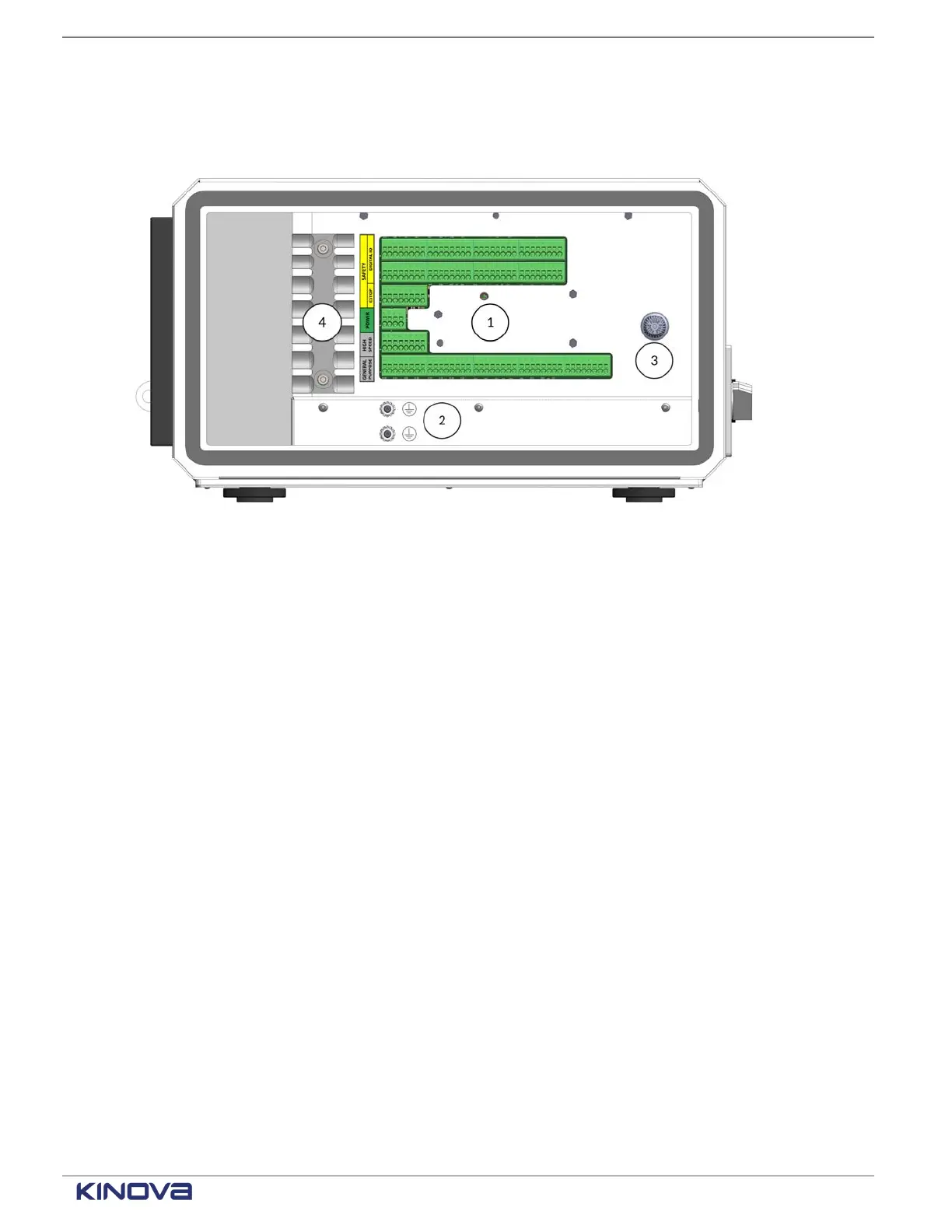
I/O connections are connected to the controller through the side panel. The protective earth
mount points and fuse are also inside the side panel of the controller.
Figure 26: Inside the side panel of the controller
1
I/Os
From top to bottom, they are Safety Digital I/O, Safety Digital I/O, Safety ESTOP, Power,
High Speed, and General Purpose
2 Protective earth stud
3 Fuse holder with a fuse held in it
4 Strain relief mounting plate, used to tie-wrap and secure cables; ensures not too much strain is
applied to the terminal
Teach pendant overview
The teach pendant is a hand-held device used by integrators to configure and program the
motions of a robot and by operators to select a program to run.
A cable connects the teach pendant to the controller. The controller saves the information
coming from the teach pendant.
The teach pendant is a touchscreen device with three buttons.
• Emergency stop
• Power
• Pendant enabling device
To configure trajectories and to operate the robot, use KortexWebApp.
+1 514-277-3777 kinovarobotics.com
© 2022 Kinova inc. All rights reserved.



 To Next Page