maXYmos BL, Type 5867B…
Page 146 5867B_002-626e-04.16
8.1.6 Telegram Configuration
8.1.6.1 Input Telegram
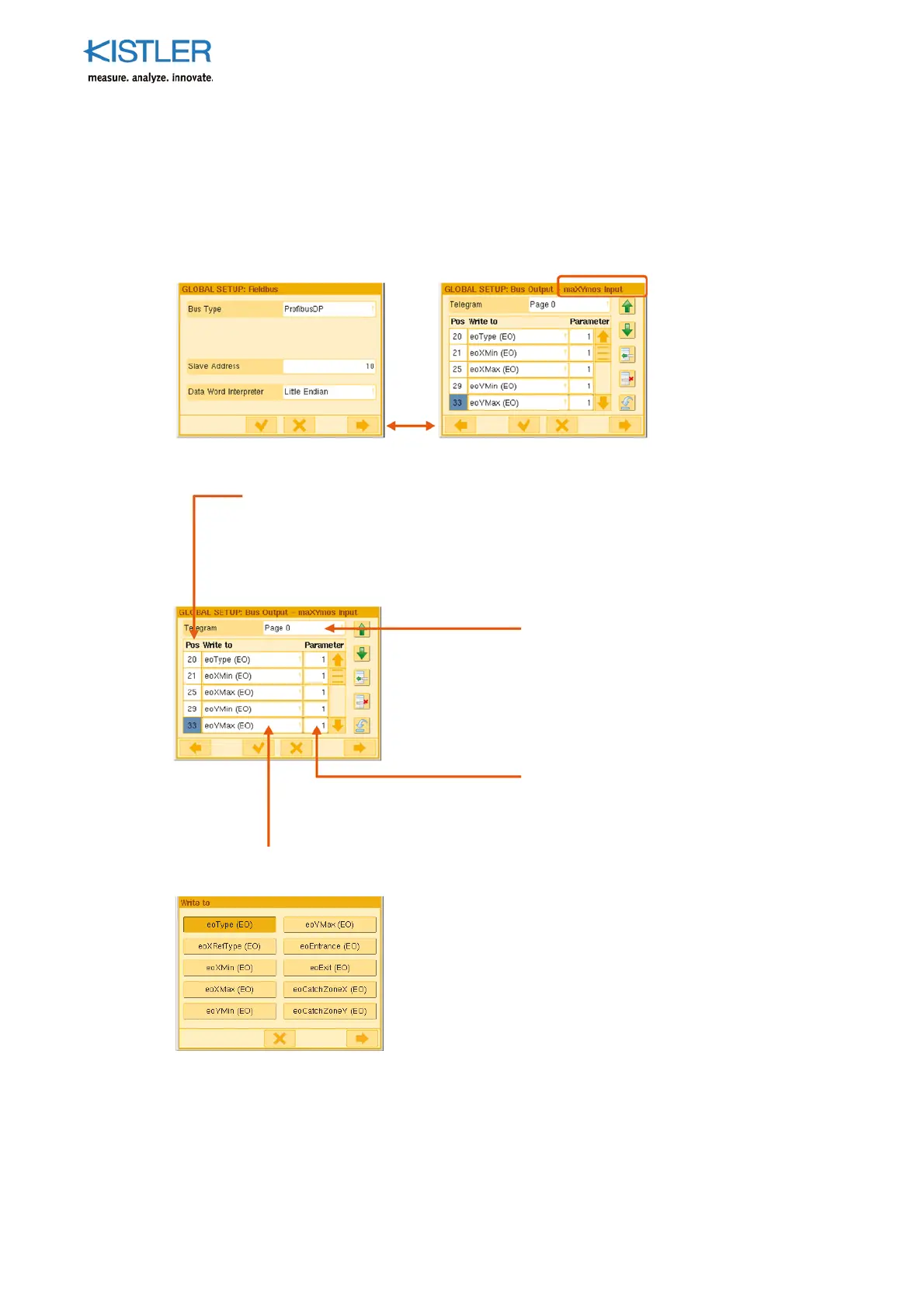
The input telegram is configured on the menu: GLOBAL SETUP: Data Bus Output –
maXYmos Input (here corresponding to for example PROFIBUS, EtherNet/IP, CC-Link)
The required data object is entered in
the Write to column. The objects on
the Write to menu can be chosen for the entry.
The byte number (
osition) in the telegram is shown in the Pos column.
Counting is consecutive in this column and takes account of bytes 0 … 19 of
the control signals and
age control. Likewise when the data objects are
entered in the Write to column their data length is taken into account
automatically. A maximum of 200 bytes are available. In this case the last
position is 219.
The
age re
uired for in
ut is chosen
with Telegram Page. A maximum of
eight pages are available.
The
arameter s
ecified for the data
object is entered in the Parameter
column. The Data Objects section
describes which object re
uires a
arameter as well as the contents of
the
arameter. Ty
ical
arameters are
EO number or length of a string.















 To Next Page