SETUP – Configuring Monitor Parameters
5867B_002-626e-04.16 Page 83
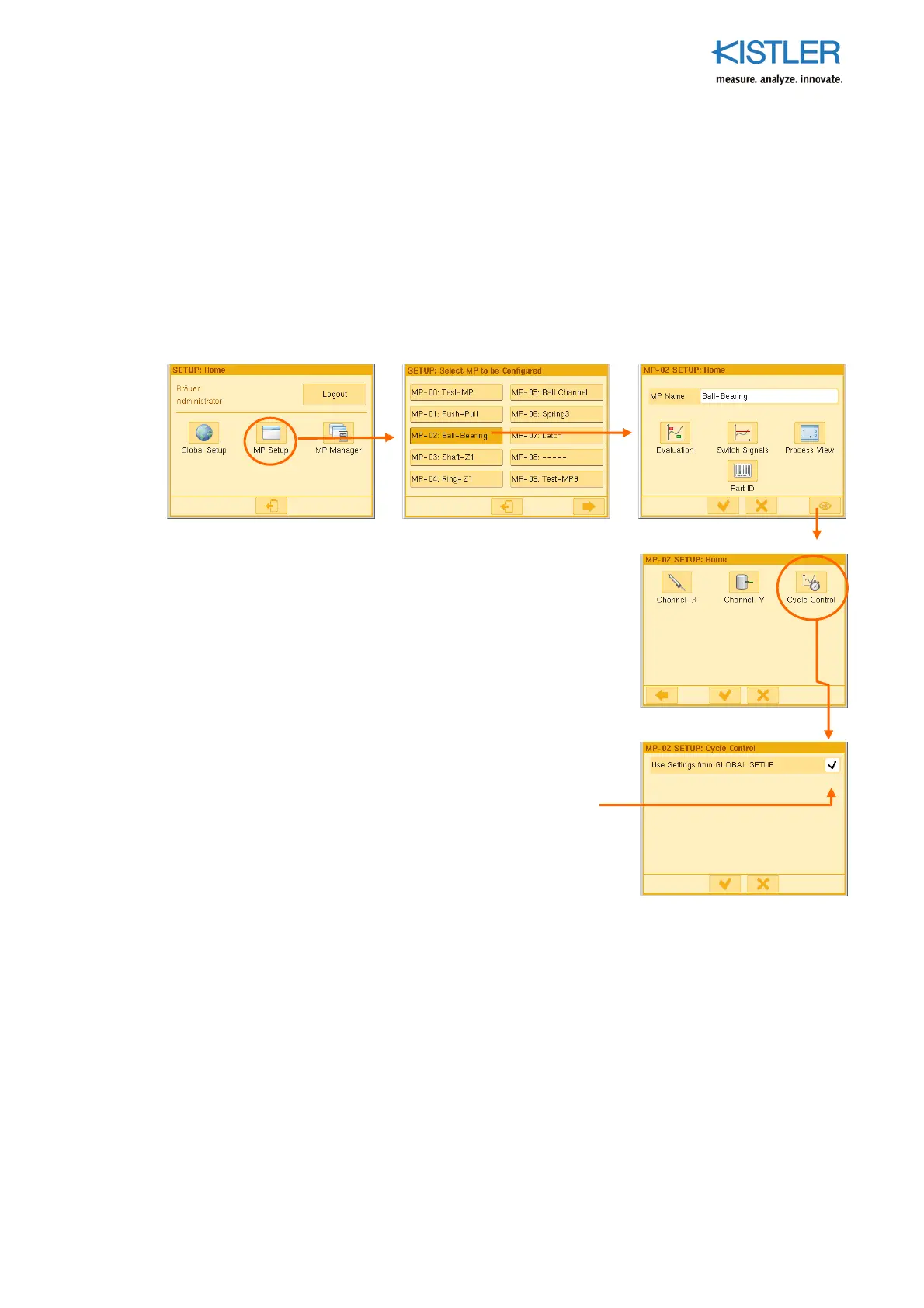
4.4.7.7 Configuring Cycle Control – MP-specific
In most cases the parameters for cycle control are specified only once and this is done
GLOBALLY. All of the measuring programs then use these centrally stored parameters. In
the "Setup MP-specific" procedure each individual MP can, however, be uncoupled from
this global cycle control and use its own parameters. This may be necessary if, for example,
one type of part makes special START-STOP settings necessary or a problematic curve
return has to be cut off (truncated). Once you have removed the tick from the checkbox
"Use Settings from GLOBAL SETUP", the parameters of the corresponding MP program can
now be configured MP-specific. This procedure then corresponds exactly to that of GLOBAL
(see p. 33).
Remove the tick from the checkbox "User Settings from
GLOBAL SETUP". This will make the parameters for cycle
control MP-specific in future. At the same time the setup
menus for the MP-specific setup of Cycle Control are
enabled. Menus and procedure correspond exactly to those
described in GLOBAL SETUP → Cycle Control (see page
34).
Remove tick















 To Next Page