SETUP – Configuring Monitor Parameters
5867B_002-626e-04.16 Page 55
4.4.2 Editing Evaluation Objects – EO Editor
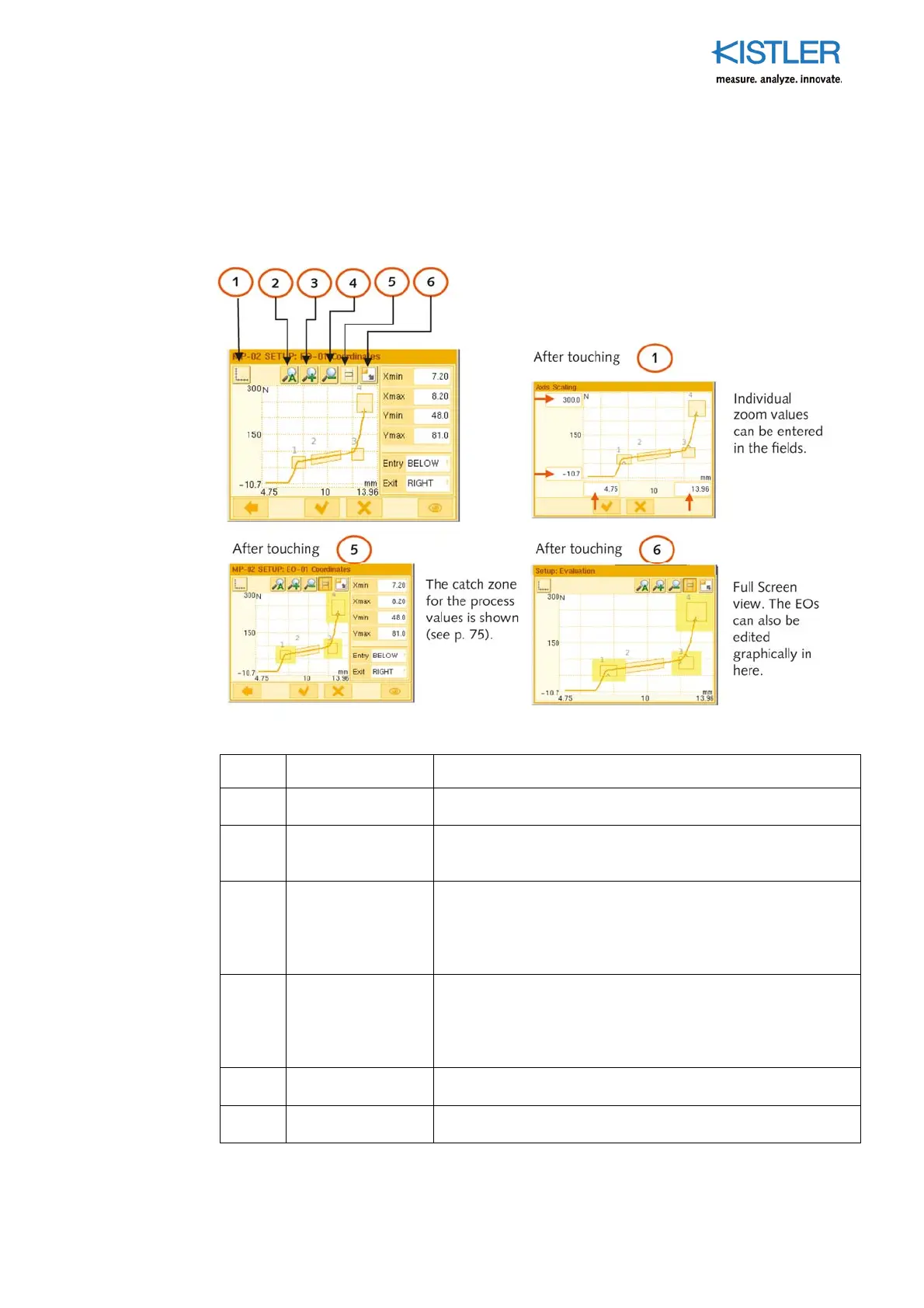
4.4.2.1 Function of Tool Buttons in EO Editor
Button Purpose Comments
1
Enter zoom
manually
Individual zoom values can be entered in the fields on the
axes.
2 Auto zoom
Touching this button zooms the current measurement curves
incl. EOs to their limits. The EOs are included. This function is
very helpful for setting up the EOs.
3 Zoom in (+)
While the button remains "latched" after being touched, the
display zooms in on the graph by one increment each time it
is pressed, centering on the point of touch at the same time.
The (toggle) button must be touched again to deactivate
Zoom+ again.
4 Zoom out (–)
While the button remains "latched" after being touched, the
display zooms out from the graph by one increment each
time it is pressed, centering on the point of touch at the
same time. The (toggle) button must be touched again to
deactivate Zoom- again.
5
Su
erim
ose catch
zone
Touching this (toggle) button shows the extended catch
zone for the process values as a gray area around each EO.
6 Full Screen
The current gra
h is dis
layed full screen, with the sidebar on
the right hidden.















 To Next Page