maXYmos BL, Type 5867B…
Page 90 5867B_002-626e-04.16
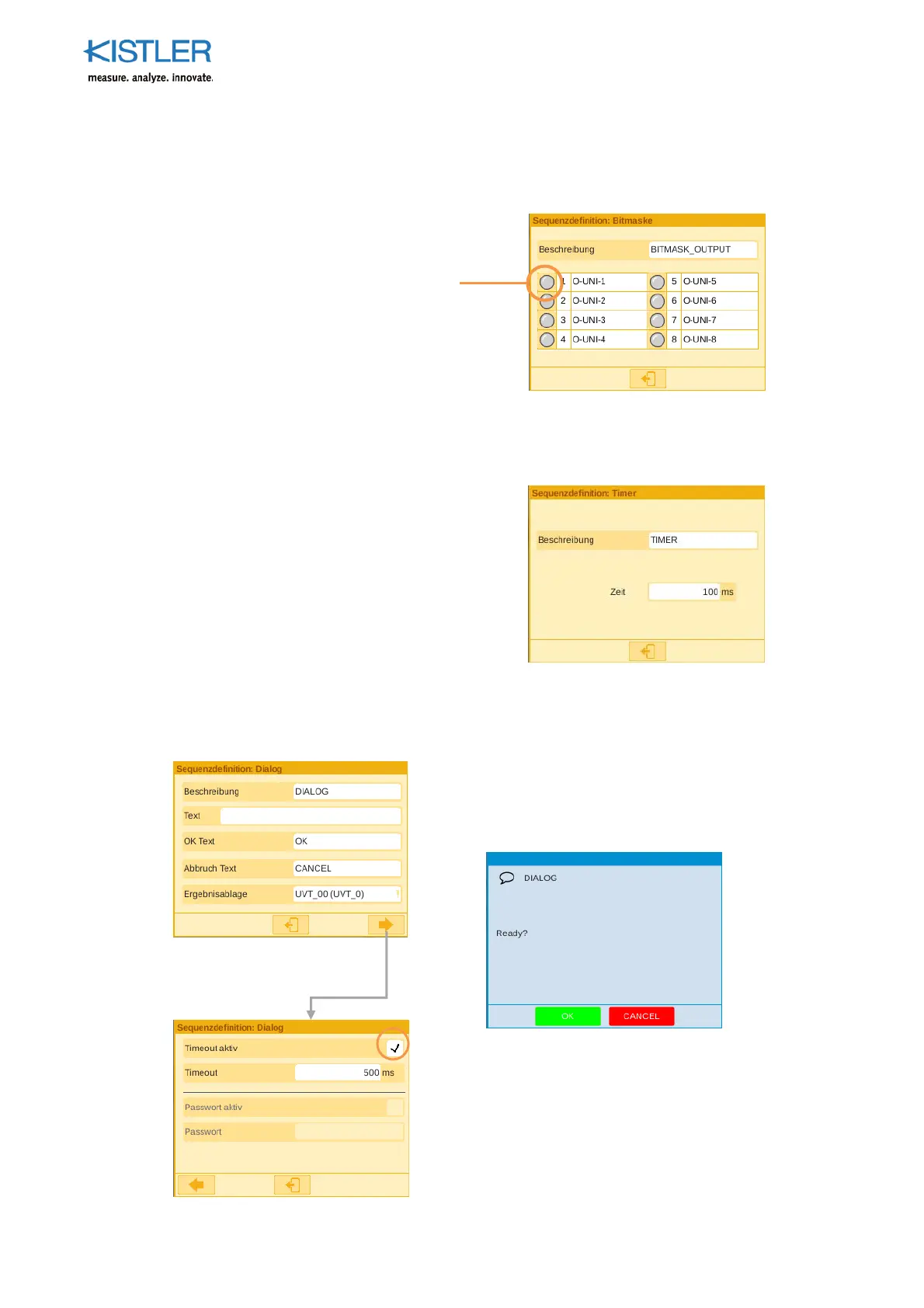
4.4.9.4.2 BIT MASK Element
The BIT MASK element is set to activate or deactivate the individual outputs as a whole.
This makes it possible to define - as early as the beginning of the sequence - which outputs
are supposed to be active.
4.4.9.4.3 TIMER Element
The TIMER element delays execution of the subsequent element by the configured time.
Use as, for example, a setting time under force.
4.4.9.4.4 DIALOG Element
The DIALOG element enables interaction with the user. It can be used, for example, to
forward useful information to the user. The dialog must either be confirmed by the user at
the visualization or will be hidden automatically after a configured period of time.
Activating or deactivating
individual outputs
The in
ut text can be customized.
Just as the text, the acknowledge
buttons can be customized to fit
individual requirements.
The result of the
corresponding dialog can be
stored in the UVT.
Acknowledgment of the dialog re
uires
that the timeout feature be active.
Once you have activated timeout, you
can set the display duration to the
period you require.















 To Next Page