6. Web Browser Operation
6.1 Enabling Download of an Unsigned ActiveX
Control
You can conne ct t o yo u r DVR via the Internet and be able to monitor and configure the DVR
remotely. To access your DVR device via a web browser (currently Internet Explorer is
what this DVR was primarily designed for), you need to install a special ActiveX component
for web access. If your Internet Explorer settings prohibit downloading unsigned ActiveX
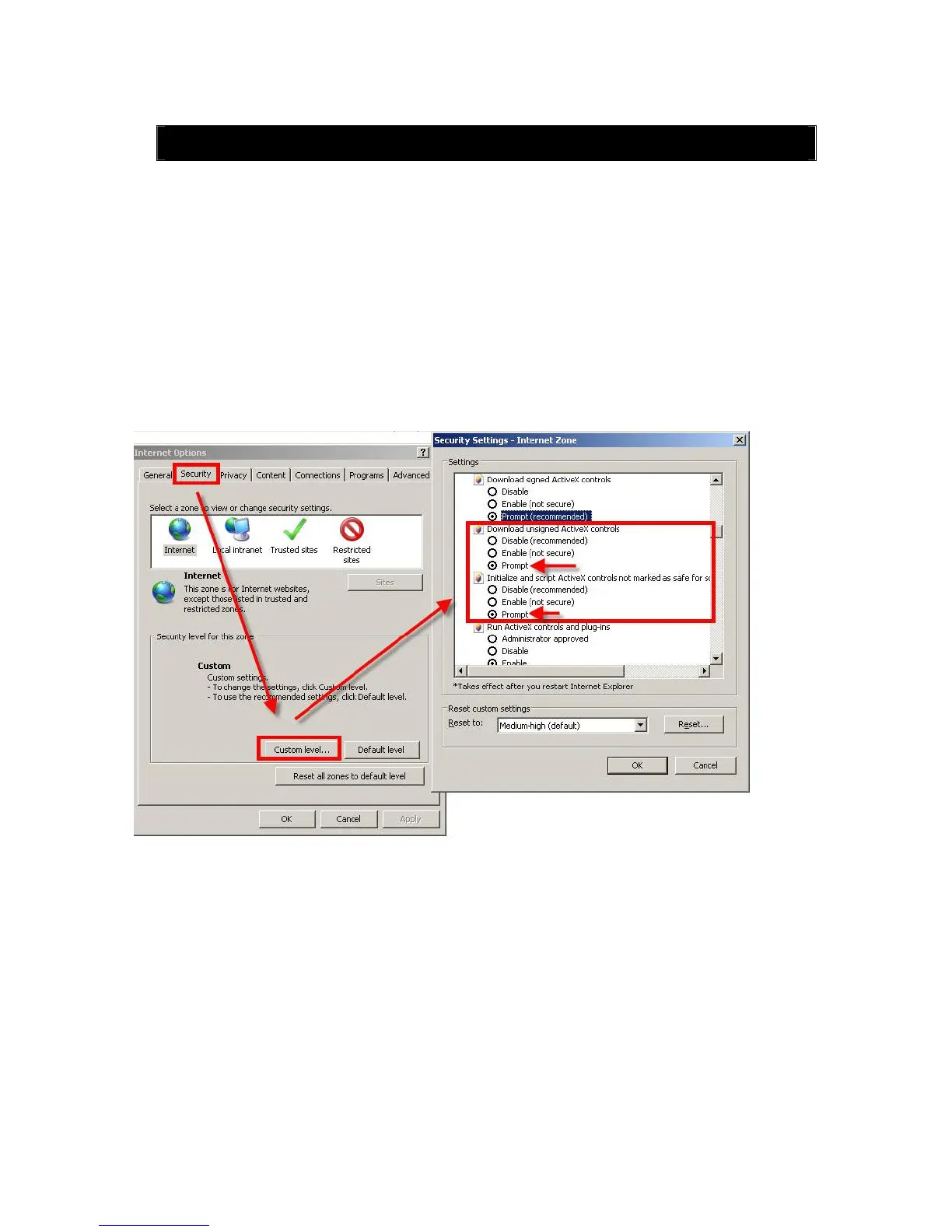
components, please enable this function manually as shown below (the process may vary
depending on the version of your Internet Explorer).
In Internet Explorer - Tools Menu - Internet Options settings under the Security tab, click
on the Custom Level button and select Enable (or Prompt) in the “Download unsigned
ActiveX controls” option and also Enable (or Prompt) in the “Initialize and script ActiveX
controls not marked as safe for scripting”.
6.2 Web Browser Login Screen
Open an IE browser, input the IP address of your DVR in the address field. If the IP is correct
and remote access is enabled on your DVR (see Section 5.5.10 File Sharing), you will be
taken to the Login window:



 To Next Page