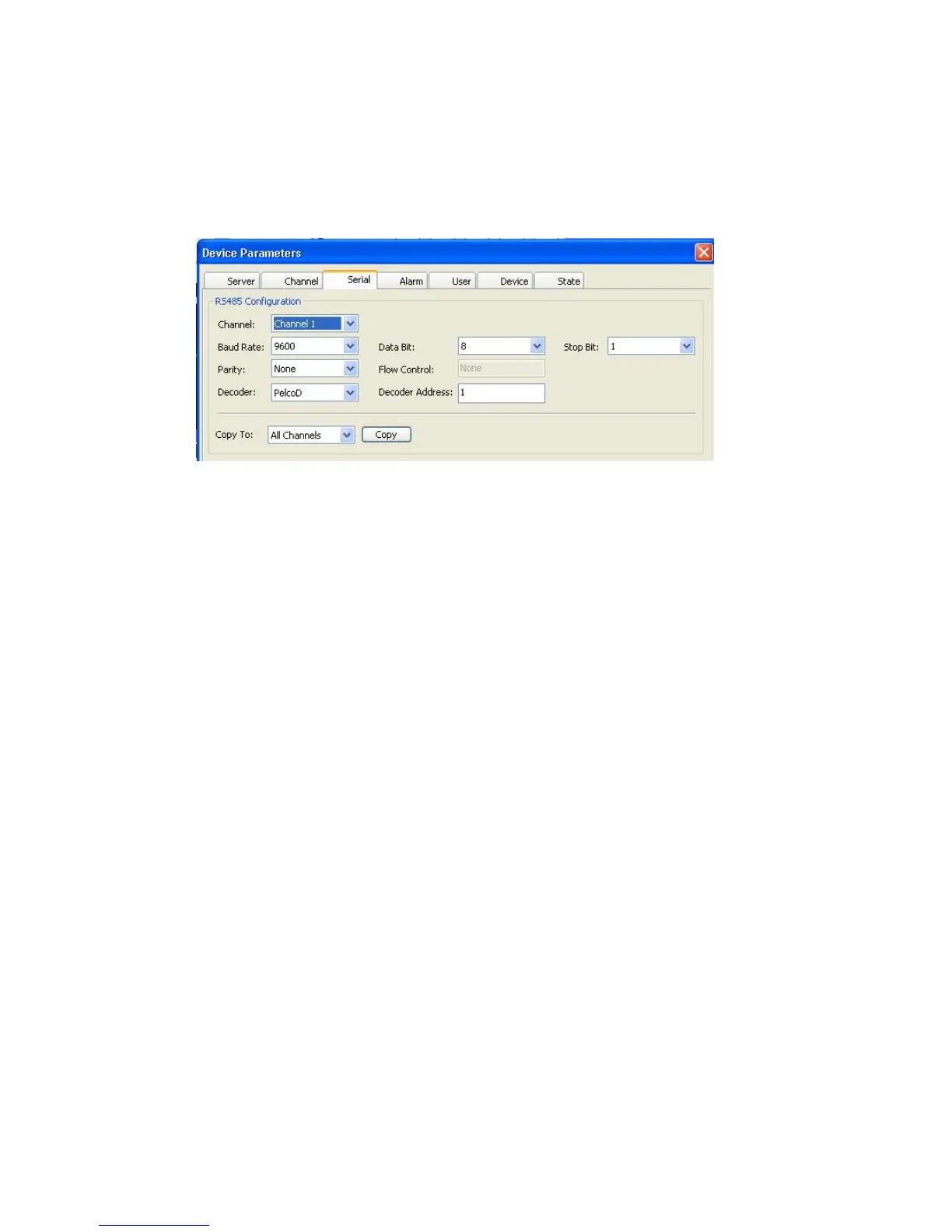
6.4.1.3 Serial
Next tab – Serial offers some important settings related to any serial devices connected to the
DVR, i.e. PTZ Cameras.
Val ue s off er ed in t he RS485 Configuration subsection:
Channel: dropdown menu with options All Channels, and Channels 1 – 4 /*8
Baud Rate: dropdown menu with options 1200, 2400, 4800, 9600
Parity: dropdown menu with options None, Odd, Even
Decoder: dropdown menu with options SAMSUNG, Panasonic, PelcoD, PelcoP
Data Bit: dropdown menu with options ranging from 4 to 8
Flow control: currently inactive field with the default value None
Decoder Address: changeable field in which you can enter the PTZ address (default value:
1)
Stop Bit: dropdown menu with options 1, 1.5, 2
The dropdown menu Copy To offers options: All Channels, and Channels 1 through 4
individually. Pressing the Copy button will copy settings from current channel to All or
specified channels.
The functions of Confirm and Cancel buttons are self-explanatory and refer to the
parameters of this tab. As with all other tabs in the Device Parameters window, you can also
Restore Default values by pressing the first button in the last row, Save the Parameters you
just modified or Exit the window without saving.



 To Next Page