Controlling locomotives 25
5.3.1 Changing function groups
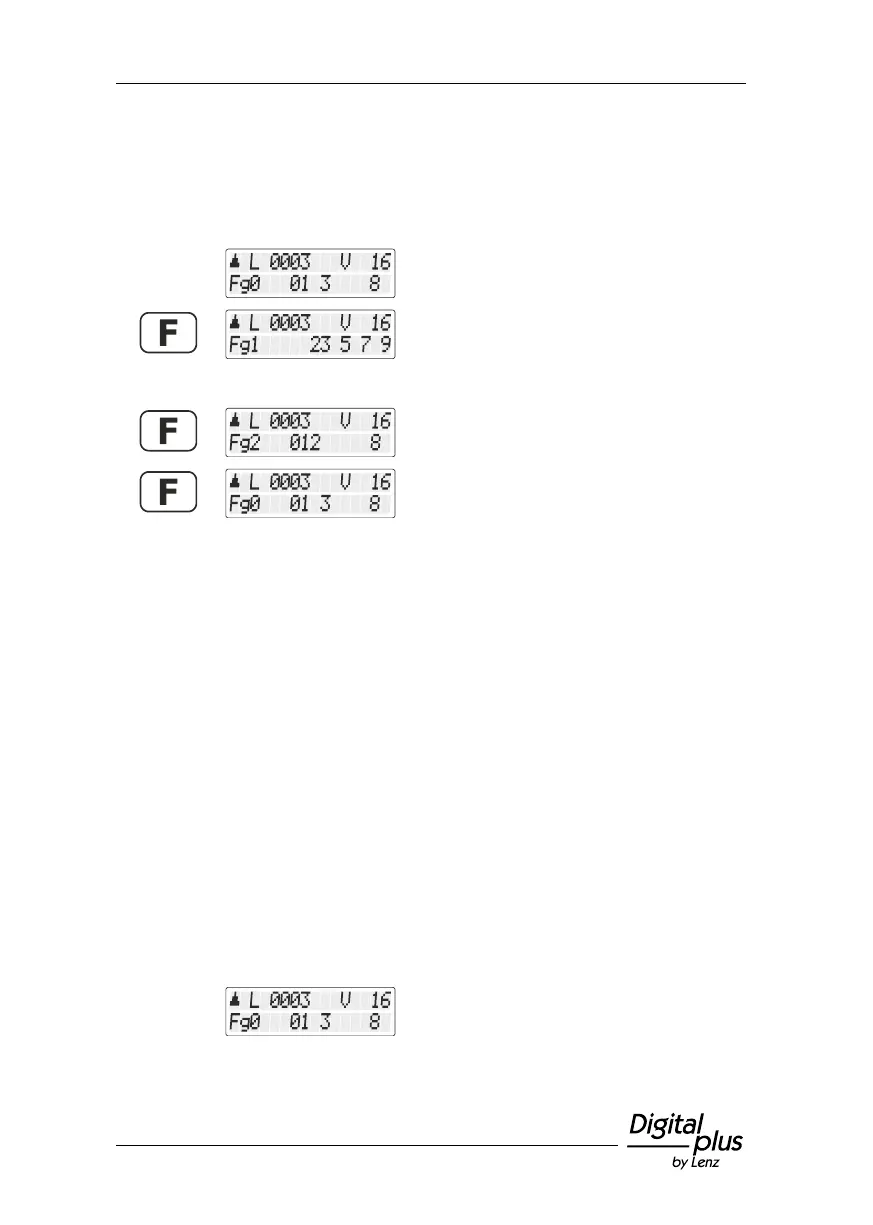
The selected function group is indicated at the bottom left of the
display.
Function group 0 is displayed, functions 0, 1,
3 and 8 are enabled.
Briefly press the 'F' key to change to the next
function group:
Function group 1 is displayed, functions 12,
13, 15, 17 and 19 are enabled.
Function group 2 is displayed, functions 20,
21, 22 and 28 are enabled.
Shows function group Fg0 again.
After the initial operation of the LH101, function group 0 is enabled.
5.3.2 Configuring locomotive decoder functions
Functions F1 to F28 can be set to permanent or temporary operation.
Function F0 is always set to permanent operation.
Press the key to enable the
function; press the key again
to disable the function.
Press the key to enable the
function; release the key to
disable the function.
This setting is saved in the command station. When calling up the
locomotive, the manual control queries the setting from the command
station. This setting can be made individually for each function and
each locomotive address.
Call up the locomotive address whose
function setting you want to display or
change.


 To Next Page