34 Operating manual LH101
7.1 Creating a new route
BEFORE you create a route, note down the respective point
number as well as the required setting. The Annex (p.
95) includes a form that you can copy for this purpose. The
download area on our website also contains a PDF form
that you can use.
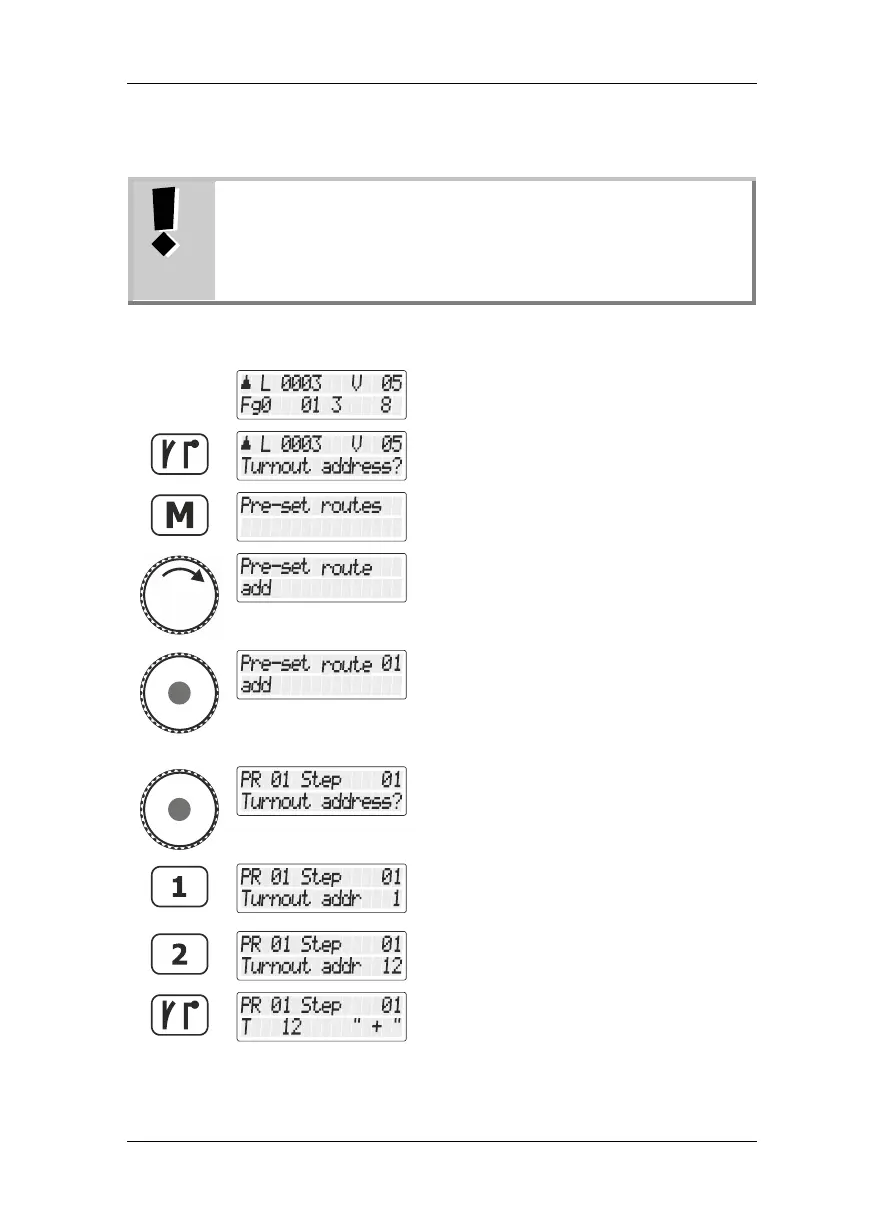
Proceed from “Controlling locomotive“.
Use the 'points/signals’ key to change to the
menu for switching points and signals.
Press the 'points/signals’ key again to change
to creating (or editing/deleting) routes.
Use the rotary knob to select “Fahrstrasse
neu anlegen/Creating route“.
Press the key to confirm your selection.
The number of the next available route is
displayed at the top right. You can take over
this number or turn the rotary knob to select
another available number.
Press the key to confirm your selection …
… and start to enter the point address for
step 1. If you enter a wrong address, use the
'<=' key to delete the entered digits.
Continue until you have entered the last digit.
Press the points/signals key again to confirm
your entry. A + or a – after the point address
indicates its setting.



 To Next Page