Displaying feedback 57
11 Displaying feedback
Use this function to display the status of inputs of LR100/101 feedback
modules.
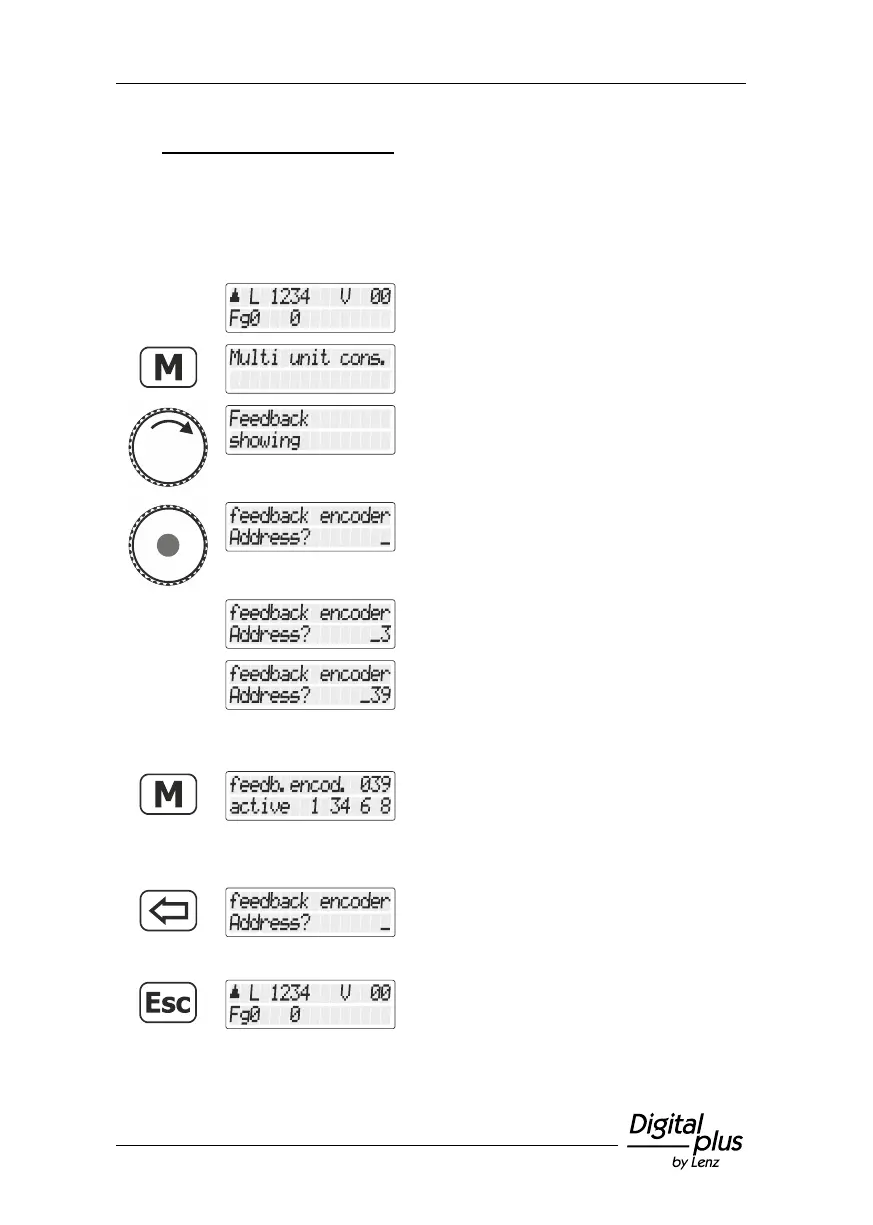
Press the 'M' key. You are offered the option
last selected, e. g. multiple traction.
Turn the rotary knob to display
"Rückmeldungen anzeigen/Display
feedback".
Press the rotary knob to select the option.
You are asked to enter the feedback address.
Let us assume that you want to display the 8
digits of feedback address 39.
Use the '<=' key to correct your entry if
necessary. Press ’Enter’. The manual control
checks the status of the feedback module
with the command station and displays the
result.
The top line displays the address of the read-
out feedback module.
The bottom line displays the active feedback
contacts. "1 3 4 6 8" means that feedback
contacts 1,3,4,6 and 8 are enabled.
Press the '<=' key to enter the address of
another feedback module …
… press the 'Esc' key to return to “Controlling
locomotive”.



 To Next Page