Configuring (programming) decoder settings 65
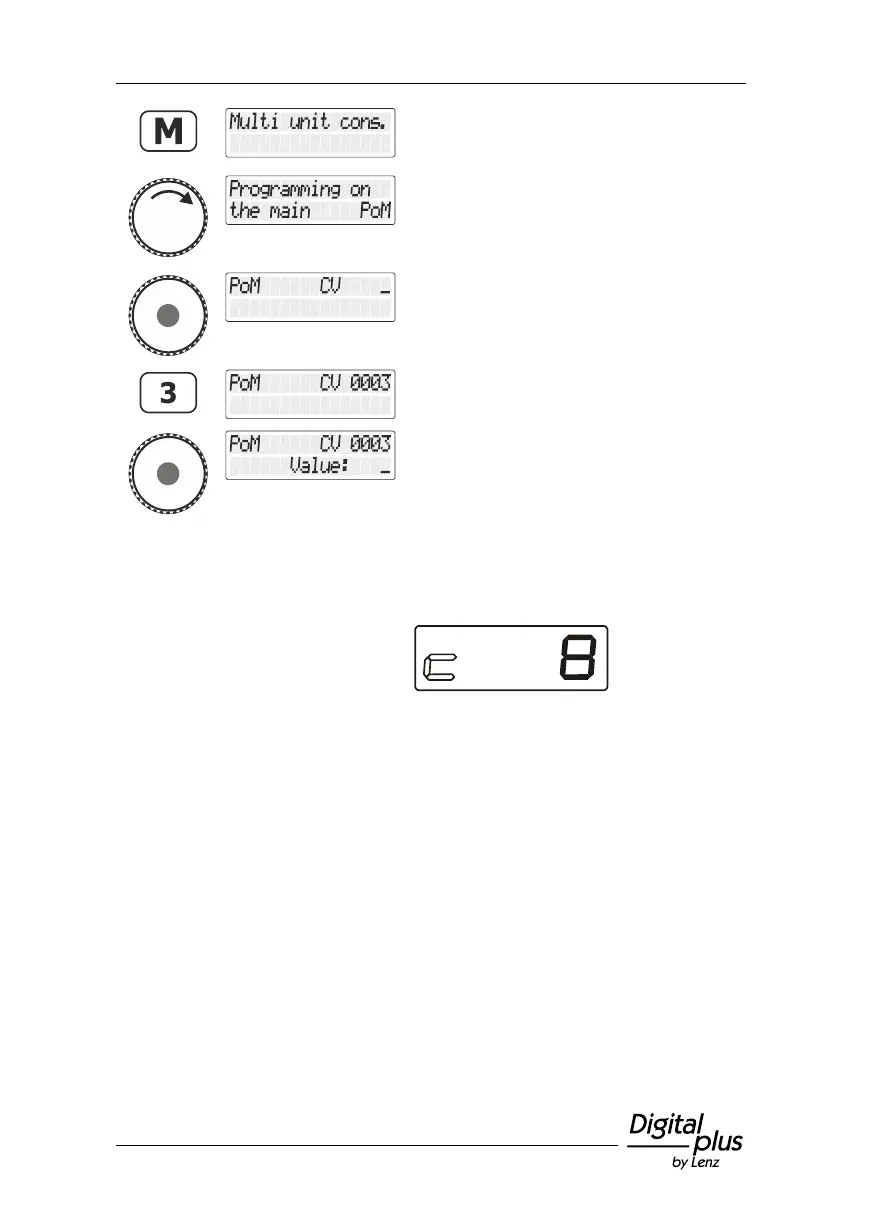
Press the 'M' key. You are offered the option
last used (in this example the multiple
traction).
Turn the rotary knob until "Programmieren
während des Betriebs PoM/Programming in
operational mode" is displayed.
Press the rotary knob to select the option
"PoM". You are asked to enter the CV that
you want to change using PoM.
Use the keys to enter the number of the CV
…
… and press the rotary knob to complete the
entry process.
The LRC120 address display shows the
value of CV3 for approx. 3 seconds.
"c" flashes at the very left of the display; the
value is displayed on the right:
Whenever you enter the number of a CV, a PoM read command is
sent to the decoder which sends the content of the respective CV via
RailCom. The LRC120 address display receives this information and
displays it for approx. 3 seconds.
12.2.5 Setting and deleting bits (switches) using PoM — step by
step approach
Many CVs do not use numeric values, but individual bits (switches) for
particular settings. It is much more comfortable to change a feature by
setting or deleting the corresponding bit (switch) than to calculate the
corresponding numeric value and to programme it into the CV (which
is, of course, also possible).
A particularly good example for a CV for which the deleting and setting
of bits is the better approach is CV29.



 To Next Page