30 Operating manual LH101
6 Switching points and signals
You can use the LH101 manual control to digitally switch magnetic
articles, e. g. points, signals or relays. These articles must be
connected to a switch decoder (e. g. to the LS100/LS150 of the Digital
plus by Lenz
®
system or to other compatible modules). You can
switch a total of 1024 points, signals and other magnetic articles using
the Digital plus by Lenz
®
system.
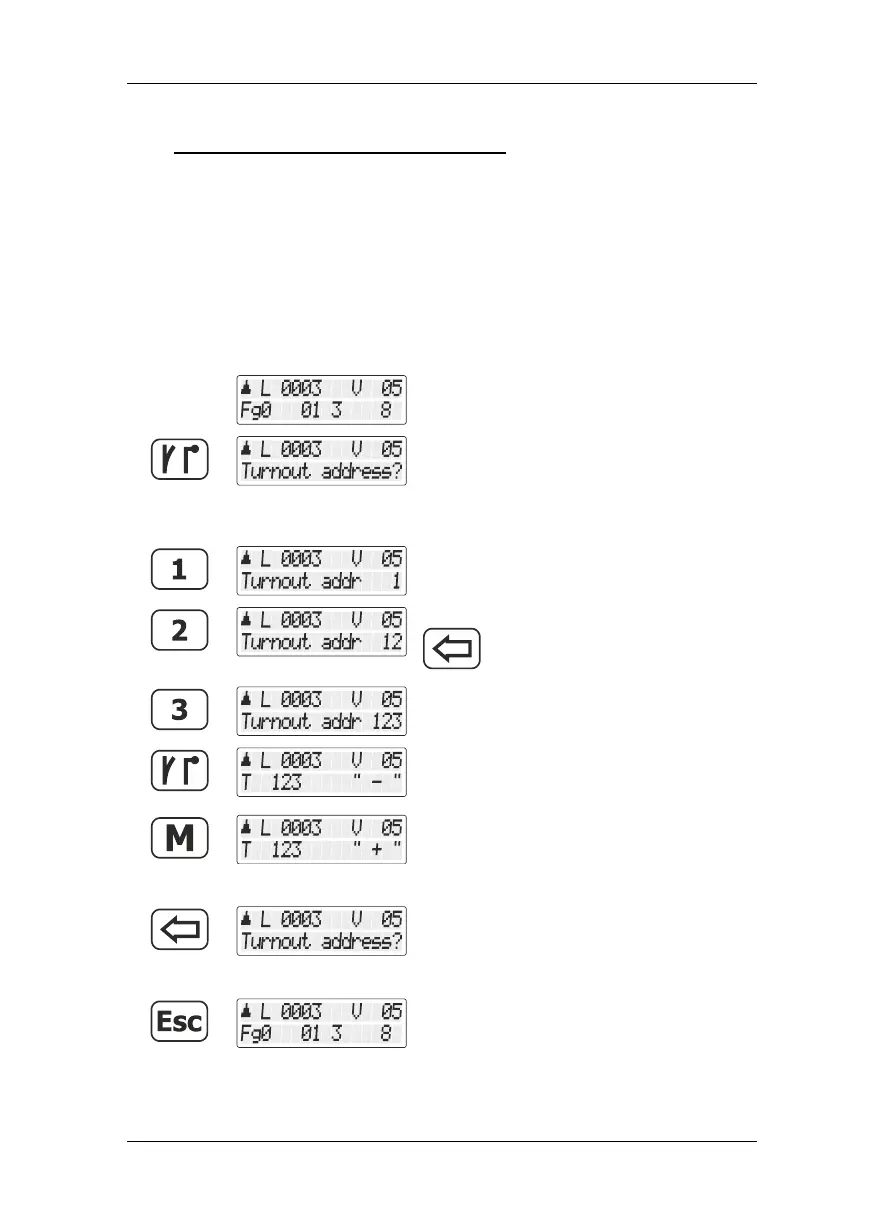
Proceed from „Controlling locomotive“.
Use the 'points/signals’ key to change to the
menu for switching points and signals.
The locomotive address currently used, including its direction and
speed step, are displayed in the top line of the display.
Start to enter the address.
If you enter a wrong address, use the
key to delete the entered digits.
Continue until you have entered the last digit.
Press the points/signals key again to confirm
your entry. A + or a – after the point address
indicates its setting.
Press the 'M' key to change the point/signal
setting.
Press the '<=' key to enter another point
address …
press the 'Esc' key to complete the switching
of points and signals.



 To Next Page