52 Operating manual LH101
10.4.2 Switching functions in the MTR
The keys that turn functions on or off affect only that locomotive in the
MTR whose address is displayed (indicted by a lower case “m”). If the
MTR address (indicted by an upper case “M”) is displayed, you cannot
switch functions and no functions are displayed.
If you want to change a function in a locomotive that is part of the
MTR, you must call up this locomotive (see the next section). You are
then able to turn on or off any function of this locomotive.
10.5 Displaying the members of an MTR and
switching between locomotives in an MTR
You can display the complete list of locomotives that are part of the
MTR as well as the MTR address itself at any time, regardless of
whether you see the multiple traction address (indicted by an upper
case “M”) or one of the locomotives that are part of the MTR (indicted
by a lower case “m”) on the display:
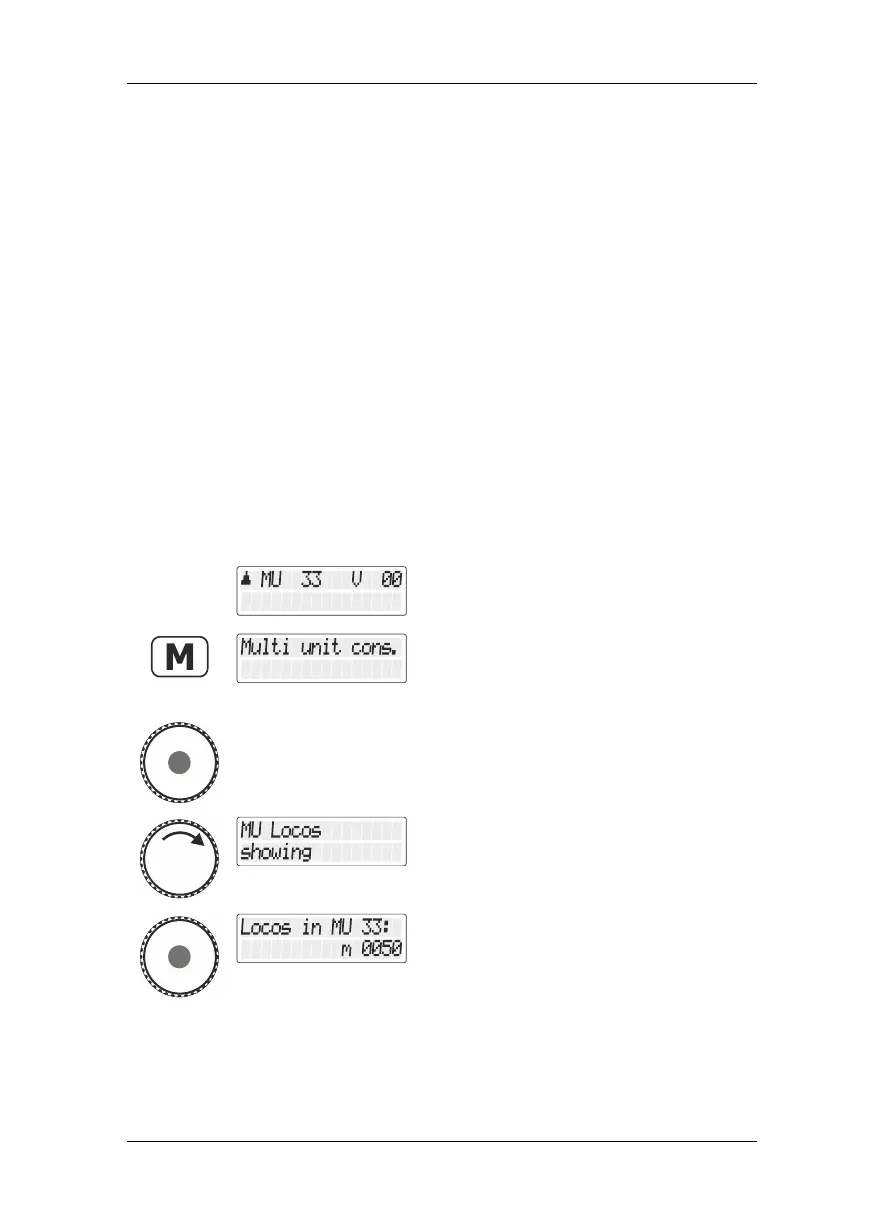
Call up a locomotive that is part of the MTR
or the MTR address itself.
Press the 'M' key. Since you have selected
an MTR or a locomotive that is part of the
MTR, you are offered the option
"Mehrfachtraktion/Multiple traction".
Press the rotary knob to select the option.
Turn the rotary knob until "MTR Loks
anzeigen/Display MTR locomotives" is
displayed.
Press the rotary knob to display the first
locomotive that is part of the MTR.



 To Next Page