Configuring (programming) decoder settings 63
Before you switch to PoM, you must call up the address of the
locomotive whose settings you want to change!
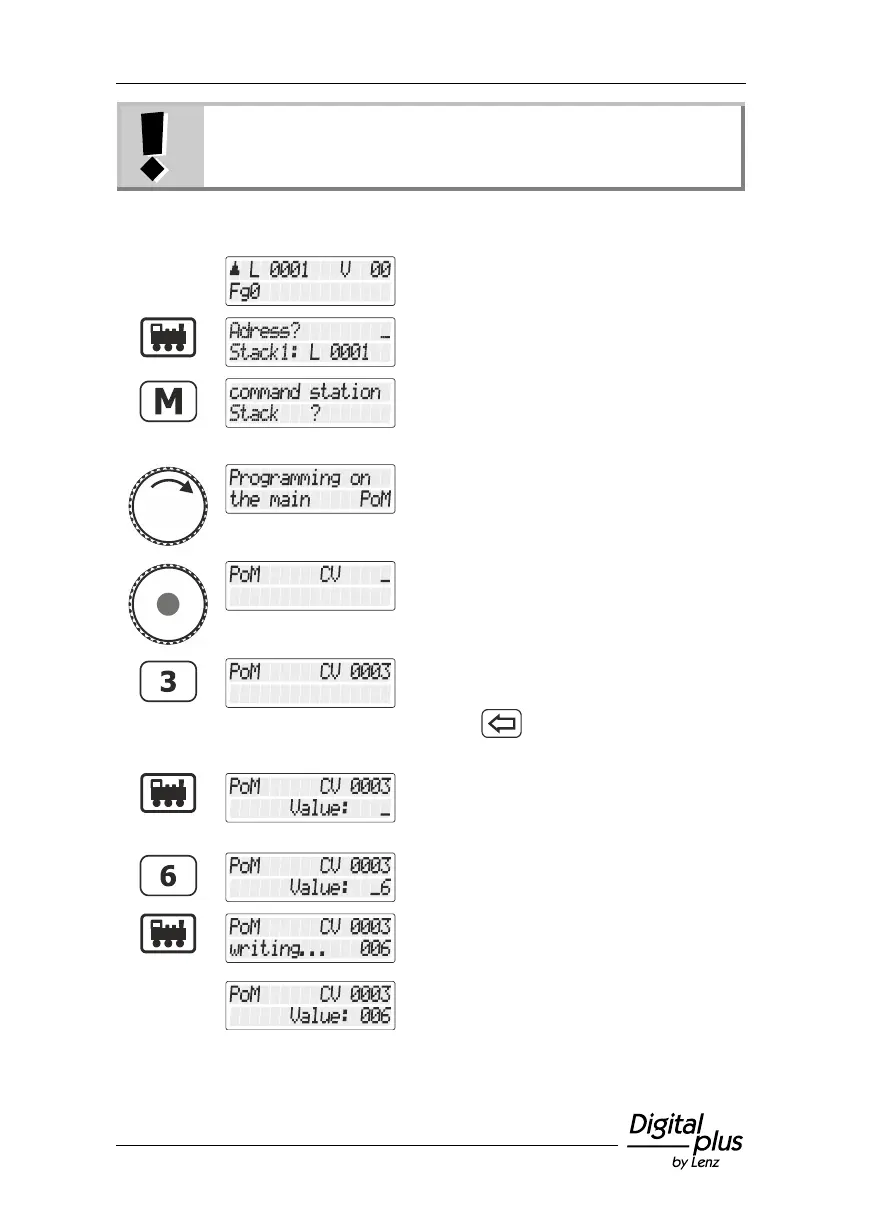
Call up the locomotive whose settings you
want to change using PoM.
Press the 'locomotive' key.
Press the 'M' key. You are offered the option
last used (in this example the locomotive
selection from the command station
memory).
Turn the rotary knob until "Programmieren
während des Betriebs PoM/Programming in
operational mode PoM" is displayed.
Press the rotary knob to select the option
"PoM". You are asked to enter the CV that
you want to change using PoM.
Use the keys to enter the number of the CV
…
(use the key to correct your entry if
necessary)
… and press the 'locomotive' key to complete
the entry process.
You can now enter the desired value…
… in this example value "6".
Press the 'locomotive' key to confirm your
entry and to start programming. Alternatively,
press the rotary knob.
The value of the CV is displayed.



 To Next Page