59
ENERGY
58
ENERGY
ENGLISH
ENERGY (Air conditioner / DX ventilator)
How to enter energy
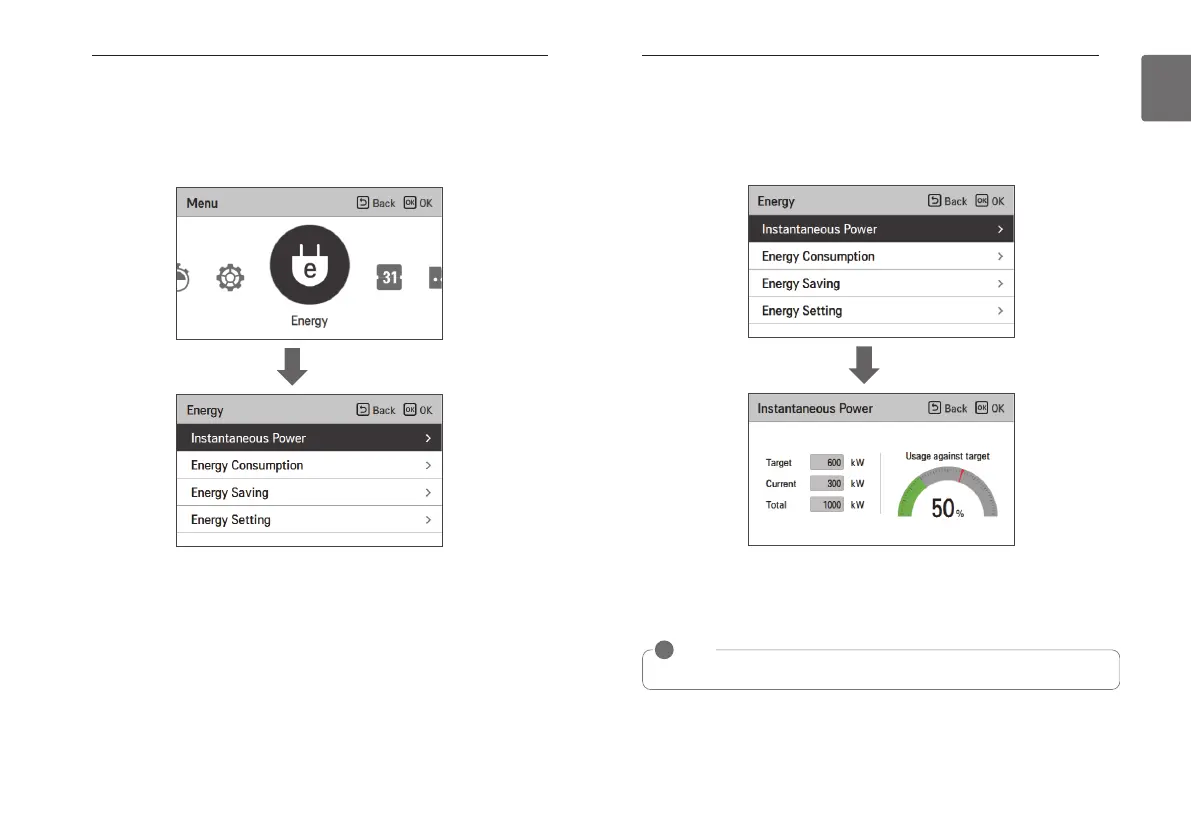
• In the menu screen, press [<,>(left/right)] button to select the energy category, and press [OK]
button to move to the energy list.
※ Some functions may not be available in some product types.
OK
Instantaneous power check
It is the function that can check the product’s instantaneous power.
※There may be some error with the actual instantaneous power, so use it only for reference.
• In the energy list, select the “Instantaneous power” category, and press [OK] button to move
to the detail screen.
• The target and the value of all can be set in the energy setting.
• The usage ratio compared to the target is the value expressed in current/target * 100.
※For how to set the energy, refer to the energy setting.
OK
NOTE
!
Instantaneous power: It is the power currently used in the product.



 To Next Page