67
ENERGY
66
ENERGY
ENGLISH
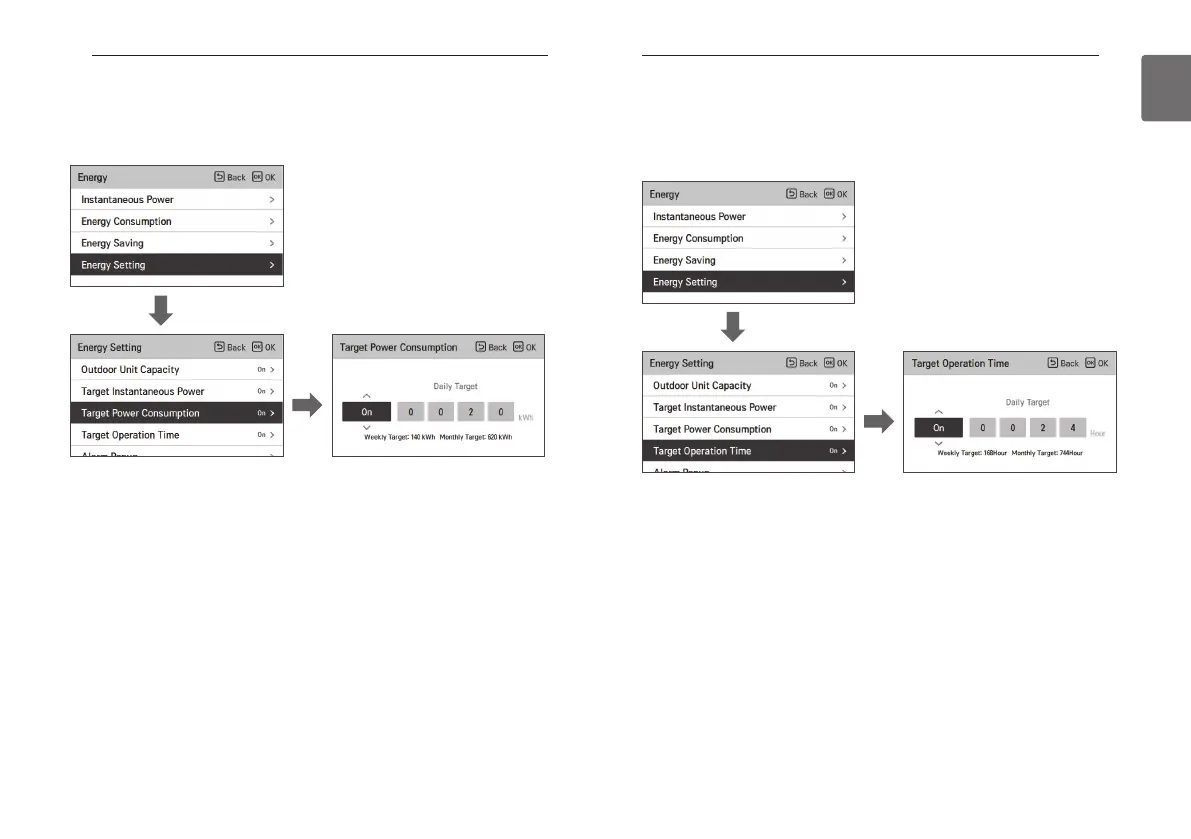
Energy setting - target power consumption
It is the function to set the target power consumption per hour.
• In the energy setting list, select “target power consumption” setting category, and press [OK]
button to move to the target power consumption setting screen.
• In the detail screen, you can select “On/Off” to set the target power consumption.
When it is set to On, you can set the target power consumption (minimum 1kWh, maximum
100kWh), and after the setting, if you press [OK] button, the set value is saved.
If you do not press [OK] button but press “Back’ button, it moves to the list screen without
saving the set value.
• If the target power consumption setting is set to “On”, it is displayed as the energy
consumption’s power consumption target value.
- Daily target consumption: Weekly usage’s daily target
- Weekly target consumption: Monthly usage’s weekly target (daily target * 7)
- Monthly target consumption: Yearly usage’s monthly target (daily target * 31)
OK
OK
Energy setting - target operation time
It is the function that can set the Instantaneous power’s target value.
You can find the power consumption status by setting the target value.
• In the energy setting list, select “target operation time” category, and press [OK] button to
move to the target operation time setting screen.
• In the detail screen, you can select “On/Off” to set the target operation time.
When it is set to On, you can set the target operation time (minimum 1hr. and maximum 24hr.),
and after the setting, if you press [OK] button, the set value is saved.
If you do not press [OK] button but press “Back’ button, it moves to the list screen without
saving the set value.
• If the target operation time setting is set to “On”, it is displayed as the energy consumption’s
operation time target value.
- Daily target : Weekly usage’s daily target
- Weekly target : Monthly usage’s weekly target (daily target * 7)
- Monthly target : Yearly usage’s monthly target (daily target * 31)
OK
OK



 To Next Page