143
INSTALLER SETTING
142
INSTALLER SETTING
ENGLISH
INSTALLER SETTING
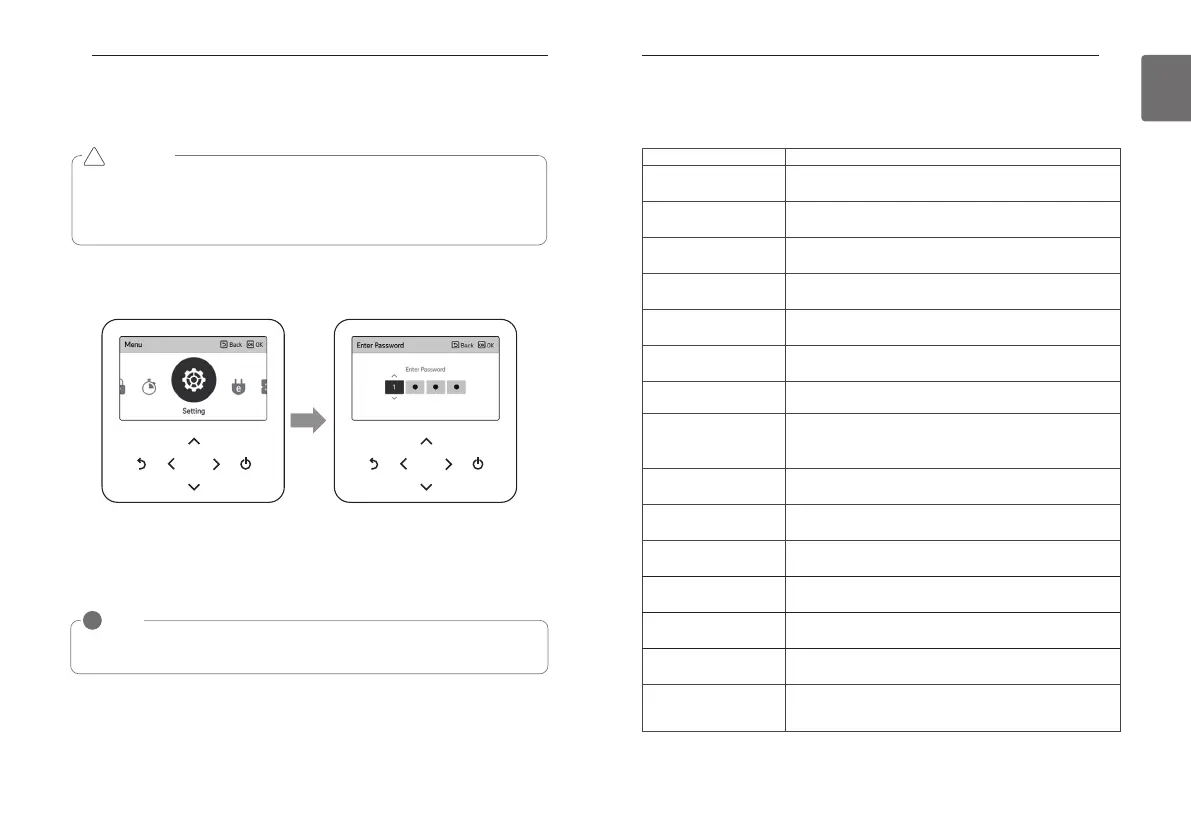
How to enter installer setting
• In the menu screen, press [<,>(left/right)] button to select the setting category, and press
[∧(up)] button for 3 seconds to enter the password input screen for the installer setting.
• Input the password and press [OK] button to move to the installer setting list.
※Installer setting password
Main screen → menu → setting → service → RMC version information → SW Version
Example) SW version : 1.00.1 a
In the above case, the password is 1001.
CAUTION
The installer setting mode is the mode to set the remote controller’s detail function. If the
installer setting mode is incorrectly set, it may cause product failure, user’s injury, or property
damage. It must be set by the installation specialist with the installation license, and if it is
installed or changed without installation license, all problems caused will be the responsibility of
the installer, and may void the LG warranty.
!
OK OK
NOTE
!
Some categories of the installer setting menu may not be available depending on the
product function or the menu name may be different.
Installer setting – air conditioner
• You can set the product user functions.
• Some functions may not be displayed/operated in some product types.
Menu Description
Test run setting
It is the function to set the trial operation at the initial product
installation.
Central control address
Setting
It is the function to set the central control address of the indoor unit
during the central controller connection.
ESP setting
It is the function to set the wind amount value corresponding to each
wind amount for easy installation.
Temperature sensor setting
It is the function to select the temperature sensor that will decide the
indoor temperature.
Ceiling height setting
It is the function to control the wind amount stage according to the
ceiling height for the ceiling type products.
Static pressure setting
The fixed pressure setting can be set only in the duct products.
It cannot be set in other products.
RMC master/slave setting It is the function to set group control or 2-remote controller control.
Override master/slave
setting
The operation master / slave selection function is to avoid other mode
operations, and it is the function to prevent the selection of the
opposite mode of the indoor unit set as master by the indoor units
set as slaves.
Dry contact mode setting
Dry contact function is the function that can be used only when the
dry contact devices is separately purchased and installed.
Fixed air volume
It is the function to apply different fan speeds automatically for each
thermal control status.
Zone Type Setting
It is possible to setup zone new type or old one of the product which
is available to install the damper controller.
Zone Number Setting
Zone Number is to set the number of installed zones. It's possible to
control only in zone new type.
Over Heating
Provides an adjustable deadband around the heating setpoint through
selectable heating thermal on/off values.
Emergency Heater setting
It is the function to set whether to use emergency heater control
function and the usage environment.
Func. control during grp.
Control setting
It is the function to set common functions or some functions to be
controlled by the master indoor unit standard during the group
control.



 To Next Page