125
USER SETTING
124
USER SETTING
ENGLISH
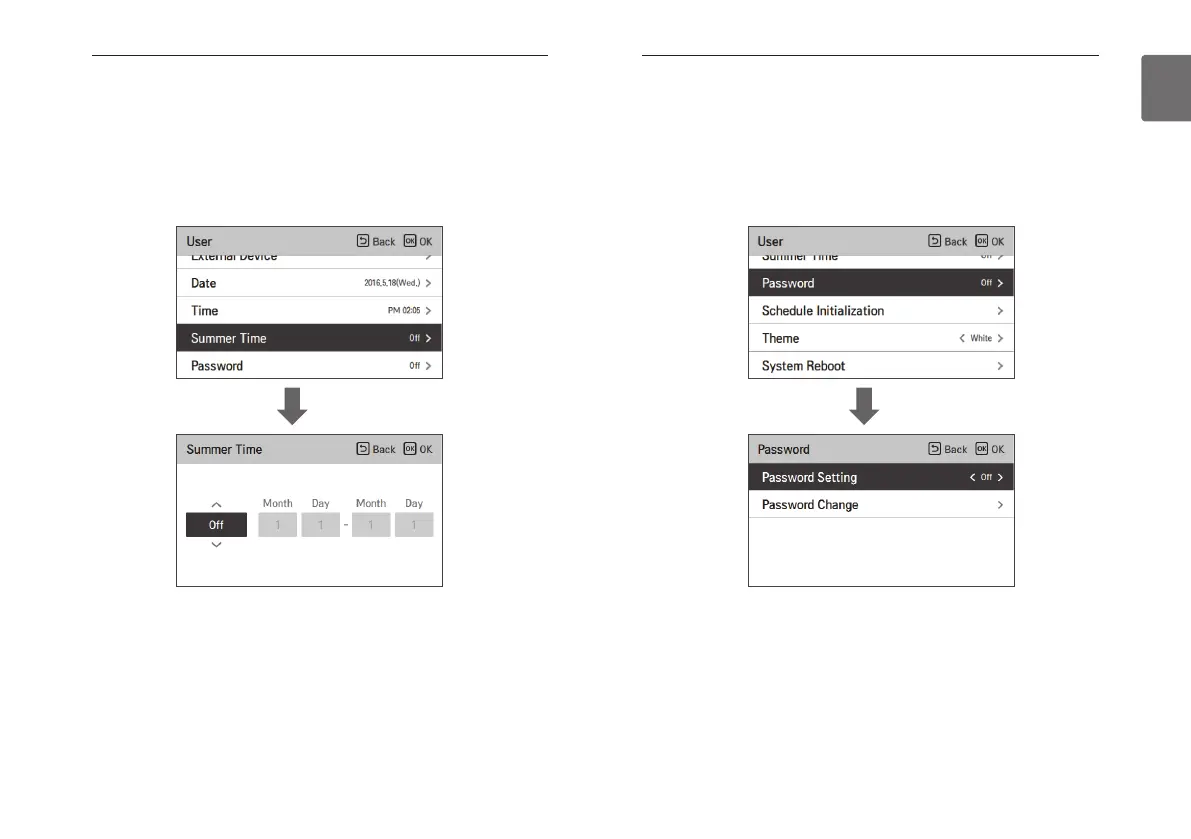
Summer time setting
Set the daylight savings time dates in the remote controller.
• In the user setting list, select the summer time setting category, and press [OK] button to
move to the detail screen.
- Summer time: The system to advance the time by 1 hour from the spring when the day is
longer and return back in the fall when the day gets shorter.
- When it becomes AM 02:00 on the DST start date, the current time changes to AM 03:00,
and when it becomes AM 02:00 of the DST end date, the current time changes to AM 01:00.
OK
Password setting
Set the password to prevent unauthorized change to remote controller settings.
• Select the user password setting category, and press [OK] button to move to the detail screen.
- If the password is set, when you enter “menu – setting”, you need to input password to
enter the setting list.
- When you forgot the password, you can initialize the password using the installer setting’s
“password initialization”.
The initialized password is “0000”.
OK



 To Next Page