65
ENERGY
64
ENERGY
ENGLISH
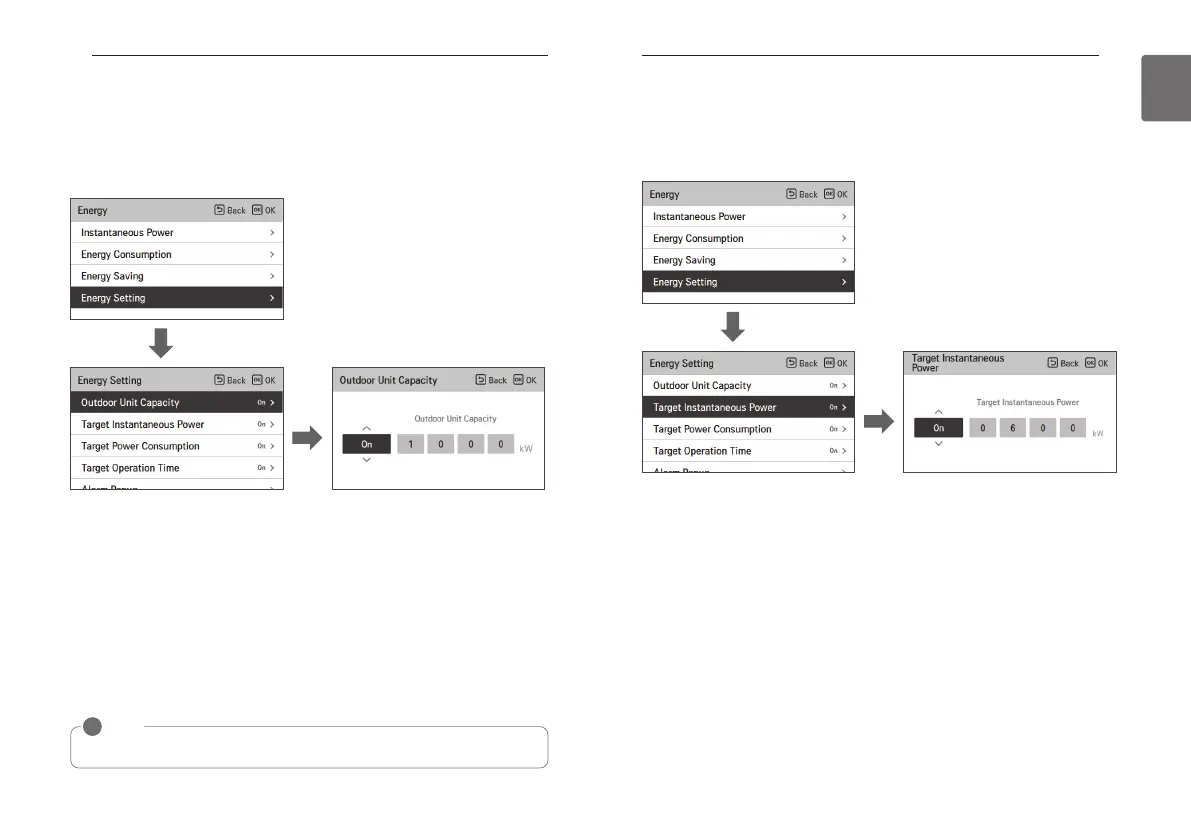
Energy setting - outdoor unit capacity setting
It is the function that can set the outdoor unit capacity.
• In the energy list, select “energy setting” category, and press [OK] button to move to the
energy setting screen.
• In the energy setting list, select “outdoor unit capacity setting” category, and press [OK] button
to move to the outdoor unit capacity setting screen.
• In the detail screen, you can select “On/Off” to set the outdoor unit capacity. If it is set to On,
you can set the outdoor unit capacity (minimum 1kW), and after the setting, if you press [OK]
button, the set value is saved. If you do not press [OK] button but press “Back’ button, it
moves to the list screen without saving the set value.
• If the capacity setting is set to “On”, in the Instantaneous power screen, it is displayed as “all”
capacity.
• For the outdoor unit capacity, refer to the label of the outdoor unit product.
- For Single product and Multi product, the first 3 digits of the model name is the outdoor unit
capacity.
ex) For ABC1019…, it is 10.1kW
- For Multi-V product, the first 2 digits of the model name < 0.75 is the outdoor unit capacity.
ex) For ABCD101.…, it is 10 * 0.75 = 7.5kW
• For TMS users, refer to the all capacity displayed on TMS.
OK
OK
NOTE
!
According to the user input, there may be difference to the actual product capacity.
Energy setting - target instantaneous power setting
It is the function that can set the Instantaneous power’s target value.
You can set the target value to find the power consumption status.
• In the energy setting list, select “target Instantaneous power” category, and press [OK] button
to move to the target Instantaneous power setting screen.
• In the detail screen, you can select “On/Off” to set the target Instantaneous power.
If it is set to On, you can set the target Instantaneous power (minimum 1kW), and after the
setting, if you press [OK] button, the set value is saved.
- If the outdoor unit capacity is set, the maximum value is the outdoor unit capacity
- If the outdoor unit capacity is not set, the maximum value is 9999kW
If you do not press [OK] button but press “Back’ button, it moves to the list screen without
saving the set value.
• When the target Instantaneous power setting is set to “On”, in the Instantaneous power
screen, it is displayed as “all” capacity.
OK
OK



 To Next Page