189
INSTALLER SETTING
ENGLISH
188
INSTALLER SETTING
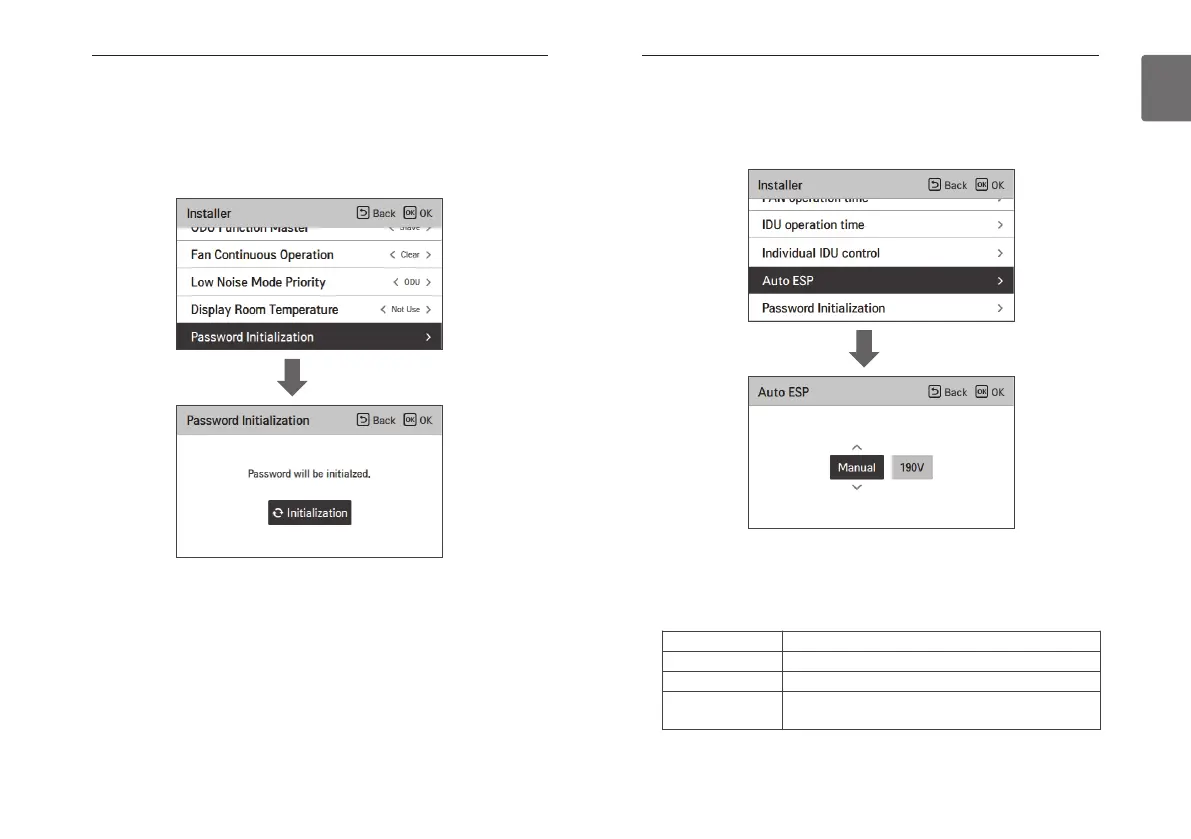
Password initialization (air conditioner / general, DX ventilator)
It is the function to initialize (0000) when you forgot the password set in the remote controller.
• In the installer setting list, select the password initialization setting category, and press [OK]
button to move to the detail screen.
• When you press “initialization” button, a popup screen appears, and when you press “check”
button, password initialization starts, and the user password is changed to 0000.
OK
Auto ESP (air conditioner)
This function automatically sets the rotation speed of the fans corresponding to each step of
rated airflow for easy installation.
• Select Auto ESP and press the [OK] button to move to the detail screen.
After selecting the voltage setting, the product will automatically operate and automatically set
the rotation speed for each fan speed - High, Medium, and Low.
Check the product type and select “Auto” for a Single product and “Manual” for a Multi V
product.
OK
Value Description
Off Not in use
Auto Automatically selects the voltage
Manual
Selects the voltage (190V-270V)
* Only for Multi V products



 To Next Page