69
ENERGY
ENGLISH
68
ENERGY
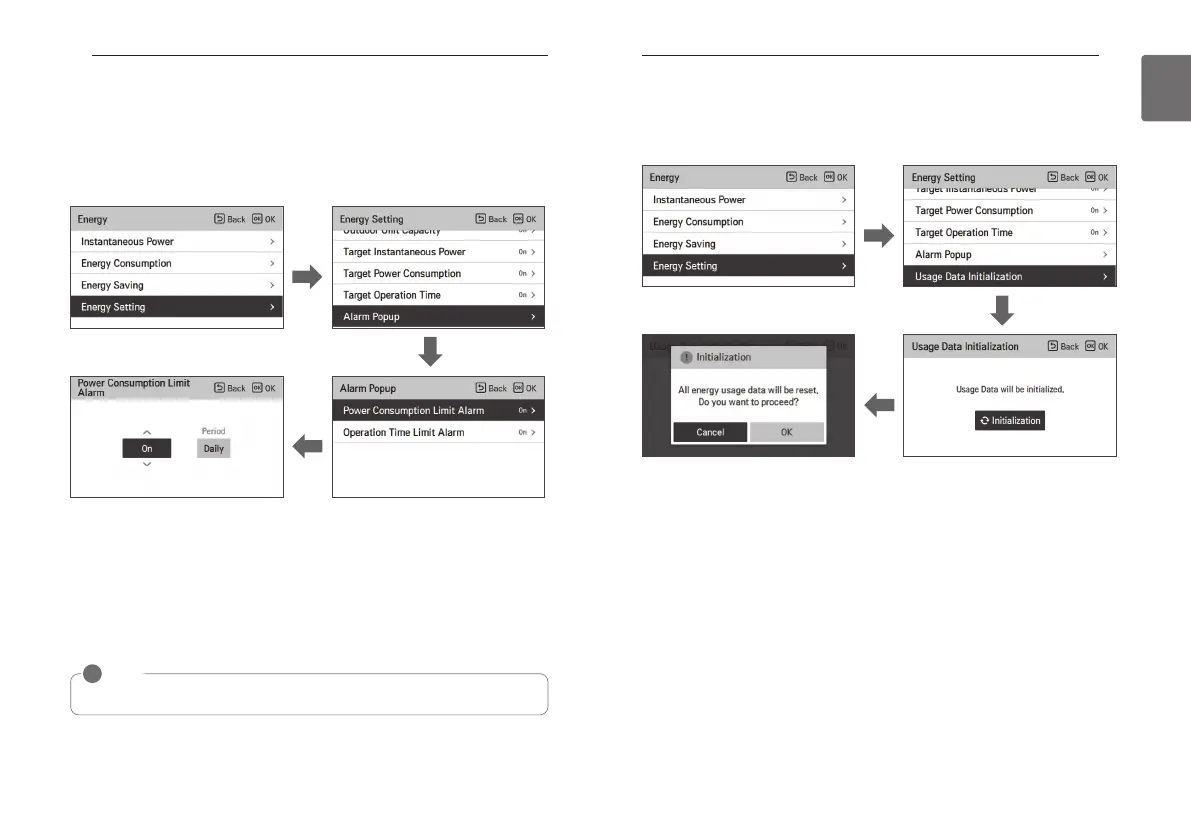
Energy setting - Alarm Popup Setting
It is the function to set whether to use the target power consumption and the target operation
time notice popup window.
• In the energy setting list, select “target operation time” category, and press [OK] button to
move to the target operation time setting screen.
• In the notice popup list, select “target power consumption notice or target operation time
notice” category, and press [OK] button to move to the detail setting screen.
• You can set the notice popup as “daily”, “weekly”, “monthly”.
After the setting, if you press [OK] button, the setting is saved and moves to the previous
screen.
• When the target power consumption notice is set to “On, daily”
If the daily target power consumption’s 80%, 90%, 95%, and 100% power is used a day, the
popup screen appears.
• When the target operation time notice is set to “On, daily”
When the product is operated at the daily target operation time’s 80%, 90%, 95%, and 100%,
the popup screen appears.
OK
OK
NOTE
!
The popup message appears once every hour.
OK
Energy setting – Usage data initialization
It is the function to initialize all of the power consumption and operation time information.
• In the energy setting list, select “consumption data initialization” category, and press [OK]
button to move to the consumption data initialization setting screen.
• In the initialization popup screen, if you press “check” button, all previously saved power
consumption and operation time are deleted.
OK
OK
OK



 To Next Page