111
FUNCTION SETTING
ENGLISH
110
FUNCTION SETTING
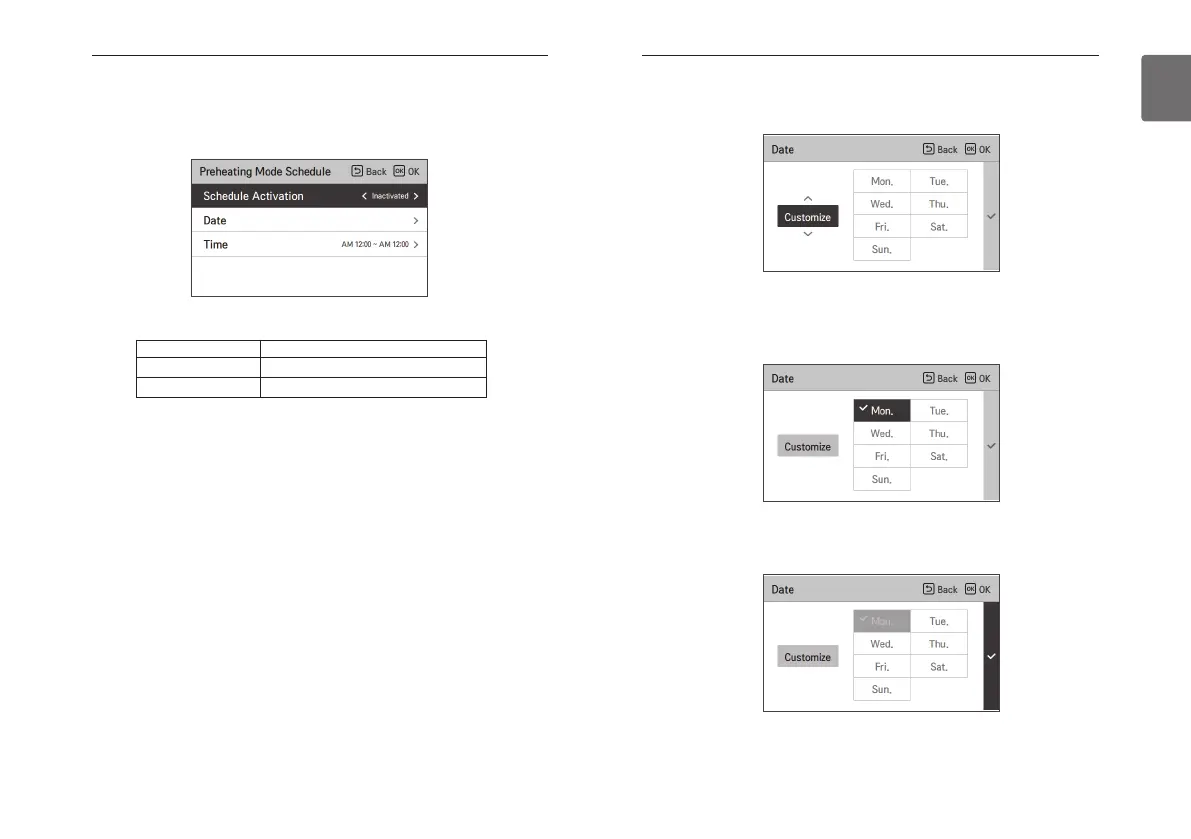
Select the Set Date item and press the [OK] button to move to the Set day screen.
- You can easily select specific Customize/Everyday/weekdays/weekend.
- If you want to set the specific day, you can move to the day you want and press the [OK] button
to select/deselect any day.
- Use the [> (right)] button to select the check box and press the [OK] button to finish setting it.
- The Preheating Mode Schedule is a scheduling function that shortens the time to reach a
comfortable temperature by warming up the indoor space before actual use.
Select the Preheating Mode Schedule item and press the [OK] button to move to the lower
settings list.
- After selecting the item to enable the schedule, you can use the [<,> (left/right)] buttons to set
it as follows.
Value
Description
Inactivated Disable Preheating Mode Schedule
Activated Enable Preheating Mode Schedule



 To Next Page