4 Operation
Special equipment
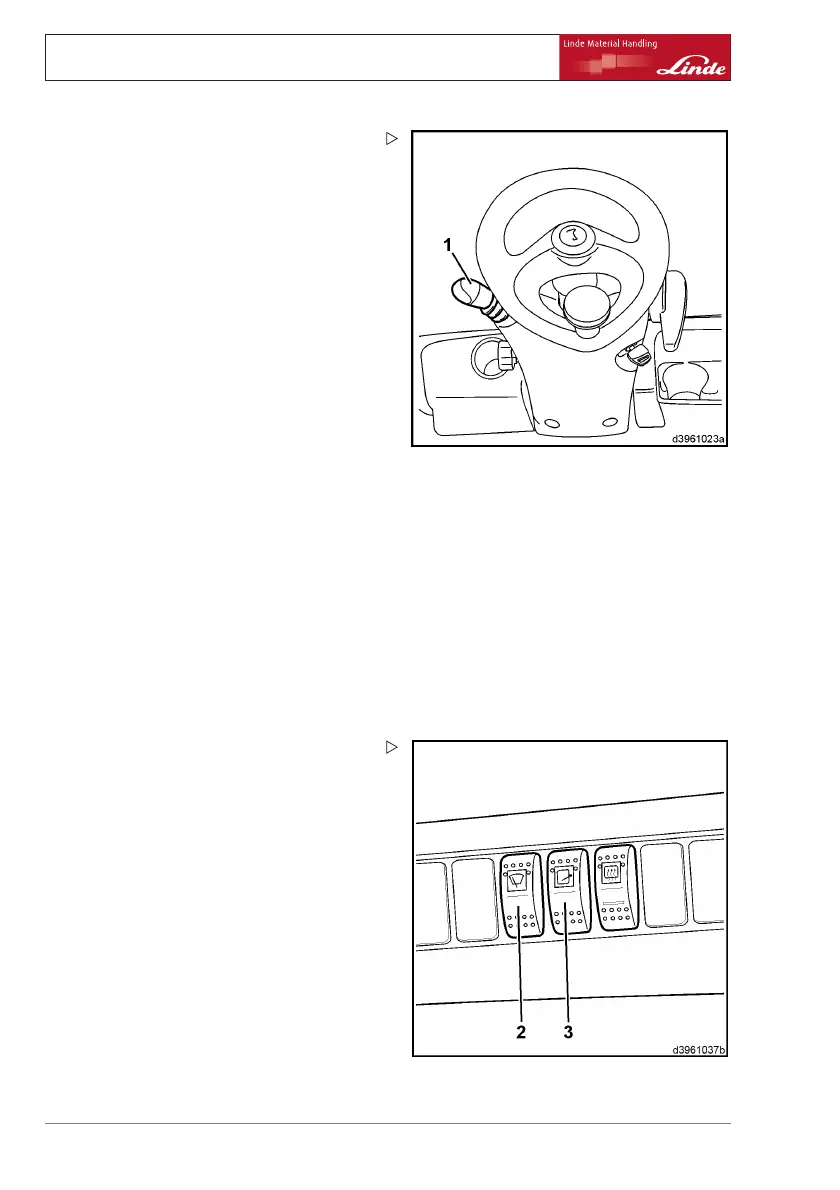
¾ Move the actuating lever (1) on the steering
wheel upwards from the centre position.
As long as the lever is actuated, the front
windscreen wiper remains in intermittent
mode and the rear window wiper remains
in continuous mode.
¾ Press the actuating lever (1
) on the steering
wheel downwards from the cen
tre position.
The front windscreen wiper is in intermittent
mode and the rear window wiper is in continu-
ous mode.
Truck at a standstill or in forwards/reverse
travel:
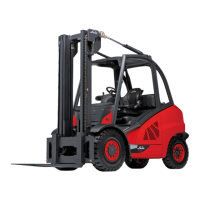
¾ Switch toggle switch (2) a
s far as it will go.
¾ Move the actuating lever (1) on the steering
wheel upwards from the centre position.
As long as the lever is actuated, the front
windscreen wiper and rear window wiper
remain in continuous mode.
¾ Press the actuating lever (1) on the steering
wheel downwards from the centre position.
The front windscreen wi
per and rear window
wiper are in continuous
mode.
Switching on the front
windscreen wiper
and roof panel wiper
¾ Move toggle switch (3) to centre position.
¾ Move the actuating lever (1) on the steering
wheel upwards from the centre position.
As long as the lever i
s actuated, the front
windscreen wiper an
d roof panel wiper remain
in intermittent mod
e.
¾ Press the actuating lever (1) on the steering
wheel downwards from the centre position.
The front windscreen wiper and roof panel
wiper are in intermittent mode.
¾ Switch toggle swit
ch (3) as far as it will go.
¾ Move the actuating lever (1) on the steering
wheel upwards from the centre position.
As long as the lever is actuated, the front
windscreen wiper remains in intermittent
76 Operating Instructions – 394 807 10 01 EN – 07/2011



 To Next Page