LiveU Live Video Uplink System User Guide
50
Changing the Profile
Changing the selected Profile changes the basic characteristics of the
broadcast (such as quality and/or delay).
IMPORTANT
There are limitations to when changes can be made. You
cannot select whether to enable/disable modems on the fly.
Profiles, Resolutions or Custom delay cannot be changed
during broadcast. In order to change the bitrate, it is
necessary to stop the transmission before making the change.
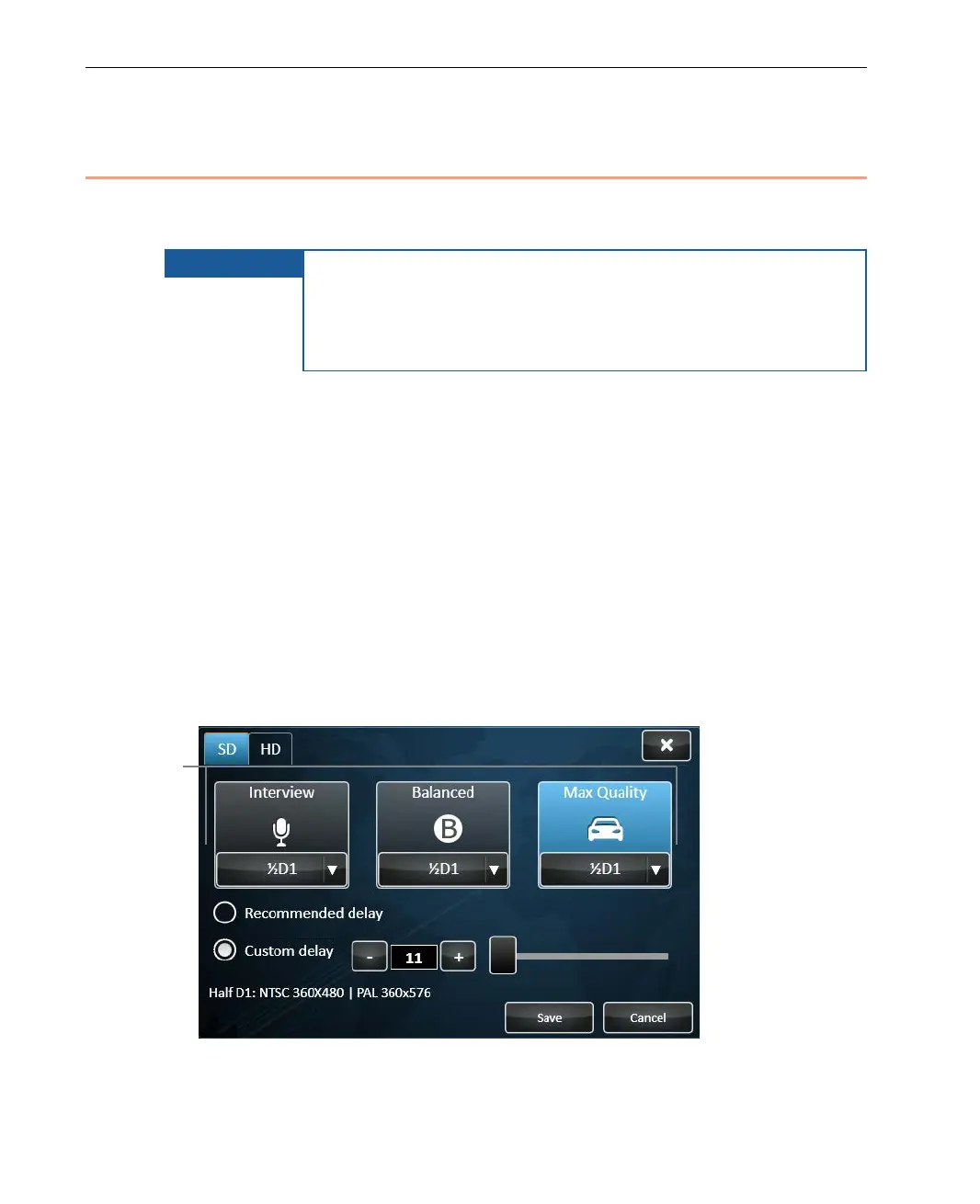
Three Profiles are provided by the device, which are the same for both SD and
HD cameras. The currently selected Profile appears highlighted. Its name is
indicated at the top of the Profile button. The bottom of the window displays
the selected Profile’s quality and overall video transmission latency.
The preconfigured resolution for each Profile is automatically selected.
Typically, there is no need to change it. If needed, you may refer to the
Changing a Profile’s Resolution section on page 55 for a description of how to
change a Profile’s resolution.
► To change the currently used Profile:
• Simply tap one of the Profile buttons: Interview, Balanced or Max
Quality, as shown below:
Figure 31: Profiles Window
Select one of
these Profile
buttons



 To Next Page