CHAPTER 4: OPERATION 41
MOVE S2
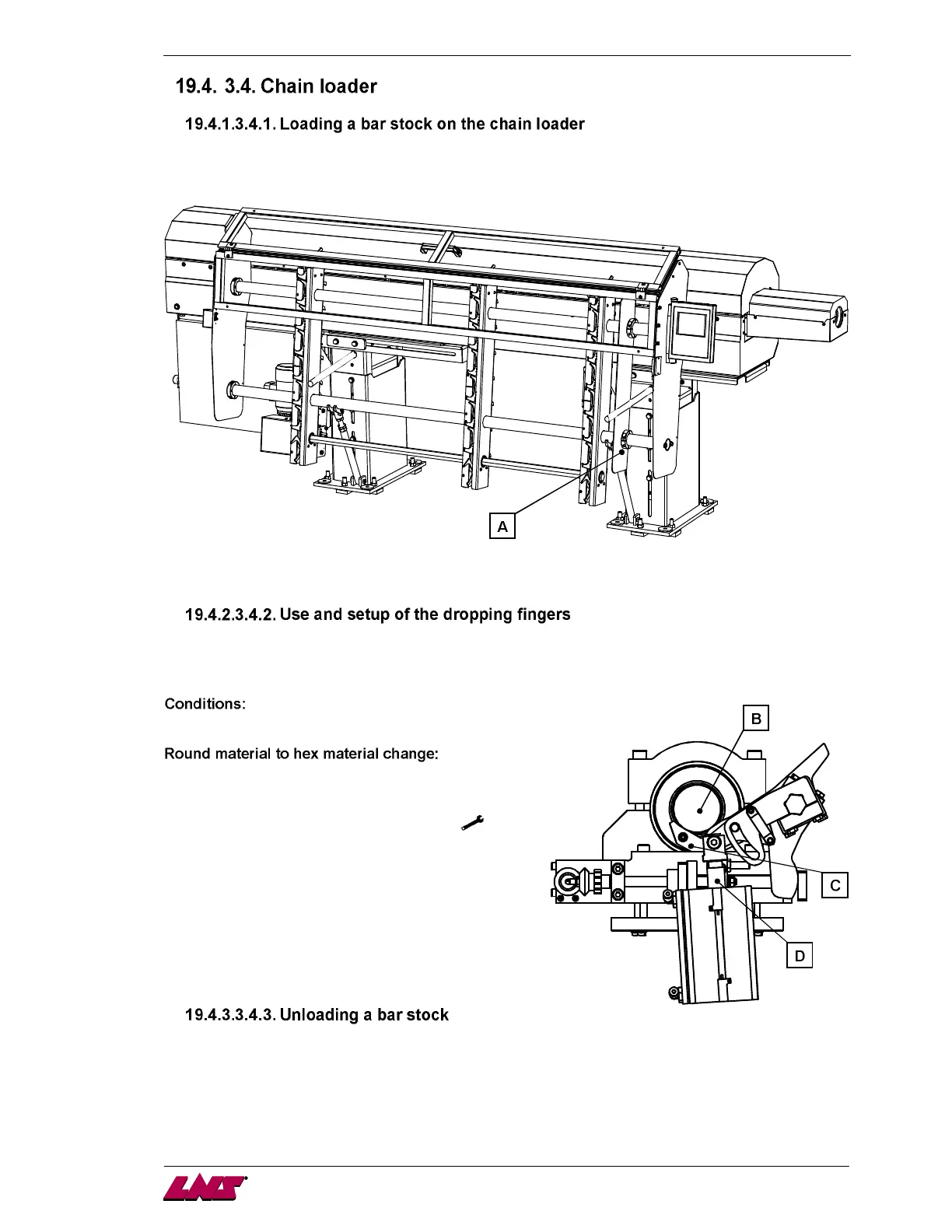
Independent of the length of the bar feeder, the bar magazine includes 3 supports.
The bar stocks are lying on the hooks of these supports. When charged on the chain loader, the bar
stocks should be against the front limiter (A).
When loading a new bar, a gear motor moves up the bars into the bar feeder on the dropping fingers,
which slow down and position the bar stock at the guiding axis.
The loaded bar stock (B) is laying on the dropping fingers (C). The dropping fingers move down (D) and
position accurately the bar stock at the guiding axis. If a drift is detected by the user, a positioning
correction is necessary.
- bar stock loaded under conditions as point 3.4.1.
1. On the remote control, press the STOP key.
2. Press the key corresponding to the symbol
.
3. In the menu "Misc. functions" > "Dropping fingers
setup" > ENTER.
4. Adjust the vertical position of the bar stock to the
guiding element by adding or removing pulses.
5. When the setup is satisfactory, escape the menu by
pressing the STOP key.
When the bar is located in the guiding element, a specific function allows to lift it up for better handling.
Pull the bar stock out of the guiding element, then activate the bar unloading function. Once the dropping
fingers in upper position, extract manually the bar stock, and confirm the proper bar removal.
The bar stocks on the chain loader can simply be removed by hand.














 To Next Page