CHAPTER 4: OPERATION 45
MOVE S2
Screen "Top cut position":
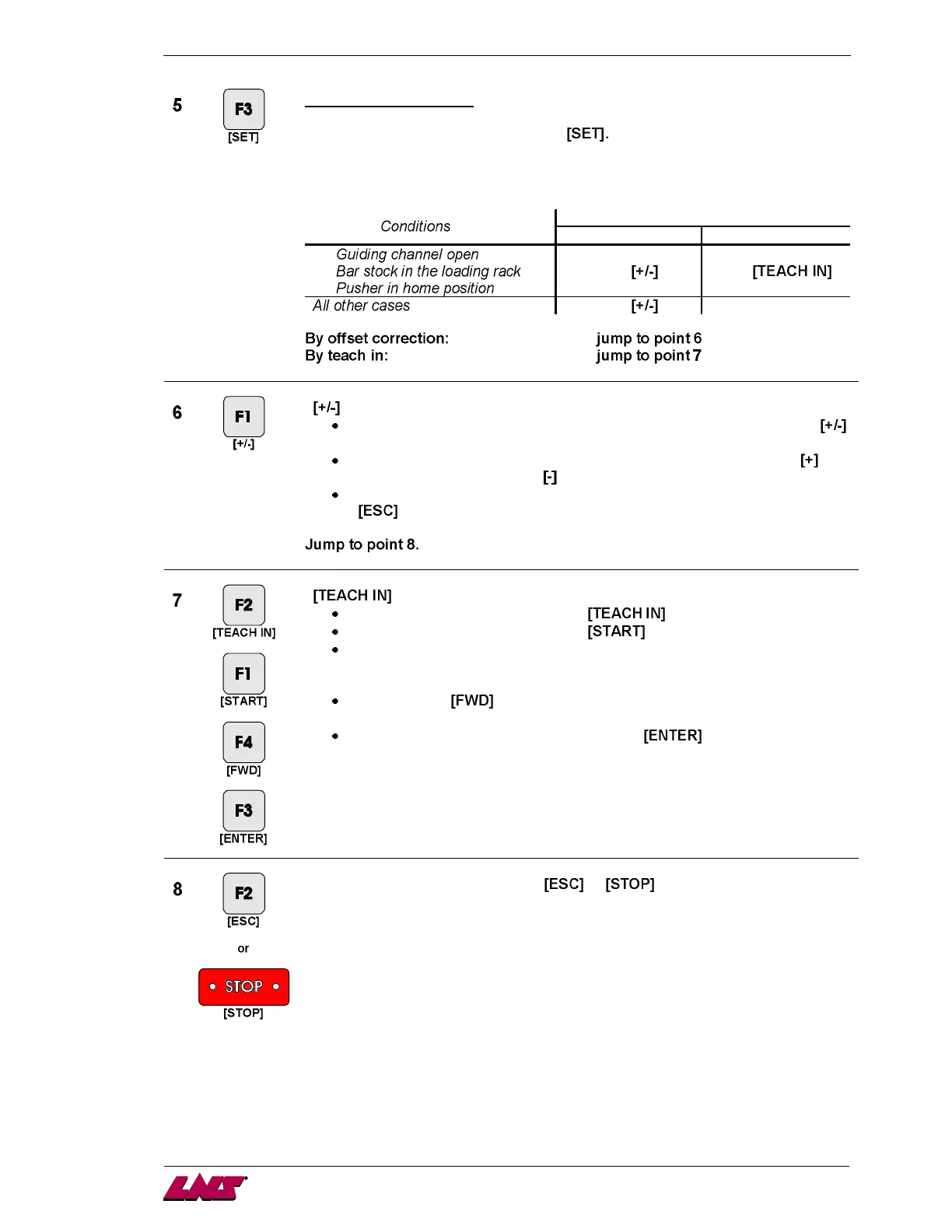
Press the key corresponding to the icon
Depending on which sequence the bar feed is in when the parameter is selected,
the available functions and icons can change :
Available functions
By offset correction Teach in
-
-
-
Icon Icon
Icon ---
By offset correction:
Press the key attributed to the icon .
The current top-cut position (Z) is displayed.
Enter with the direction keys the correction to insert, and press the icon
to add the value, or the icon
to subtract it. The new value is stored.
To exit the top-cut position set mode, press the key attributed to the icon
.
By teaching:
Press the key attributed to the icon .
Press the key attributed to the icon .
A bar is loaded and the guiding channel is closed. The feeding pusher
inserts the bar into the lathe spindle. The feeding pusher is now facing the
spindle.
Press the key and advance the bar stock to the desired position (see
previous page).
To validate the new top cut position, keep pressed until the icon
disappears.
To exit the set mode, press the keys or .














 To Next Page