46 CHAPTER 4: OPERATION
MOVE S2
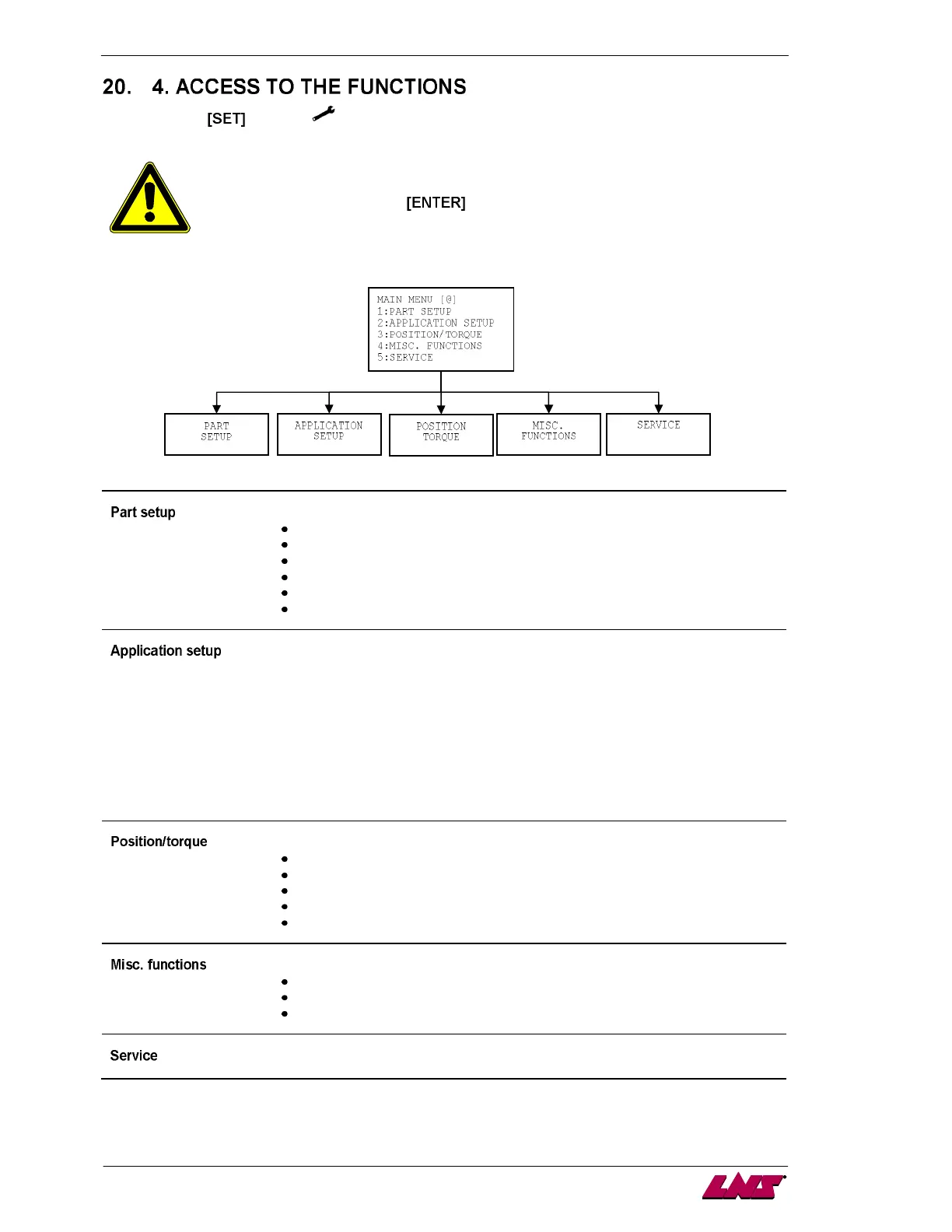
By pressing the key (icon ), it is possible to access the setup functions, no matter what cycle
the bar feed is in (automatic sequence, manual sequence, etc.).
To modify these parameters, the bar feed must be in STOP mode. To validate some
values or parameters, hold the
key until the icon disappears.
Allows to define the parameters and values of the part, like:
Bar stock shape (round, hex, square, other)
Bar stock diameter
Overall part length to feed
Number of clamping device openings
Reverse distance of the pusher after feeding
Overall part length for the auxiliary part (remnant machining)
Allows to set quickly the working mode by selecting the desired application. Following
working modes are always available:
1. Feed with turret
2. Feed without turret
3. Misc. functions (Dry Run, etc.)
Depending on the unlocked features and on the lathe, following modes may be available:
4. Sub-spindle
5. etc.
Quick access to the following position and torque values:
End of bar
Top cut
Auxiliary end of bar
Torque for the bar stock loading
Torque for the part feeding
Allows the access to specific settings like:
Language
Measure unit
Reference
Reserved for maintenance to LNS technicians and for unlocking features/displays.














 To Next Page