215585 59 Revision A
Installing Cover
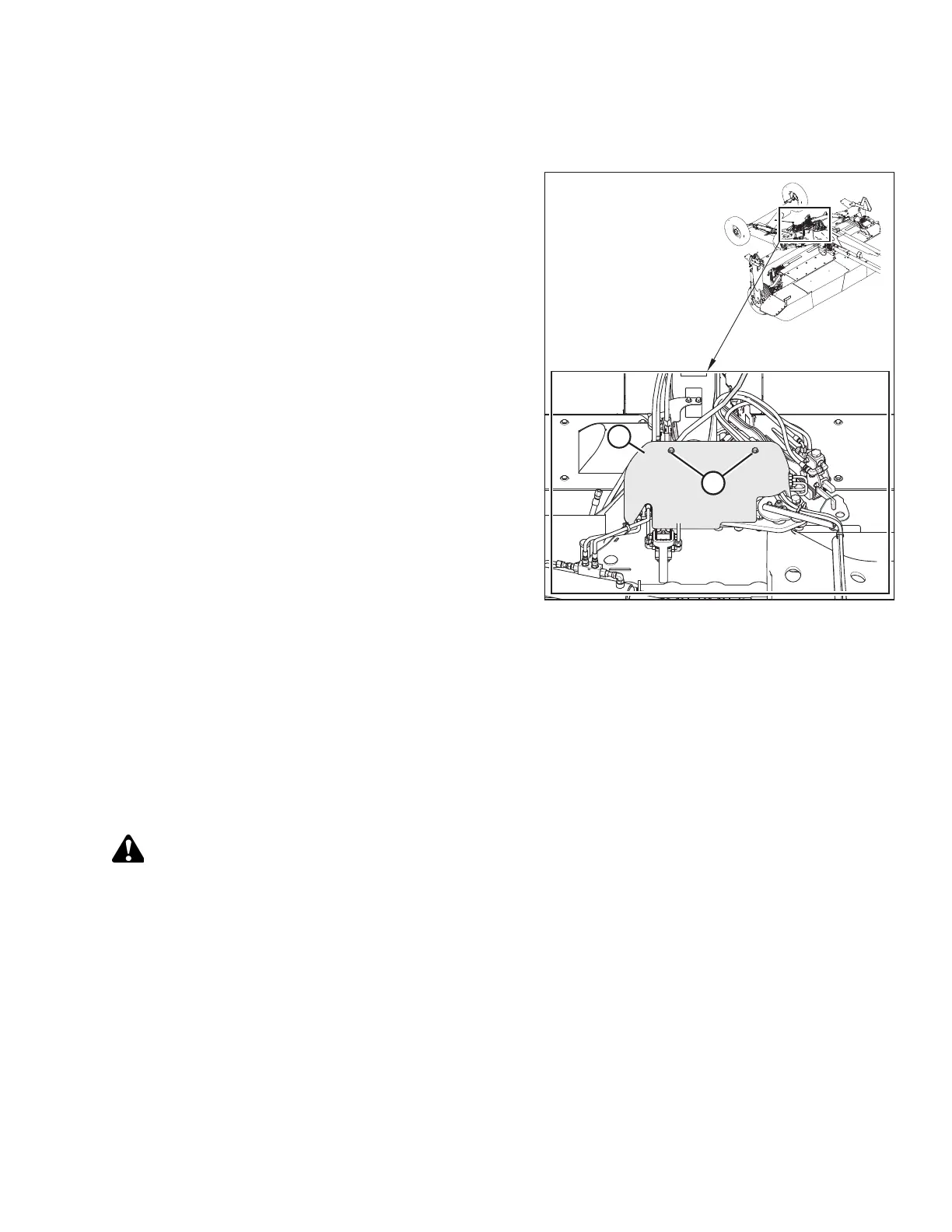
The transport cover protects the hydraulic valves and electrical components from debris.
Figure 3.122: Cover
1. Install cover (A) onto the cover support.
2. Install bolts (B). Torque bolts to 60 Nm (45 lbf·ft).
3.8.2 Installing Hydraulic Center-Link – Optional
The hydraulic center-link option is supplied in a separate shipment. For instructions, refer to the installation instructions
supplied with the kit.
3.8.3 Installing Tall Crop Divider – Optional
The tall crop divider is supplied in a separate shipment. For instructions, refer to the installation instructions supplied with
the kit.
DANGER
To avoid bodily injury or death from unexpected startup of the machine, always stop the engine and remove the key
from the ignition before leaving the operator’s seat for any reason.
IMPORTANT:
If the rotary disc pull-type will be transported on public roads in the transport mode, do NOT install the tall crop dividers.
Install the dividers after the machine is delivered to the customer.
ASSEMBLING THE ROTARY DISC PULL-TYPE – WITH OR WITHOUT THE DEALER-INSTALLED TRANSPORT




 To Next Page