215585 74 Revision A
4.3.2 Installing Two-Point Hitch (Cat. II) Adapter
The two-point hitch adapter allows the pull-type to connect to an existing two-point hitch connection.
$
%
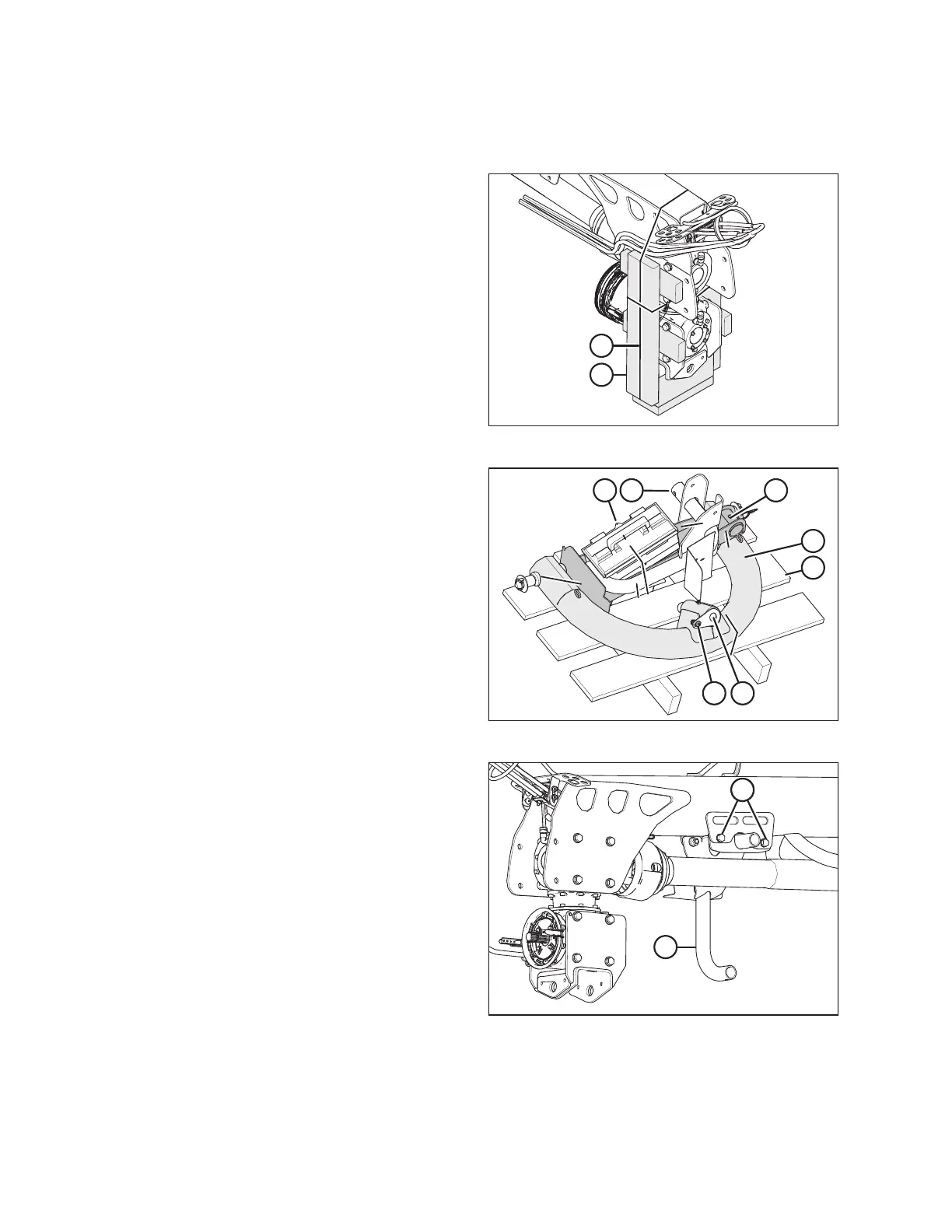
Figure 4.35: Hitch End Packing
1. Remove shipping wire or banding (A) securing shipping
blocks (B) at front of hitch, and remove blocks.
2. Swivel lower gearbox until the input shaft is facing forward.
$
%
&
'
( )
*
Figure 4.36: Two-Point Hitch Packing
3. Retrieve two-point hitch adapter shipment.
NOTE:
Do NOT remove any strapping that secures hitch
adapter (A) to pallet (B).
4. Remove strapping that secures pin (C) to adapter (A).
5. Remove pin (C) from adapter, and remove bolt (D) and nut
from pin (C).
6. Remove strapping from toolbox (E), jack stand support (F),
and jack (G). Remove these parts from the pallet.
7. Remove the hardware bag from the jack stand support.
$
%%
Figure 4.37: Jack Stand Support
8. Install jack support stand (A) as shown. Secure with two
M12 x 1.75 x 40 bolts (B), M12 washers, and M12 center
lock nuts per side. Torque hardware to 69 Nm (51 lbf·ft).
ASSEMBLING THE ROTARY DISC PULL-TYPE – FACTORY-INSTALLED TRANSPORT





 To Next Page