S
ection
5
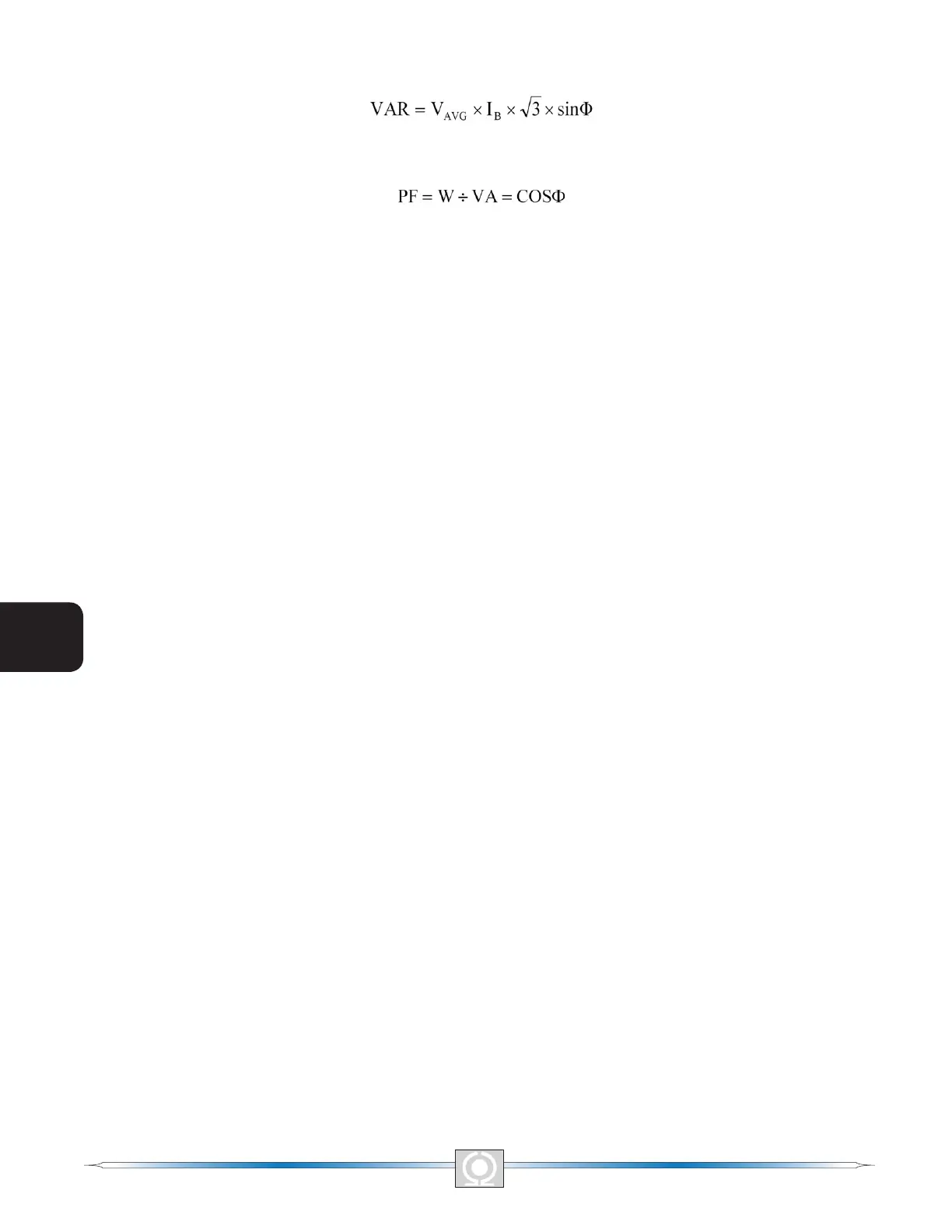
Reactive Power (var). This value is the calculated product of the metered generator voltage (VAVG), metered
generator current (I
B
) square root of 3 and the sine of the metered phase angle. See Equation 5-3.
Equation 5- 3. Reactive Power Equation
Power Factor. This value is the calculated result of dividing the Real Power (W) value by the Apparent Power (VA)
value. See Equation 5-4.
Equation 5- 4. Power Factor Equation
Operating Status. The Operating Status controls and indicators include three buttons and three corresponding
indicators. Operating Status buttons are labeled PF, VAR, and OFF. Clicking the PF button changes the color of
the adjacent PF indicator to green and causes the DVR2000EC to maintain the desired power factor regulation
point. The power factor regulation point can be set within the range of 0.6 lead to 0.6 lag. Clicking the VAR button
changes the color of the adjacent VAR indicator to green and causes the DVR2000EC to maintain the desired
var regulation point. The var regulation point can be set within the range of 100 percent absorb to 100 percent
generate. Clicking the OFF button changes the color of the adjacent OFF indicator to red and disables power
factor and var regulation.
Operation of the Operating Status controls is determined by the status of the contacts connected across the
DVR2000EC Var/PF Control terminals (52J, 52K). When these contacts are open, the Operating Status controls
are enabled. Closing the contacts at terminals 52J and 52K disables the Operating Status controls and interrupts
regulation of vars or power factor until the contacts are opened again.
Setpoint - Voltage (V). This setting eld can be used to enter the desired generator output terminal voltage. The
voltage setpoint can also be entered at the Setting Adjustments screen, Setpoint tab, Automatic Voltage Regulator
(AVR) - AVR Setpoint (V). The background color of this eld is green when operating in AVR mode and power
factor and var regulation is disabled.
Setpoint - Current (A). This setting denes the eld current setpoint when operating in FCR mode. The current
setpoint can also be entered at the Setting Adjustments screen, Setpoint tab, Field Current Regulator (FCR) -
FCR Setpoint. Current values from 0 to 3 Adc may be entered in increments of 0.01 Adc. The background color of
this eld is green when operating in FCR mode.
Setpoint - Var (% of nom.). This setting determines the level of generator vars maintained by the DVR2000EC
when operating in var mode. The var setpoint can also be entered at the Setting Adjustments screen, Setpoint
tab, Reactive Power Control (VAR) - VAR Setpoint (% of nom.). The background color of this eld is green when
the DVR2000EC is operating in AVR mode and is regulating the var setpoint.
Setpoint - Power Factor. This setting determines the level of power factor regulation maintained by the DVR2000EC.
The power factor setpoint can also be entered at the Setting Adjustments screen, Setpoint tab, Power Factor
Control (PF) - PF Setpoint. Power Factor setpoint values are adjustable from -0.6 to -1 (1) or 0.6 to +1 in 0.001
increments. The background color of this eld is green when the DVR2000EC is operating in AVR mode and is
regulating the power factor setpoint.
Control Mode. Clicking the AVR button changes the color of the adjacent AVR indicator to green and enables the
AVR operating mode. When operating in AVR mode, the DVR2000E regulates the generator output voltage at
the AVR setpoint. Clicking the FCR button changes the color of the adjacent FCR indicator to green and enables
the FCR operating mode. When operating in FCR mode, the DVR2000E maintains the eld current at the FCR
setpoint.
Fine Adjustment. Raise and Lower buttons control the ne adjustment of the operating setpoint. (The ne
adjustment through the front panel push buttons only controls the voltage setpoint.) Raise and Lower buttons
perform the same function as closing the appropriate set of contacts connected to the External Adjust terminals
(6D and 7 to decrease, 6U and 7 to increase) of the DVR2000E. In AVR mode, each click of the Raise button
increases the voltage setpoint 0.1 volts; each click of the Lower button decreases the voltage setpoint 0.1 volts.
The minimum and maximum limits for ne adjustment of the voltage setpoint are controlled by the Regulator
Sensing Voltage setting (System Conguration screen) and the Fine Voltage Adjustment - Band setting (Setting
Adjustments screen). Fine adjustment of the voltage setpoint can be increased/decreased no higher/lower than
58
3
Main Index
5
Section 5 Index
59
3
Main Index
5
Section 5 Index



 To Next Page