65
Getting started
Adjusting
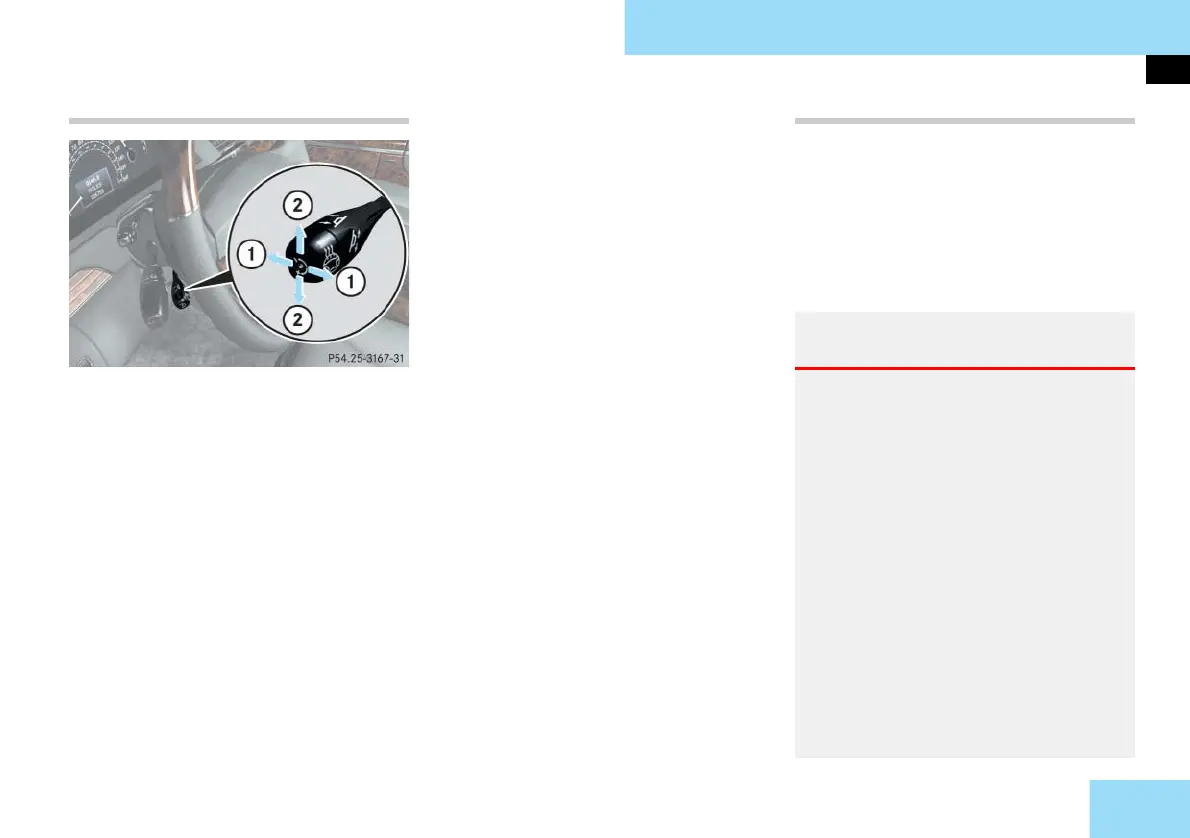
Steering wheel adjustment
1 Adjusting steering column, in or out
2 Adjusting steering column, up or
down
왘 Switch on the ignition (컄 page 60).
or
왘 Open the driver’s door.
i The memory function (컄 page 140) lets
you store settings for the steering wheel to-
gether with settings for the rear view mirrors
and seat positions.
Adjusting steering column in or out
왘 Move stalk forward or backward in
direction of arrow 1 until a comfort-
able steering wheel position is
reached with your arms slightly bent
at the elbow.
Adjusting steering column up or down
왘 Move the stalk up or down in direc-
tion of arrow 2.
Make sure your legs can move freely and
that all of the displays (including mal-
function and indicator lamps) on the in-
strument cluster are clearly visible.
For more information, see “Heated
steering wheel” (
컄 page 276).
Easy-entry/exit feature
This feature allows for easier entry into
and exit from the vehicle. When entering
and exiting the vehicle, the steering
wheel is in its uppermost position.
The easy-entry/exit feature can be acti-
vated or deactivated in the
CONVENIENCE
submenu of the control system
(
컄 page 177).
Warning! G
You must make sure no one can become
trapped or injured by the moving steering
wheel when the easy-entry/exit feature is
activated.
To stop steering wheel movement, do one
of the following:
앫 Move steering wheel adjustment stalk
(컄 page 64)
.
앫 Press seat adjustment switch
(컄 page 63)
.
앫 Press one of the memory position but-
tons or the memory button M
(컄 page 140)
.
Do not leave children unattended in the
vehicle, or with access to an unlocked vehi-
cle. Children could open the driver’s door
and unintentionally activate the easy-en-
try/exit feature, which could result in an
accident and/or serious personal injury.



 To Next Page