MSB780(X) - User’s Guide
Note: You can start recording only if date and time are correctly set. If it is not, you will be
automatically redirected to "Set Date/Time" screen
Recording screen
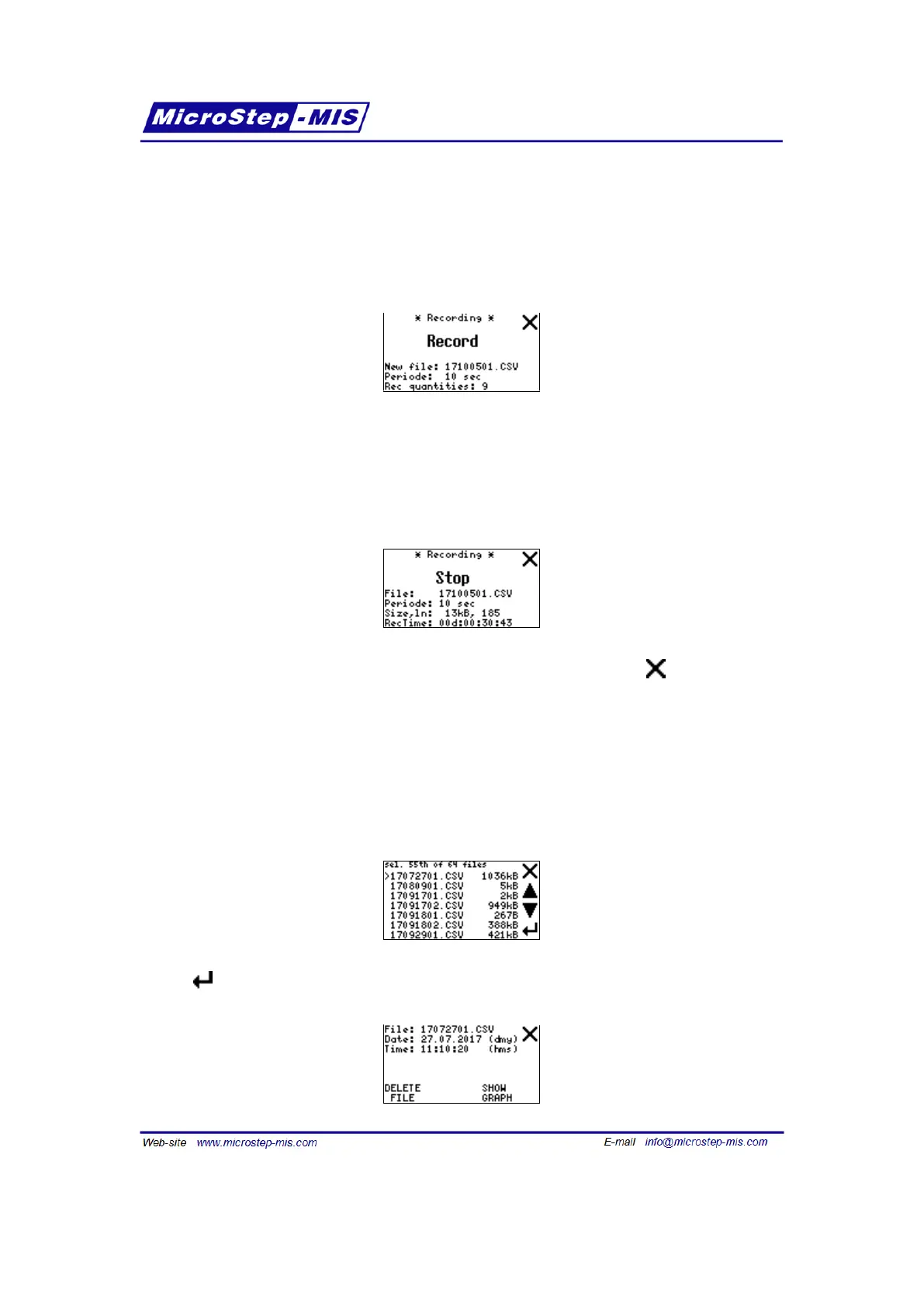
This screen is used to start and stop recording.
Start recording by tapping on the "Record" button.
This screen also shows the name of file which will be created, sampling periode of recording
and number of quantities selected to be recorded. File name is generated automatically and
consists of date (yymmdd) and order number of record within the day.
After the recording is started, the screen changes a bit:
You can stop recording using the "Stop" button. If you exit this screen with button, recording
will continue on background which is signalized by |R| icon on the main basic screen.
On this screen there are also lines showing actual size and number of lines in the file being
created.
RecTime shows how long has been the recording taken till now in days:hours:minutes:seconds.
List screen (view records in graph)
This screen is used for viewing logged data and deleting files individually. After entering the List
submenu you can see the list of recorded files on SD Card as follows:
Tap the button to enter the file menu:
62



 To Next Page