4
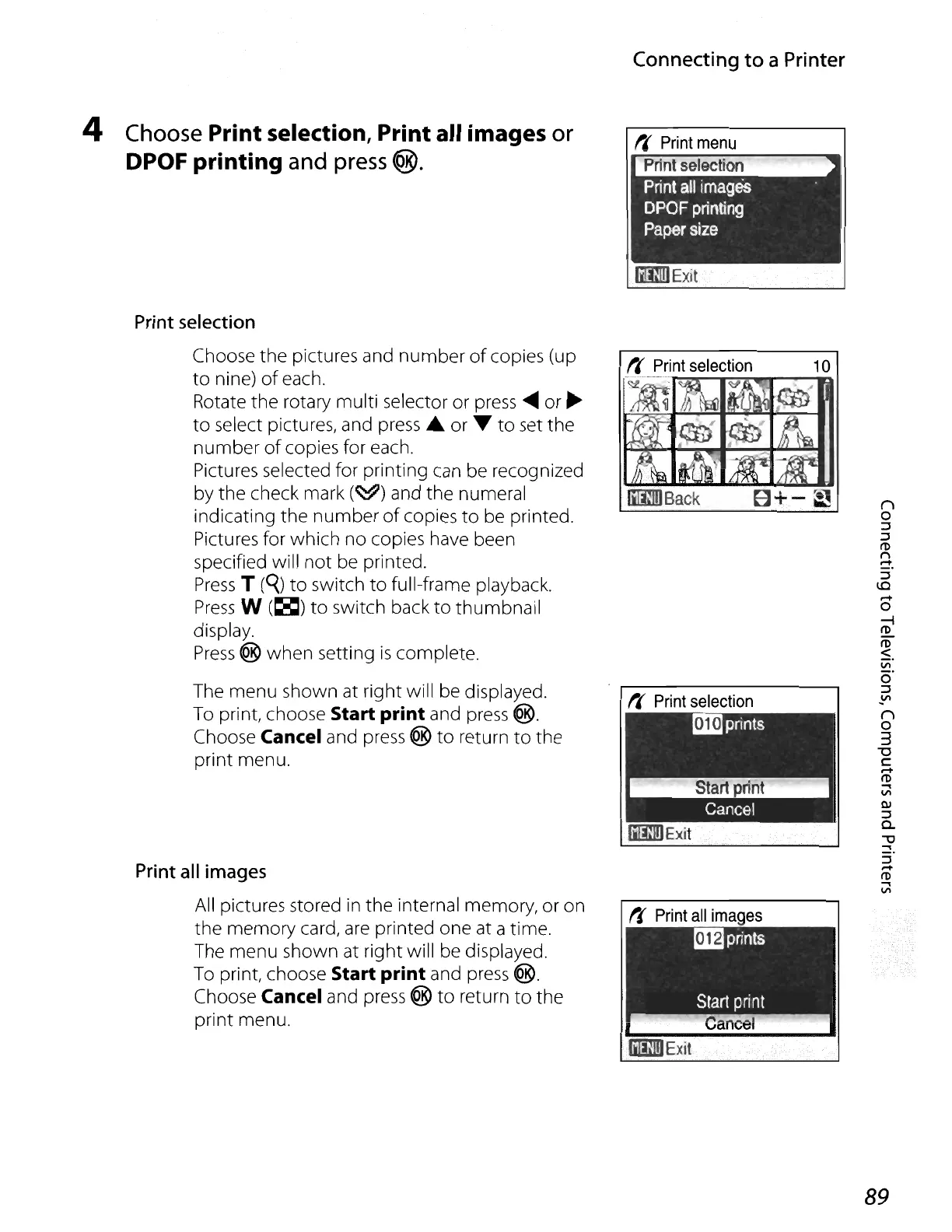
Choose
Print selection, Print all images
or
DPOF printing
and
press
®.
Print
selection
Choose
the
pictures and
number
of
copies (up
to
nine)
of
each.
Rotate the rotary multi selector or
press
.....
or ...
to
select pictures, and press .& or ....
to
set the
number
of
copies for each.
Pictures selected for printing
can
be recognized
by the check mark
(~)
and the numeral
indicating the
number
of
copies
to
be printed.
Pictures for which
no
copies have been
specified will
not
be printed.
Press
T
(q)
to
switch
to
full-frame playback.
Press
W
(~)
to
switch back
to
thumbnail
display.
Press
® when setting
is
complete.
The menu shown at right will be displayed.
To
print, choose Start print and
press
®.
Choose Cancel and press ®
to
return
to
the
print menu.
Print
all
images
All pictures stored
in
the internal memory, or on
the
memory card,
are
printed one at a time.
The menu shown at right will be displayed.
To
print, choose Start print and
press
@.
Choose Cancel and press ®
to
return
to
the
print menu.
Connecting to a Printer
()
o
::J
::J
(1)
n
.....
::J
lC
.....
o
~
(1)
<
VI
o·
::J
~
()
o
3
"0
c:
....
(1)
....
VI
QJ
::J
c..
"'U
....
::J
.....
(1)
....
VI
89






 To Next Page