EasyManua.ls Logo

Nikon Coolpix S710 - Shooting Suited for the Scene; Using the Scene Mode; Setting the Scene Mode

Nikon Coolpix S710
198 pages
Print Icon
To Next Page IconTo Next Page
To Previous Page IconTo Previous Page
Loading...
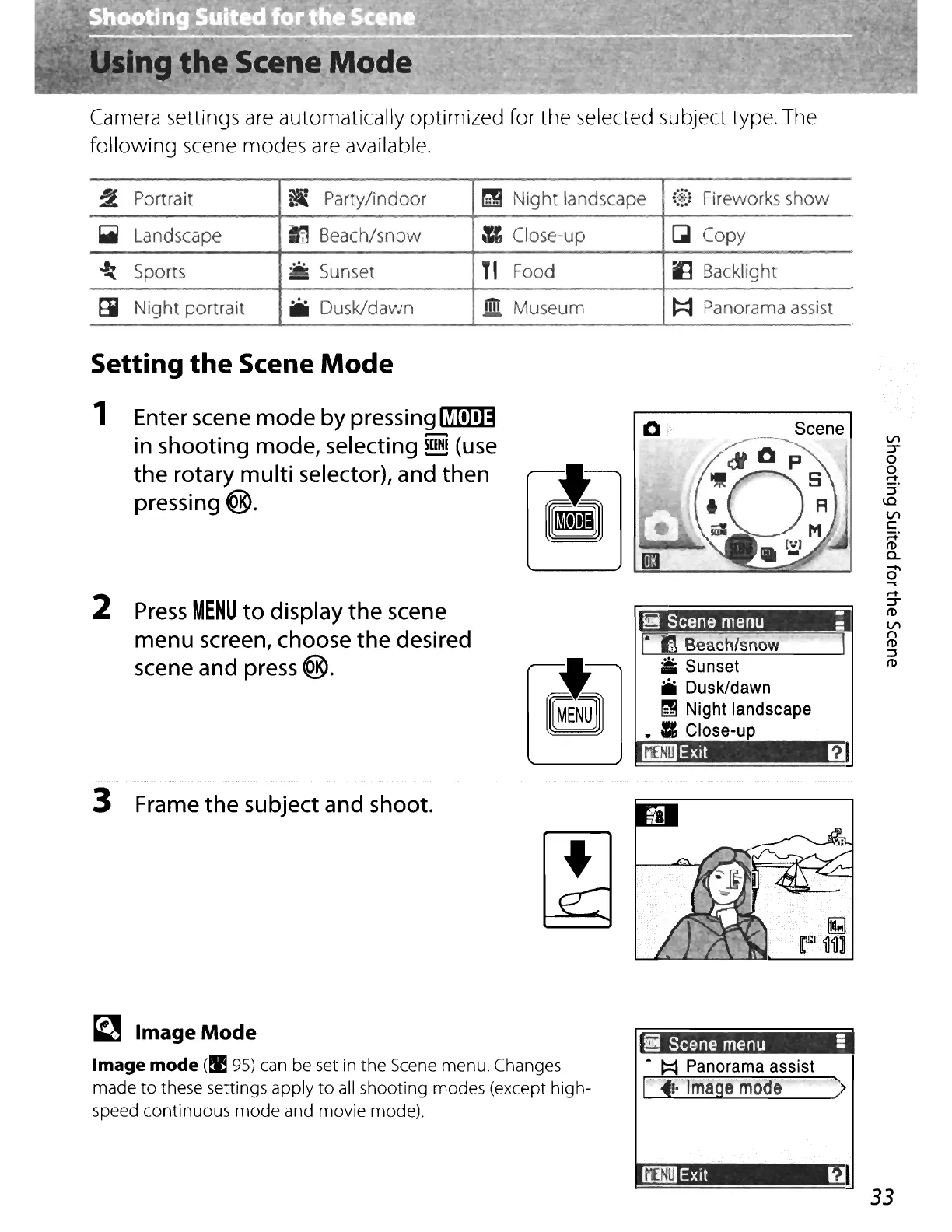
Camera settings
are
automatically optimized for the selected subject type. The
following scene modes
are
available.
~
Portrait
~
Party/indoor
~
Night landscape
i;E:
Fireworks show
Iii
Landscape
-
Beach/snow
=Close-up
~
Copy
:
~
Sports
....
Sunset
T'
Food
~
Backlight
~
Night portrait
iiIi
Dusk/dawn
.!!!l
Museum
t:::t
Panorama assist
Setting
the
Scene
Mode
1 Enter scene
mode
by pressing
fi!illI!]]
in
shooting mode, selecting
mill
(use
the
rotary multi selector), and then
pressing
<@.
2
Press
MENU
to
display
the
scene
menu screen, choose
the
desired
scene and press
<@.
Scene
I,
,-
~
Beach/snow
Iii
Sunset
iii
Dusk/dawn
~
Night
landscape
..
Close-up
Exit
f1
VI
':7'
o
o
~.
::l
1.0
VI
C
;::to
(J)
c-
O'
~
....
':7'
(J)
VI
1'"1
(J)
::l
(J)
3 Frame
the
subject and shoot.
~
ImageMode
Image mode
(t:E
95)
can
be set in the
Scene
menu. Changes
made
to
these settings apply
to
all
shooting modes (except high-
speed continuous
mode
and movie mode).
I
!!!
Scene
menu
5
&
~
Panorama
assist
[ji:
lrriagemode
')
_Exit
~
33

Table of Contents

Other manuals for Nikon Coolpix S710

Related product manuals